







Question: Ideally, you world use a partial absolue reference. mixed reference to lock in only the row and not the column when referencing the price so
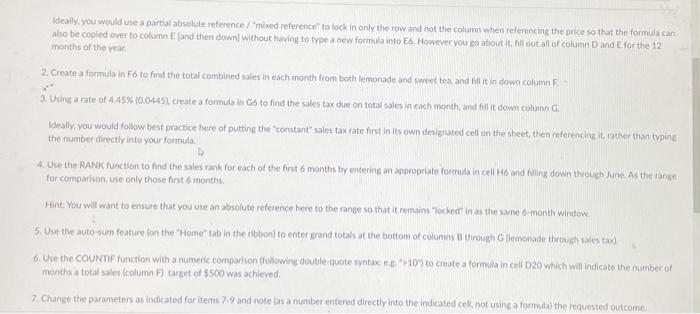
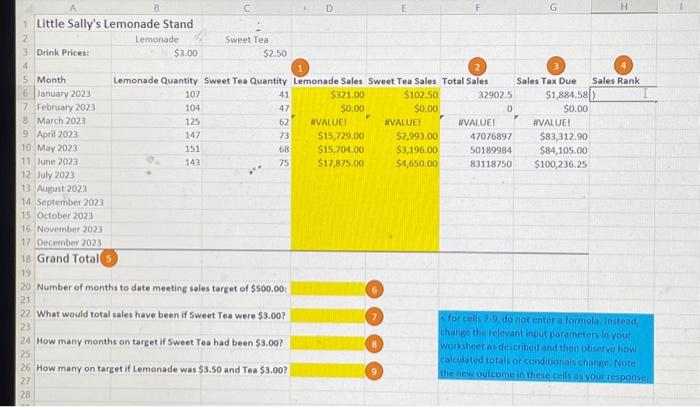
Ideally, you world use a partial absolue reference. "mixed reference" to lock in only the row and not the column when referencing the price so that the formula can also be copied over to column E. and then down] without having to type a aew formula into Eb. However you go about it, fill out all of column D and E. for the 12 months of the rear. 2 Create a formula in Fo to find the total combined sales in each month from both lemonade and sweet tea, and fill it in down column F 3. Using a rate of 4.45\% (0.0445), create a formula in Gb to find the sales tax due on total sales in each month, and fill it down column G. Ideally, you would follow best practice here of putting the "constant" sales tax rate first in its own designated cell an the sheet, then referencirs it rather than typing the number directly in to your formula. 4. Use the RANK function to find the sles rank for each of the first 6 months by entering an approperate formula in cell H6 and filing down through June. As the range for comparison, use only those first 6 months: Hint: You will want to ensure that you use an absolute reference here to the range so that it remains "locked in as the same 6 -month window. 5. Use the auto-sum feature fon the "Home" tab in the ribbon) to enter grand totals at the botton of columns 8 through G tlemenade through sales tax) 6. Use the COUNTF function with a numeric comparison (followine double-quote systace e e 107 to create a formula in cell D20 which will indicate the number of months a total sales (column F) target of $500 was achieved. 7. Charige the parameters as indicated for items 7.9 and note (as a number entered directly into the indicated cels, not using a formula) the requested outcome
Step by Step Solution
There are 3 Steps involved in it

Get step-by-step solutions from verified subject matter experts
 Study Help