







Question: IFS function is new to Excel, it is important that you understand how to solve problems nesting IF functions together, as many organizations may not
IFS function is new to Excel, it is important that you understand how to solve problems nesting IF functions together, as many organizations may not have the most up to date version of the software.
On the Inventory worksheet, enter a nested IF formula into cell L2 to determine there order status based on the following.? A blank should be returned if the current inventory and reorder point are both blank. ? Rush should be returned if the Discontinue value is N and current inventory is less than or equal to the rush reorder point.? Reorder should be returned if the Discontinue value is equal to N and current inventory is less than the reorder point. ? For all others, OK should be returned. ? Fill the formula down through cell L21.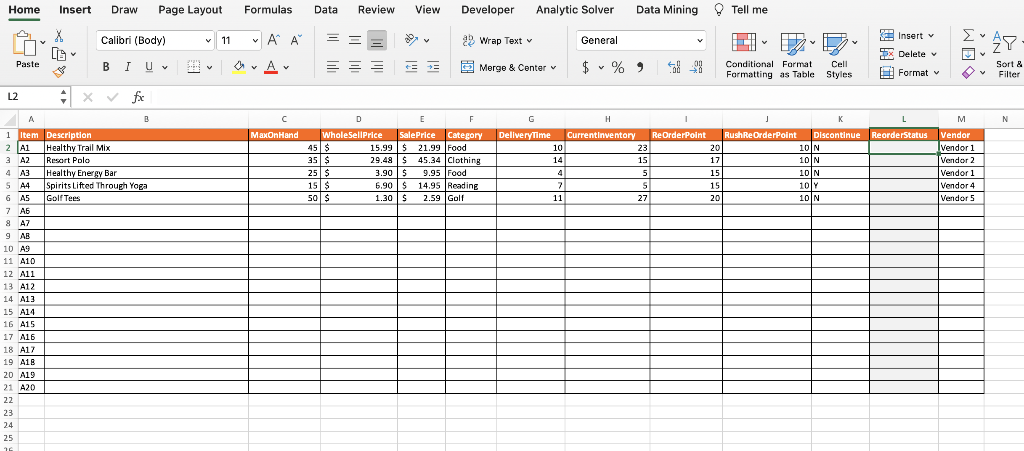
Home Insert Draw Page Layout X LO Paste L2 A Item 1 2 A1 3 A2 4 A3 5 A4 6 A5 7 8 A7 9 AB 10 A9 11 A10 12 A11 13 A12 14 A13 15 A14 16 A15 17 A16 18 A17 19 A18 20 A19 21 A20 22 23 24 25 26 [ B ; Calibri (Body) BI U v x fx B Description Healthy Trail Mix Resort Polo Healthy Energy Bar Spirits Lifted Through Yoga Golf Tees 11 Formulas Data Review View A A Av C MaxOnHand = == D WholeSellPrice 45 $ 35 $ 25 $ 15 $ 50 $ ab +=+= Developer Analytic Solver Wrap Text v Merge & Center E F Sale Price Category 15.99 $ 21.99 Food 29.48 S $ 45.34 Clothing 3.90 $ 9.95 Food 6.90 $14.95 Reading 1.30 $ 2.59 Golf DeliveryTime 10 14 4 7 11 General Data Mining $ % 9 V I H CurrentInventory ReOrderPoint 23 15 5 5 5898 27 20 17 15 15 20 Tell me n V L/ Cell Conditional Format Formatting as Table Styles Insert v Delete v Format v 10 N 10 N 10 N 10 Y 10 N . K J L M RushReOrderPoint Discontinue ReorderStatus Vendor Vendor 1 Vendor 2 Vendor 1 Vendor 4 Vendor 5 28 Sort & Filter N
Step by Step Solution
3.39 Rating (180 Votes )
There are 3 Steps involved in it
Heres the nested I... View full answer

Get step-by-step solutions from verified subject matter experts
 Study Help