



Question: I'm new to the assembly language and I'm using MPLab X IDE with a PIC16F84A chip I need help to write a program using assembly.
I'm new to the assembly language and I'm using MPLab X IDE with a PIC16F84A chip
I need help to write a program using assembly.
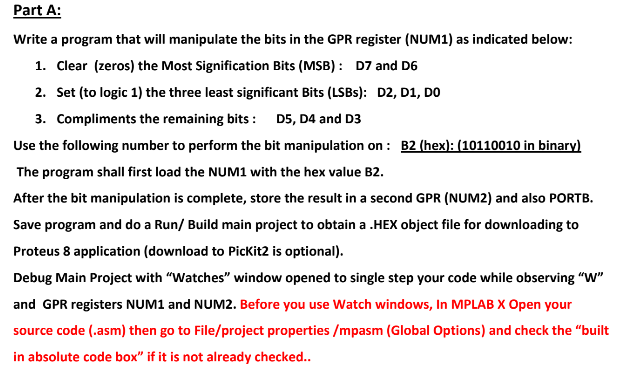
Part A: Write a program that will manipulate the bits in the GPR register (NUM1) as indicated below: 1. Clear (zeros) the Most Signification Bits (MSB) D7 and D6 2. Set (to logic 1) the three least significant Bits (LSBs): D2, D1, Do 3. Compliments the remaining bits: D5, D4 and D:3 Use the following number to perform the bit manipulation on B2 (hex): (10110010 in binarvl The program shall first load the NUM1 with the hex value B2 After the bit manipulation is complete, store the result in a second GPR (NUM2) and also PORTB. Save program and do a Run/ Build main project to obtain a.HEX object file for downloading to Proteus 8 application (download to PicKit2 is optional). Debug Main Project with "Watches" window opened to single step your code while observing W" and GPR registers NUM1 and NUM2. Before you use Watch windows, In MPLAB X Open your source code (.asm) then go to File/project properties /mpasm (Global Options) and check the "built in absolute code box" if it is not already checked.. Part A: Write a program that will manipulate the bits in the GPR register (NUM1) as indicated below: 1. Clear (zeros) the Most Signification Bits (MSB) D7 and D6 2. Set (to logic 1) the three least significant Bits (LSBs): D2, D1, Do 3. Compliments the remaining bits: D5, D4 and D:3 Use the following number to perform the bit manipulation on B2 (hex): (10110010 in binarvl The program shall first load the NUM1 with the hex value B2 After the bit manipulation is complete, store the result in a second GPR (NUM2) and also PORTB. Save program and do a Run/ Build main project to obtain a.HEX object file for downloading to Proteus 8 application (download to PicKit2 is optional). Debug Main Project with "Watches" window opened to single step your code while observing W" and GPR registers NUM1 and NUM2. Before you use Watch windows, In MPLAB X Open your source code (.asm) then go to File/project properties /mpasm (Global Options) and check the "built in absolute code box" if it is not already checked
Step by Step Solution
There are 3 Steps involved in it

Get step-by-step solutions from verified subject matter experts