







Question: im not able to do this question in visual studio.net I need the code in visual studio.net 2019 with user interface You must build a
im not able to do this question in visual studio.net
I need the code in visual studio.net 2019 with user interface
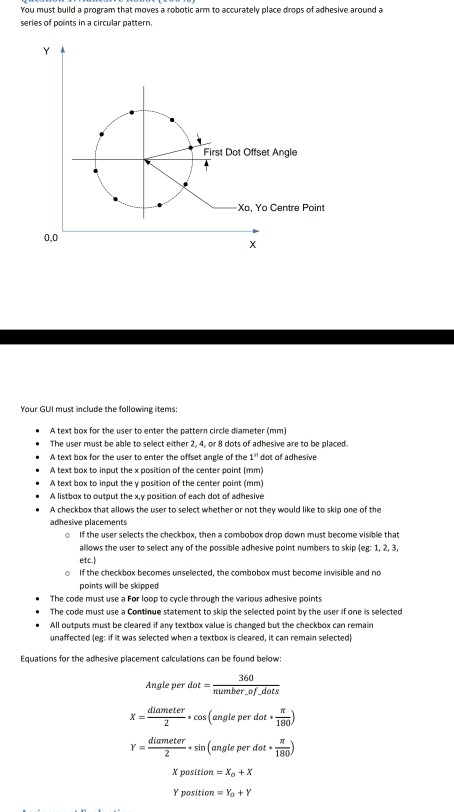
You must build a program that moves a robotic arm to accurately place drops of adhesive around a series of points in a circular pattern. First Dot Offset Angle Xo, Yo Centre Point Your GUI must include the following items: A text box for the user to enter the pattern circle diameter (mm) The user must be able to select either 2, 4, or 8 dots of adhesive are to be placed A text box for the user to enter the offset angle of the 1" det of adhesive A text box to input the x position of the center point (mm) A text box to input the y position of the center point (mm) A listbox to output the x.y position of each dot of adhesive A checkbox that allows the user to select whether or not they would like to skip one of the adhesive placements If the user selects the checkbox, then a combobox drop down must become visible that allows the user to select any of the possible adhesive point numbers to skip leg: 1, 2, 3, etc.) If the checkbox becomes unselected, the combobox must become invisible and no points will be shipped The code must use a Forloop to cycle through the various adhesive points The code must use a Continue statement to skip the selected point by the user if one is selected All outputs must be cleared if any textbox value is changed but the checkbox can remain unaffected eg: if it was selected when a textbox is cleared, it can remain selected) Equations for the adhesive placement calculations can be found below: 360 Angle per dot mumber of dots x ="zer.cos (angle per dotto) y cameter.sin(angle per det ) diameter x position = Xo+X Y position = Yo +Y You must build a program that moves a robotic arm to accurately place drops of adhesive around a series of points in a circular pattern. First Dot Offset Angle Xo, Yo Centre Point Your GUI must include the following items: A text box for the user to enter the pattern circle diameter (mm) The user must be able to select either 2, 4, or 8 dots of adhesive are to be placed A text box for the user to enter the offset angle of the 1" det of adhesive A text box to input the x position of the center point (mm) A text box to input the y position of the center point (mm) A listbox to output the x.y position of each dot of adhesive A checkbox that allows the user to select whether or not they would like to skip one of the adhesive placements If the user selects the checkbox, then a combobox drop down must become visible that allows the user to select any of the possible adhesive point numbers to skip leg: 1, 2, 3, etc.) If the checkbox becomes unselected, the combobox must become invisible and no points will be shipped The code must use a Forloop to cycle through the various adhesive points The code must use a Continue statement to skip the selected point by the user if one is selected All outputs must be cleared if any textbox value is changed but the checkbox can remain unaffected eg: if it was selected when a textbox is cleared, it can remain selected) Equations for the adhesive placement calculations can be found below: 360 Angle per dot mumber of dots x ="zer.cos (angle per dotto) y cameter.sin(angle per det ) diameter x position = Xo+X Y position = Yo +Y
Step by Step Solution
There are 3 Steps involved in it

Get step-by-step solutions from verified subject matter experts
 Study Help