







Question: Im supposed to calculaate the body mass index using java on Eclipse and design the GUI. Below you will see the code im using and
Im supposed to calculaate the body mass index using java on Eclipse and design the GUI. Below you will see the code im using and the GUI I design, must have Exception Handling 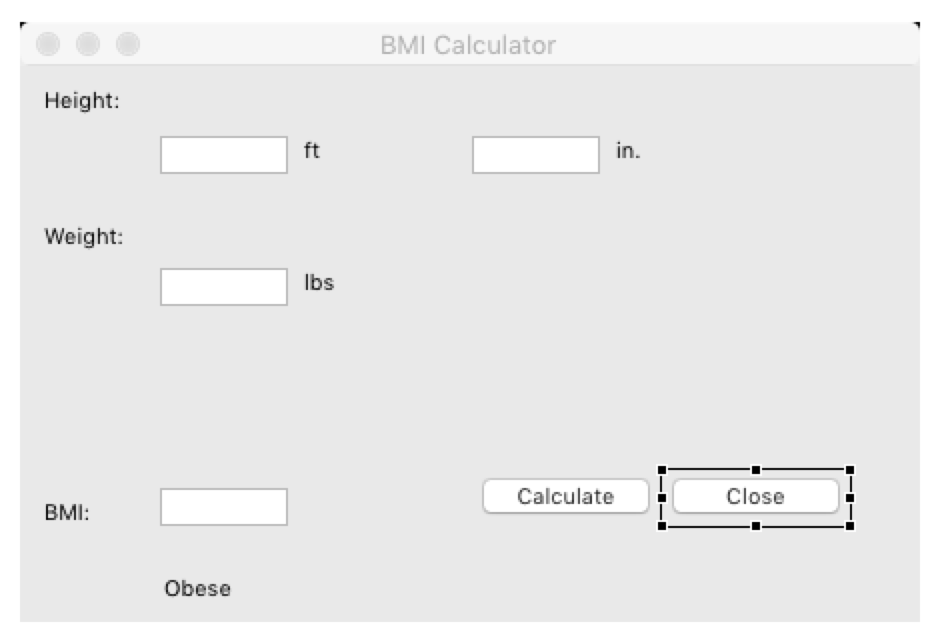
package edu.pupr.BMI;
import org.eclipse.swt.widgets.Display;
import org.eclipse.swt.widgets.Shell;
import org.eclipse.swt.widgets.Text;
import org.eclipse.swt.SWT;
import org.eclipse.swt.widgets.Label;
import org.eclipse.swt.widgets.Button;
import org.eclipse.swt.events.SelectionAdapter;
import org.eclipse.swt.events.SelectionEvent;
public class BMI {
protected Shell shell;
private Text text;
private Text text_1;
private Text text_2;
private Text text_3;
/**
* Launch the application.
* @param args
*/
public static void main(String[] args) {
try {
BMI window = new BMI();
window.open();
} catch (Exception e) {
e.printStackTrace();
}
}
/**
* Open the window.
*/
public void open() {
Display display = Display.getDefault();
createContents();
shell.open();
shell.layout();
while (!shell.isDisposed()) {
if (!display.readAndDispatch()) {
display.sleep();
}
}
}
/**
* Create contents of the window.
*/
protected void createContents() {
shell = new Shell();
shell.setSize(450, 300);
shell.setText("BMI Calculator");
Label lblHeight = new Label(shell, SWT.NONE);
lblHeight.setBounds(10, 10, 82, 19);
lblHeight.setText("Height:");
text = new Text(shell, SWT.BORDER | SWT.RIGHT);
text.setBounds(70, 35, 64, 19);
Label lblFt = new Label(shell, SWT.NONE);
lblFt.setBounds(140, 35, 59, 14);
lblFt.setText("ft");
Label lblWeight = new Label(shell, SWT.NONE);
lblWeight.setBounds(10, 78, 59, 14);
lblWeight.setText("Weight:");
text_1 = new Text(shell, SWT.BORDER | SWT.RIGHT);
text_1.setBounds(70, 101, 64, 19);
Label lblLbs = new Label(shell, SWT.NONE);
lblLbs.setBounds(140, 101, 59, 14);
lblLbs.setText("lbs");
Label lblBmi = new Label(shell, SWT.NONE);
lblBmi.setBounds(10, 216, 59, 14);
lblBmi.setText("BMI:");
text_2 = new Text(shell, SWT.BORDER | SWT.RIGHT);
text_2.setBounds(70, 211, 64, 19);
Label lblObese = new Label(shell, SWT.NONE);
lblObese.setBounds(70, 254, 59, 14);
lblObese.setText("Obese");
text_3 = new Text(shell, SWT.BORDER | SWT.RIGHT);
text_3.setBounds(226, 35, 64, 19);
Label lblIn = new Label(shell, SWT.NONE);
lblIn.setBounds(296, 35, 59, 14);
lblIn.setText("in.");
Button btnCalculate = new Button(shell, SWT.NONE);
btnCalculate.addSelectionListener(new SelectionAdapter() {
@Override
public void widgetSelected(SelectionEvent e) {
}
});
btnCalculate.setBounds(226, 202, 94, 28);
btnCalculate.setText("Calculate");
Button btnClose = new Button(shell, SWT.NONE);
btnClose.addSelectionListener(new SelectionAdapter() {
@Override
public void widgetSelected(SelectionEvent e) {
}
});
btnClose.setBounds(321, 202, 94, 28);
btnClose.setText("Close");
}
}
BMI Calculator Height: ft in. Weight: lbs Calculate Close BMI: Obese
Step by Step Solution
There are 3 Steps involved in it

Get step-by-step solutions from verified subject matter experts
 Study Help