







Question: I'm using Excel for the first time and am currently learning through yt videos. Can someone explain to me why E9 is filled with #####
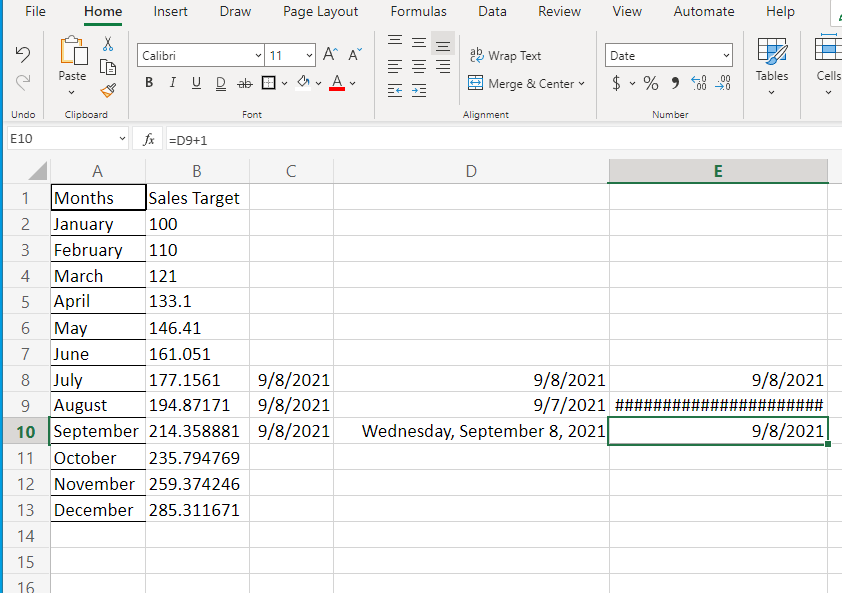
I'm using Excel for the first time and am currently learning through yt videos. Can someone explain to me why E9 is filled with ##### instead of 9/8/2021?
For all of the cells around it I have the same formula inputted, =d9+1 , in order to get 9/8/2021. Why is that one cell not showing the same result?
File Home Insert Draw Page Layout Formulas Data Review View Automate Help 2 Calibri 11 A Til Lili MI TIMIT Date Paste ab Wrap Text Merge & Center 00 Cells Tables BI U Dab $ -% Undo Clipboard Font Alignment Number E10 fx =D9+1 D E 5 A B C 1 Months Sales Target 2 January 100 3 February 110 4 March 121 April 133.1 6 May 146.41 7 June 161.051 8 July 177.1561 9/8/2021 9 August 194.87171 9/8/2021 10 September 214.358881 9/8/2021 11 October 235.794769 November 259.374246 13 December 285.311671 14 15 9/8/2021 9/8/2021 9/7/2021 ### Wednesday, September 8, 2021 9/8/2021) 12 16
Step by Step Solution
There are 3 Steps involved in it

Get step-by-step solutions from verified subject matter experts
 Study Help