







Question: //implement missing components from this calculator in the java code below for calculator so that the output is exactly what is in the screenshot/image below
//implement missing components from this calculator in the java code below for calculator so that the output is exactly what is in the screenshot/image below the code
import java.awt.*; import java.awt.event.*; import javax.swing.*;
@SuppressWarnings("serial") public class Calculator extends JFrame implements ActionListener { //Declare the objects. private JLabel myTitle; private Font myTitleFont; private JButton FClear; private JPanel myPanel; private JTextField result; public static void main(String[] args) { new Calculator(); }
public Calculator() { setSize(500, 680); setTitle("CSCI-141"); this.setResizable(false);
myTitle = new JLabel("Calculator"); myTitleFont = new Font(Font.MONOSPACED,Font.PLAIN,40); //Create TextFields, buttons, and panels. myPanel = new JPanel(); myPanel.setLayout(new FlowLayout()); myPanel.setPreferredSize(new Dimension(500, 500)); result = new JTextField(20); FClear = new JButton("C");
//Add action listener FClear.addActionListener(this); myPanel.add(myTitle); myPanel.add(result); myPanel.add(FClear); this.getContentPane().add(myPanel); this.setVisible(true); this.setDefaultCloseOperation(JFrame.EXIT_ON_CLOSE); }
public void actionPerformed(ActionEvent e) { if(e.getSource() == FClear) { result.setText(""); } //Add missing button actions } }
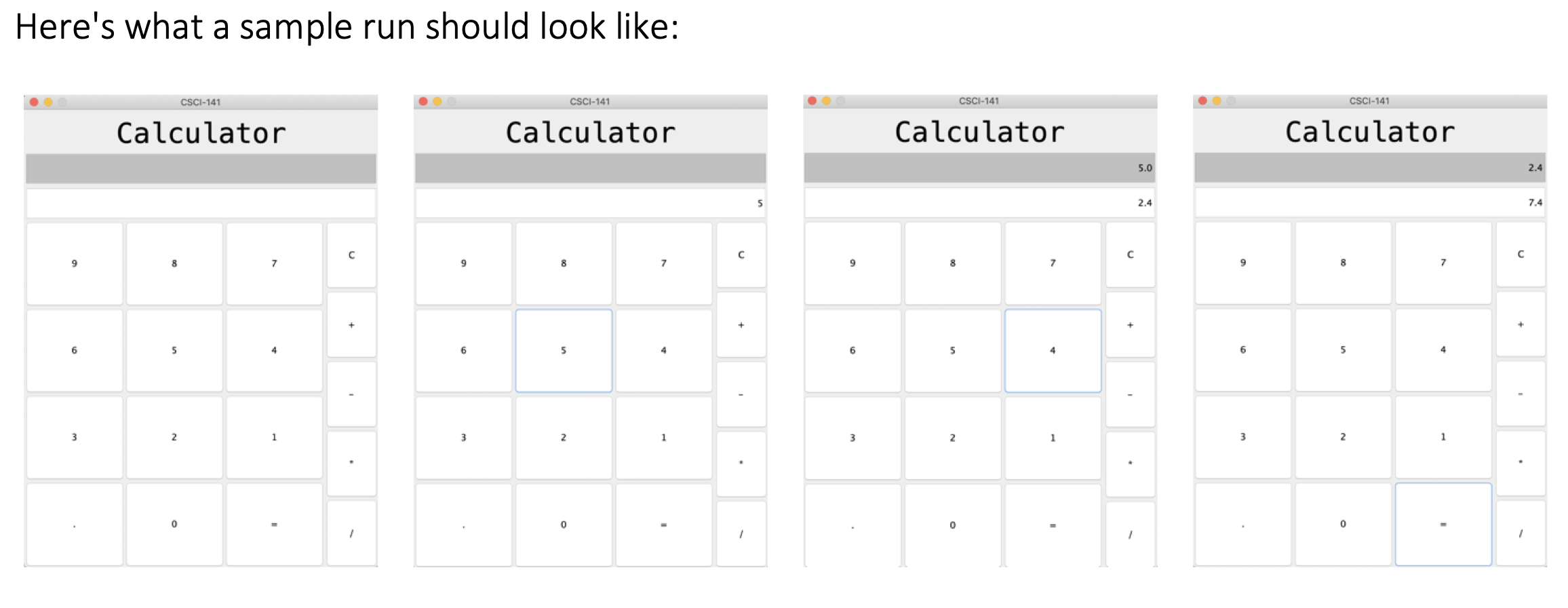
Here's what a sample run should look like: CSCI-141 CSCI-141 CSCI-141 CSCI-141 Calculator Calculator Calculator Calculator 2.4 7.4
Step by Step Solution
There are 3 Steps involved in it

Get step-by-step solutions from verified subject matter experts
 Study Help