







Question: import java.util.Arrays; import java.util.Scanner; public class UserInput { private static Scanner scStr; public static void main(String[] args) { try (Scanner sc = new Scanner(System.in)) {
import java.util.Arrays; import java.util.Scanner;
public class UserInput { private static Scanner scStr; public static void main(String[] args) { try (Scanner sc = new Scanner(System.in)) { scStr = new Scanner(System.in); String fName,lName; System.out.print("Your name : "); fName = scStr.next(); lName = scStr.next(); int seatNum; System.out.print("IDS401 seat number: "); seatNum = sc.nextInt(); String gender; System.out.print("Gender: "); gender = scStr.next(); System.out.print("Academic Status: "); scStr.next(); String address; System.out.print("Address: "); address = scStr.nextLine(); while(address.trim().length()==0){ address = scStr.nextLine(); } String temp[] = address.split(","); String city = temp[0].split("\\.")[1]; String state = temp[1].split(" ")[0]; String zip = temp[1].split(" ")[1]; System.out.printf("%-20s%-20s%-20s%-20s ","Last Name: ", lName,"First Name: ", fName); System.out.printf("%-20s%-20s%-20s%-20s ","Course #: ","IDS401","Course Seat # : ", seatNum); System.out.printf("%-20s%-20s ","Gender : ", gender.toUpperCase().charAt(0)+ ""); System.out.printf("%-20s%-20s%-20s%-20s ","Student City : ",city,"Student State: ", state); System.out.printf("%-20s%-20s ","Student Zipcode : ", zip); } } }
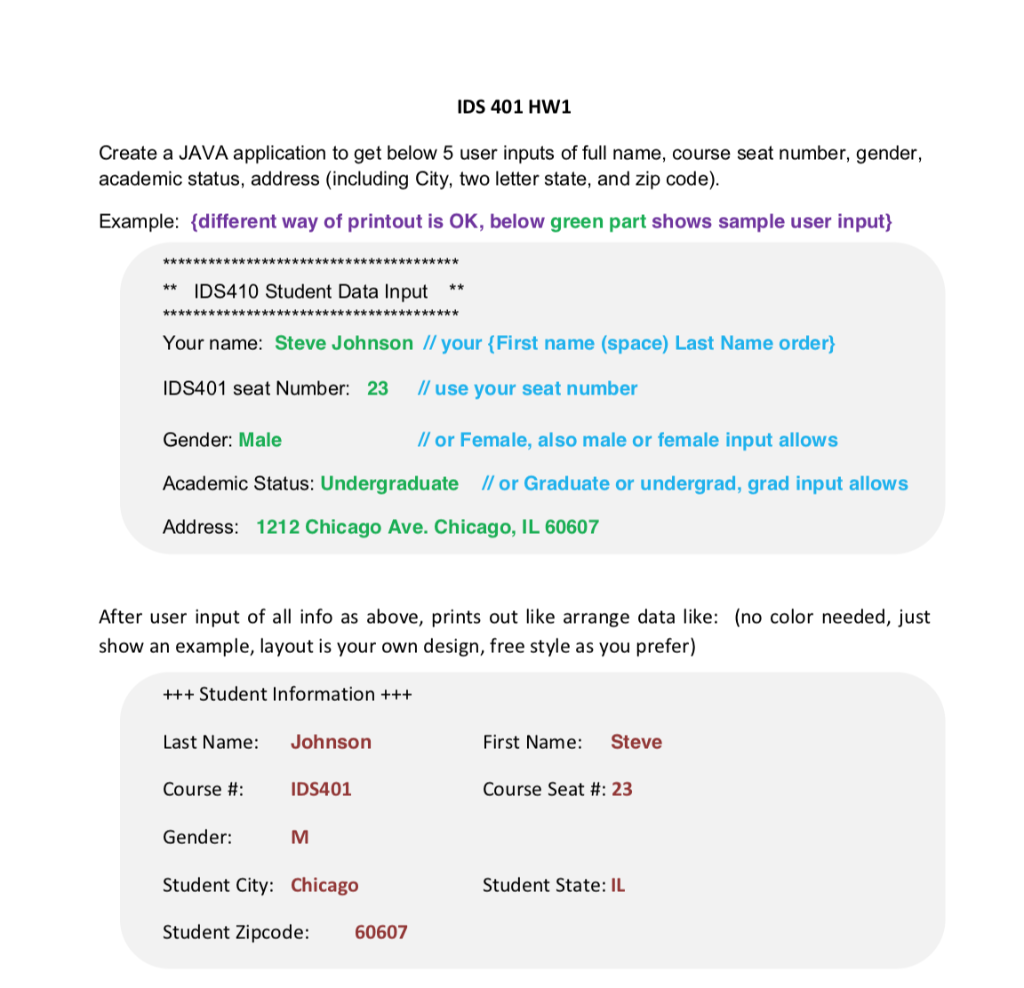 When I run the program, nothing is there for "Student State" and for "Student Zipcode" the state initials are in that spot. The code above the instructions is what I got. I'm not sure how to fix it, so that it runs correctly. Thanks
IDS 401 HW1 Create a JAVA application to get below 5 user inputs of full name, course seat number, gender, academic status, address (including City, two letter state, and zip code). Example: {different way of printout is OK, below green part shows sample user input} *************************************** ** IDS410 Student Data Input * ********************************* ****** Your name: Steve Johnson // your {First name (space) Last Name order} IDS401 seat Number: 23 // use your seat number Gender: Male // or Female, also male or female input allows Academic Status: Undergraduate ll or Graduate or undergrad, grad input allows Address: 1212 Chicago Ave. Chicago, IL 60607 After user input of all info as above, prints out like arrange data like: (no color needed, just show an example, layout is your own design, free style as you prefer) +++ Student Information +++ Last Name: Johnson First Name: Steve Course #: IDS401 Course Seat #: 23 Gender: M Student City: Chicago Student State: IL Student Zipcode: 60607
Step by Step Solution
There are 3 Steps involved in it

Get step-by-step solutions from verified subject matter experts
 Study Help