







Question: import turtle from turtle import Turtle import random from time import sleep WIDTH = 1 6 0 0 HEIGHT = 9 0 0 backgroundColor =
import turtle
from turtle import Turtle
import random
from time import sleep
WIDTH
HEIGHT
backgroundColor #
buildingColor #c
windowColor #FFFFFF
unveilTheCurtain False
starTurtles
buildingTurtle Turtle
buildings
def drawBuildingsbuildingTurtle:
while buildingTurtle.xcor WIDTH:
buildings.appenddrawBuildingbuildingTurtle
buildingTurtle.gotobuildingTurtlexcor
def drawBuildingbuildingTurtle wallHeightNone, floorWidthNone:
buildingTurtle.penfillcolorbuildingColor, pencolorbuildingColor, pensize
buildingTurtle.beginfill
previousWallHeight constructWallbuildingTurtle wallHeightwallHeight
floorWidth constructFloorbuildingTurtle floorWidth
constructWallbuildingTurtle previousWallHeight, wallHeight
buildingTurtle.endfill
return previousWallHeight floorWidth
def redrawBuildingsbuildingTurtle:
buildingTurtle.penup
buildingTurtle.goto
buildingTurtle.pendown
for building in buildings:
drawBuildingbuildingTurtle wallHeightbuilding floorWidthbuilding
def setupBuildingcolorset:
colorset.penup
colorset.penfillcolorbuildingColor, pencolorbuildingColor, pensize
colorset.goto
colorset.pendown
def constructFloorconstruct floorWidthNone:
construct.setheading
if floorWidth is None:
floorWidth random.randintWIDTH
construct.forwardfloorWidth
return floorWidth
def constructWallconstruct previousWallHeightNone, wallHeightNone:
if previousWallHeight is None:
construct.setheading
wallHeight random.randint intHEIGHT if wallHeight is None else wallHeight
construct.forwardwallHeight
return wallHeight
else:
construct.setheading
construct.forwardpreviousWallHeight
def drawwindowx y width, height:
turtle.penup
turtle.gotox y
turtle.pendown
turtle.fillcolorwindowColor
turtle.beginfill
for in range:
turtle.forwardwidth
turtle.left
turtle.forwardheight
turtle.left
turtle.endfill
def drawStars:
starAmount WIDTH
stars randomStar for in rangestarAmount
for star in stars:
drawStarstar star
def randomStar:
return random.randint WIDTH random.randintHEIGHT HEIGHT
def updateStars:
for star in starTurtles:
x star.xcor
if x WIDTH:
x
star.setxx
star.setyrandomStar
star.clear
drawStarx WIDTH starTurtlestar
def drawStarx yNone, starTurtleNone:
if starTurtle is None:
starTurtle defaultTurtle
starTurtles.appendstarTurtle
starTurtle.hideturtle
starTurtle.coloryellow
starTurtle.penup
safeGotox y starTurtle
drawLine starTurtle
starTurtle.right
drawLine starTurtle
starTurtle.left
drawLine starTurtle
starTurtle.left
drawLine starTurtle
starTurtle.penup
def drawLinelength turtleturtle:
halfLength length
turtle.pendown
turtle.forwardhalfLength
turtle.backwardlength
turtle.left
turtle.backwardhalfLength
turtle.penup
def safeGotox yNone, turtleturtle:
turtle.gotox turtle.ycor if y is None else y
turtle.setheading
def defaultTurtlenewTurtleNone:
if newTurtle is None:
newTurtle Turtle
if not unveilTheCurtain:
newTurtle.hideturtle
return newTurtle
def main:
screen turtle.Screen
if not unveilTheCurtain:
screen.tracer
defaultTurtleturtle
global buildingTurtle
defaultTurtlebuildingTurtle
setupBuildingbuildingTurtle
turtle.setupWIDTH HEIGHT
turtle.setworldcoordinates WIDTH, HEIGHT
turtle.bgcolorbackgroundColor
drawStars
drawBuildingsbuildingTurtle
while True:
screen.update
sleep
updateStars
redrawBuildingsbuildingTurtle
if namemain:
main
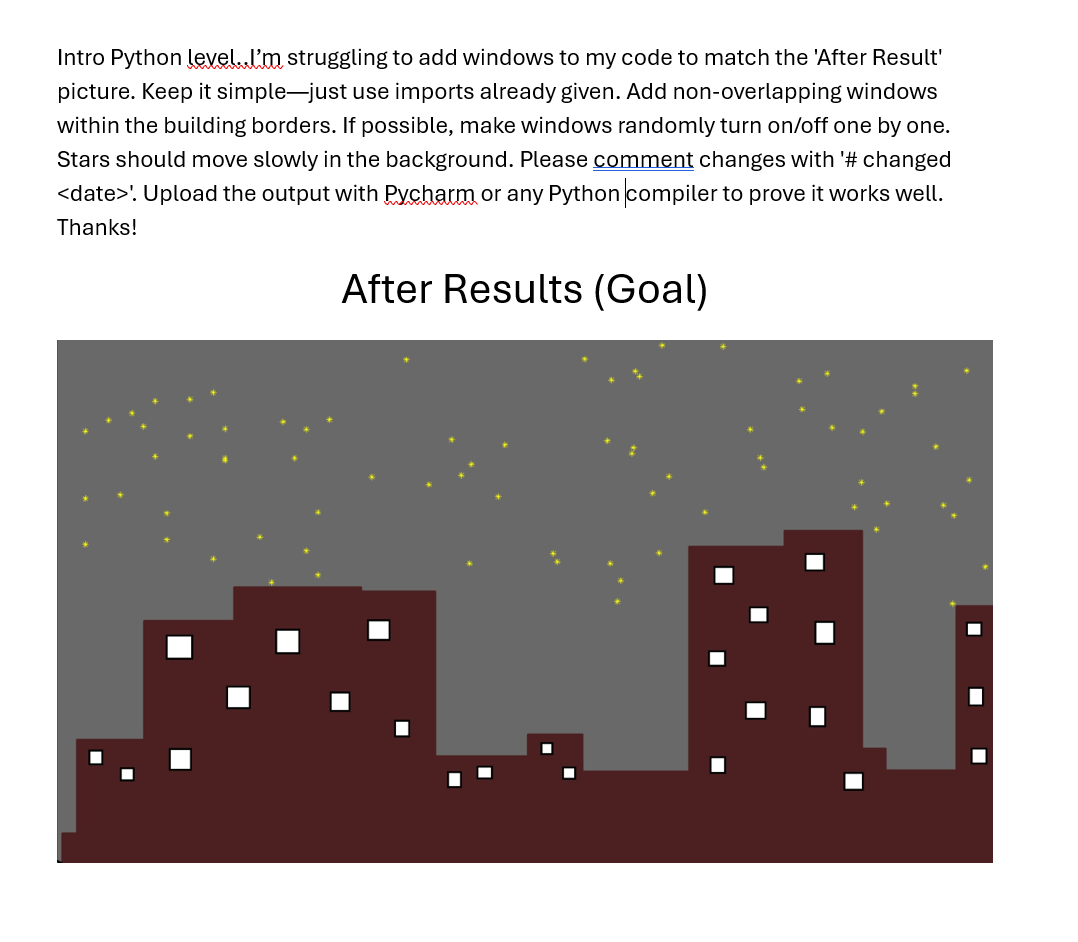
Intro Python level..lm struggling to add windows to my code to match the 'After Result' picture. Keep it simplejust use imports already given. Add nonoverlapping windows within the building borders. If possible, make windows randomly turn onoff one by one. Stars should move slowly in the background. Please comment changes with # changed Upload the output with Pycharm or any Pythoncompiler to prove it works well. Thanks!
After Results Goal
Step by Step Solution
There are 3 Steps involved in it
1 Expert Approved Answer
Step: 1 Unlock

Question Has Been Solved by an Expert!
Get step-by-step solutions from verified subject matter experts
Step: 2 Unlock
Step: 3 Unlock
 Study Help