







Question: # Importing the OpenCV library - You can display an image using plt.imshow(l import cv2 import numpy as np - In order to successfully display
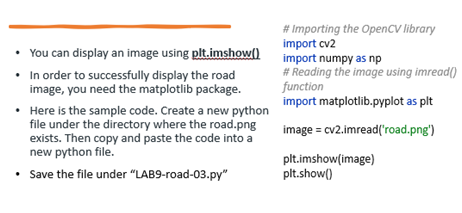

\# Importing the OpenCV library - You can display an image using plt.imshow(l import cv2 import numpy as np - In order to successfully display the road \# Reading the image using imread() image, you need the matplotlib package. function - Here is the sample code. Create a new python import matplotlib.pyplot as plt file under the directory where the road.png exists. Then copy and paste the code into a image = cv2. .imread('road.png') new python file. - Save the file under "LAB9-road-03.py" plt.imshow(image) plt.show()
Step by Step Solution
There are 3 Steps involved in it
1 Expert Approved Answer
Step: 1 Unlock

Question Has Been Solved by an Expert!
Get step-by-step solutions from verified subject matter experts
Step: 2 Unlock
Step: 3 Unlock
 Study Help