







Question: In Android Studio, how do I display only list rows function on the menu in the first screen (the first image) and display only back
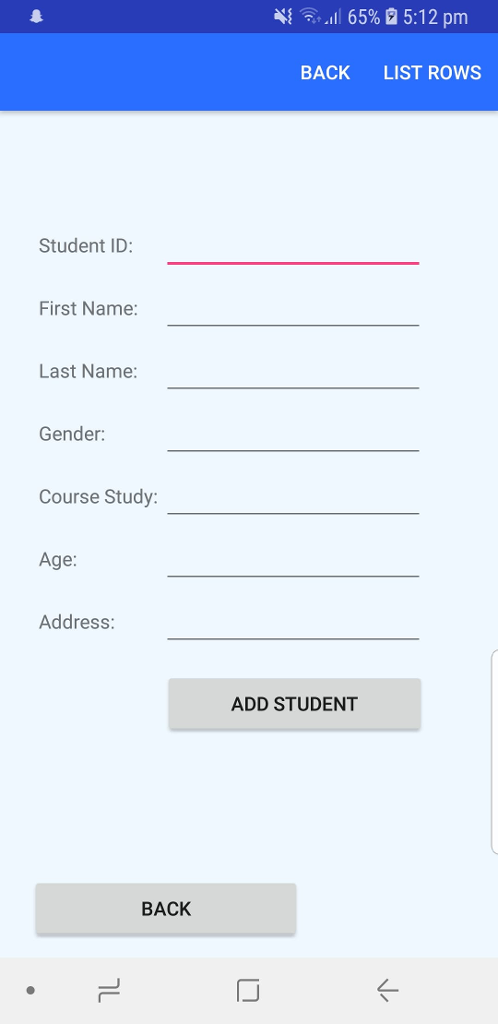
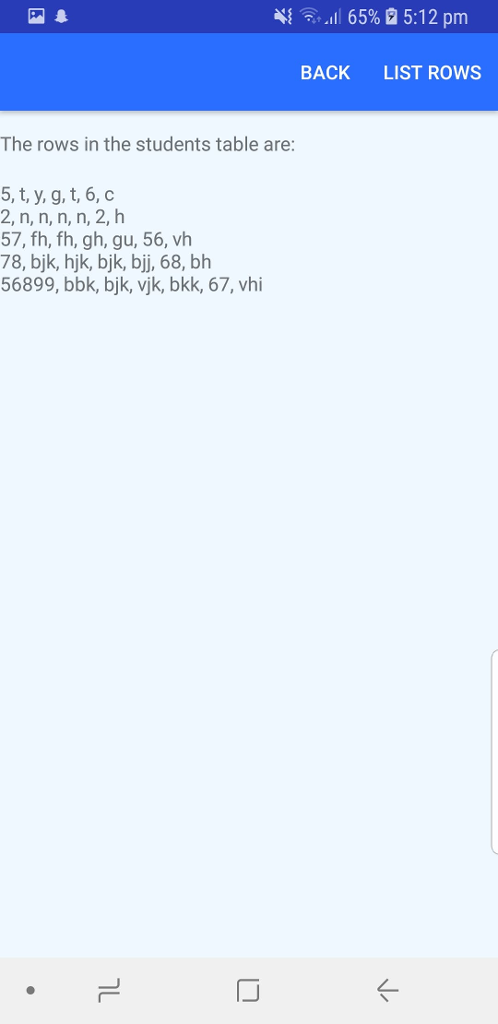
In Android Studio, how do I display only "list rows" function on the menu in the first screen (the first image) and display only "back" function on the menu in the second screen (second image).
//content_screen2.xml
LinearLayout xmlns:android="http://schemas.android.com/apk/res/android" android:orientation="vertical" android:layout_width="match_parent" android:layout_height="match_parent" android:paddingTop="70dp" android:background="#F0F8FF" > TextView android:layout_width="match_parent" android:layout_height="wrap_content" android:id="@+id/response" /> TextView android:layout_width="match_parent" android:layout_height="wrap_content" android:id="@+id/studrec" /> TableLayout android:id="@+id/add_table" android:layout_width="match_parent" android:layout_height="606dp" android:paddingTop="40dp"> TableRow> TextView android:layout_marginLeft="25dp" android:padding="3dip" android:text="Student ID:" /> EditText android:id="@+id/sid" android:layout_width="190dp" android:layout_height="wrap_content" /> TableRow> TableRow> TextView android:layout_marginLeft="25dp" android:padding="3dip" android:text="First Name:" /> EditText android:id="@+id/fn" android:layout_width="match_parent" android:layout_height="wrap_content" android:minWidth="150dip" /> TableRow> TableRow> TextView android:layout_marginLeft="25dp" android:padding="3dip" android:text="Last Name:" /> EditText android:id="@+id/ln" android:layout_width="match_parent" android:layout_height="wrap_content" android:minWidth="150dip" /> TableRow> TableRow> TextView android:layout_marginLeft="25dp" android:padding="3dip" android:text="Gender:" /> EditText android:id="@+id/ge" android:layout_width="match_parent" android:layout_height="wrap_content" android:minWidth="150dip" /> TableRow> TableRow> TextView android:layout_marginLeft="25dp" android:padding="3dip" android:text="Course Study:" /> EditText android:id="@+id/cs" android:layout_width="match_parent" android:layout_height="wrap_content" android:minWidth="150dip" /> TableRow> TableRow> TextView android:layout_marginLeft="25dp" android:padding="3dip" android:inputType="number" android:digits="0123456789" android:text="Age:" /> EditText android:id="@+id/ag" android:layout_width="match_parent" android:layout_height="wrap_content" android:minWidth="150dip" /> TableRow> TableRow> TextView android:layout_marginLeft="25dp" android:padding="3dip" android:text="Address:" /> EditText android:id="@+id/ad" android:layout_width="match_parent" android:layout_height="wrap_content" android:minWidth="150dip" /> TableRow> Button android:id="@+id/add_button" android:layout_width="207dp" android:layout_height="wrap_content" android:layout_marginLeft="118dp" android:layout_marginRight="52dp" android:layout_marginTop="14dp" android:padding="6dip" android:text="Add Student" /> Button android:id="@+id/back_button" android:layout_width="207dp" android:layout_height="wrap_content" android:layout_marginLeft="22dp" android:layout_marginRight="142dp" android:layout_marginTop="100dp" android:onClick="back_button" android:padding="6dip" android:text="Back" /> TableLayout> LinearLayout>
//menu_screen2.xml
menu xmlns:android="http://schemas.android.com/apk/res/android" xmlns:app="http://schemas.android.com/apk/res-auto" xmlns:tools="http://schemas.android.com/tools" tools:context="com.supriya.qs2.MainActivity"> item android:id="@+id/back" android:title="Back" android:orderInCategory="100" app:showAsAction="ifRoom" /> item android:id="@+id/list_rows" android:title="Show Record" android:orderInCategory="100" app:showAsAction="ifRoom" /> menu>
//Screen2.java
package com.user.myproject; import android.content.Context; import android.content.Intent; import android.os.Bundle; import android.support.v7.app.AppCompatActivity; import android.support.v7.widget.Toolbar; import android.text.TextUtils; import android.util.Log; import android.view.View; import android.view.Menu; import android.view.MenuItem; import android.widget.TextView; import android.widget.EditText; import android.widget.TableLayout; import android.widget.Button; import android.view.View.OnClickListener; import android.view.inputmethod.InputMethodManager; import android.widget.Toast; import java.util.ArrayList; public class Screen2 extends AppCompatActivity { private DatabaseManager mydManager; private TextView response; private TextView studentRec; private EditText sid, fn, ln, ge, cs, ag, ad; private Button addButton; private TableLayout addLayout; private boolean recInserted; @Override protected void onCreate(Bundle savedInstanceState) { super.onCreate(savedInstanceState); setContentView(R.layout.activity_main2); Toolbar toolbar = (Toolbar) findViewById(R.id.toolbar); setSupportActionBar(toolbar); getSupportActionBar().setTitle(null); mydManager = new DatabaseManager(Screen2.this); response = (TextView)findViewById(R.id.response); studentRec = (TextView)findViewById(R.id.studrec); addLayout = (TableLayout)findViewById(R.id.add_table); addLayout.setVisibility(View.VISIBLE); studentRec.setVisibility(View.GONE); addButton = (Button) findViewById(R.id.add_button); addButton.setOnClickListener(new View.OnClickListener() { public void onClick(View v) { sid = (EditText)findViewById(R.id.sid); fn = (EditText)findViewById(R.id.fn); ln = (EditText)findViewById(R.id.ln); ge = (EditText)findViewById(R.id.ge); cs = (EditText)findViewById(R.id.cs); ag = (EditText)findViewById(R.id.ag); ad = (EditText)findViewById(R.id.ad); recInserted = mydManager.addRow(Integer.parseInt(sid.getText().toString()), fn.getText().toString(),ln.getText().toString(), ge.getText().toString(), cs.getText().toString(), Integer.parseInt(ag.getText().toString()), ad.getText().toString()); if(!ag.getText().toString().equals("")) { boolean digitsOnly = TextUtils.isDigitsOnly(ag.getText()); if (!digitsOnly) { Toast.makeText(Screen2.this, "Please only input digits", Toast.LENGTH_SHORT).show(); } } if (recInserted) { response.setText("The row in the students table is inserted"); } else { response.setText("Sorry, errors when inserting to DB"); } InputMethodManager imm = (InputMethodManager) getSystemService(Context.INPUT_METHOD_SERVICE); mydManager.close(); sid.setText(""); fn.setText(""); ln.setText(""); ge.setText(""); cs.setText(""); ag.setText(""); ad.setText(""); studentRec.setText(""); } }); } public void back_button(View view) { Intent intent = new Intent(Screen2.this, Screen1.class); startActivity(intent); } @Override public boolean onCreateOptionsMenu(Menu menu) { // Inflate the menu; this adds items to the action bar if it is present. getMenuInflater().inflate(R.menu.menu_screen2, menu); return true; } @Override public boolean onOptionsItemSelected(MenuItem item) { // Handle action bar item clicks here. The action bar will // automatically handle clicks on the Home/Up button, so long // as you specify a parent activity in AndroidManifest.xml. int id = item.getItemId(); switch (item.getItemId()) { case R.id.list_rows: showRec(); break; } return super.onOptionsItemSelected(item); } public boolean showRec() { addLayout.setVisibility(View.GONE); studentRec.setVisibility(View.VISIBLE); mydManager.openReadable(); ArrayList tableContent = mydManager.retrieveRows(); response.setText("The rows in the students table are: "); String info = ""; for (int i = 0; i " "; } studentRec.setText(info); System.out.println(info); return true; } } //DatabaseManager.java
package com.user.myproject; import android.database.sqlite.SQLiteDatabase; import android.content.Context; import android.content.ContentValues; import android.database.Cursor; import android.database.sqlite.SQLiteOpenHelper; import android.util.Log; import java.util.ArrayList; public class DatabaseManager { public static final String DB_NAME = "student"; public static final String DB_TABLE = "information"; public static final String DB_TABLE2 = "information2"; public static final String DB_TABLE3 = "information3"; public static final int DB_VERSION = 1; private static final String CREATE_TABLE = "CREATE TABLE IF NOT EXISTS " + DB_TABLE + " (studentId INTEGER, first_name TEXT, last_name TEXT, gender TEXT, course_study TEXT, age INTEGER, address TEXT);"; private static final String CREATE_TABLE2 = "CREATE TABLE IF NOT EXISTS " + DB_TABLE2 + " (task_name TEXT, location TEXT);"; private static final String CREATE_TABLE3 = "CREATE TABLE IF NOT EXISTS " + DB_TABLE3 + " (unit_name TEXT, location2 TEXT, date TEXT, time TEXT);"; private SQLHelper helper; private SQLiteDatabase db; private Context context; //radoio = TEXT public DatabaseManager(Context c) { this.context = c; helper = new SQLHelper(c); this.db = helper.getWritableDatabase(); } public DatabaseManager openReadable() throws android.database.SQLException { helper = new SQLHelper(context); db = helper.getReadableDatabase(); return this; } public void close() { helper.close(); } public boolean addRow(Integer c, String fn, String ln, String ge, String cs, Integer ag, String ad) { synchronized (this.db) { ContentValues newStudent = new ContentValues(); newStudent.put("studentId", c); newStudent.put("first_name", fn); newStudent.put("last_name", ln); newStudent.put("gender", ge); newStudent.put("course_study", cs); newStudent.put("age", ag); newStudent.put("address", ad); try { db.insertOrThrow(DB_TABLE, null, newStudent); } catch (Exception e) { Log.e("Error in inserting rows", e.toString()); e.printStackTrace(); return false; } //db.close(); return true; } } public boolean addRow2(String tn, String lo ) { synchronized (this.db) { ContentValues newTask = new ContentValues(); newTask.put("task_name", tn); newTask.put("location", lo); try { db.insertOrThrow(DB_TABLE2, null, newTask); } catch (Exception e) { Log.e("Error in inserting rows", e.toString()); e.printStackTrace(); return false; } //db.close(); return true; } } public boolean addRow3(String un, String lo2, String da, String ti) { synchronized (this.db) { ContentValues newExam = new ContentValues(); newExam.put("unit_name", un); newExam.put("location", lo2); newExam.put("date", da); newExam.put("time", ti); try { db.insertOrThrow(DB_TABLE3, null, newExam); } catch (Exception e) { Log.e("Error in inserting rows", e.toString()); e.printStackTrace(); return false; } //db.close(); return true; } } public ArrayList retrieveRows() { ArrayList studentRows = new ArrayList(); String[] columns = new String[]{"studentId", "first_name", "last_name", "gender", "course_study", "age", "address"}; Cursor cursor = db.query(DB_TABLE, columns, null, null, null, null, null); cursor.moveToFirst(); while (cursor.isAfterLast() == false) { studentRows.add(Integer.toString(cursor.getInt(0)) + ", " + cursor.getString(1) + ", " + cursor.getString(2) + ", " + cursor.getString(3) + ", " + cursor.getString(4) + ", " + Integer.toString(cursor.getInt(5)) + ", " + cursor.getString(6)); cursor.moveToNext(); } if (cursor != null && !cursor.isClosed()) { cursor.close(); } return studentRows; } public ArrayList retrieveRows2() { ArrayList taskRows = new ArrayList(); String[] columns = new String[]{"task_name", "location"}; Cursor cursor = db.query(DB_TABLE2, columns, null, null, null, null, null); cursor.moveToFirst(); while (cursor.isAfterLast() == false) { taskRows.add(cursor.getString(0) + ", " + cursor.getString(1)); cursor.moveToNext(); } if (cursor != null && !cursor.isClosed()) { cursor.close(); } return taskRows; } public ArrayList retrieveRows3() { ArrayList examRows = new ArrayList(); String[] columns = new String[]{"unit_name", "location2", "date", "time"}; Cursor cursor = db.query(DB_TABLE3, columns, null, null, null, null, null); cursor.moveToFirst(); while (cursor.isAfterLast() == false) { examRows.add(cursor.getString(0) + ", " + cursor.getString(1) + " ," + cursor.getString(2) + " ," + cursor.getString(3)); cursor.moveToNext(); } if (cursor != null && !cursor.isClosed()) { cursor.close(); } return examRows; } public void clearRecords() { db = helper.getWritableDatabase(); db.delete(DB_TABLE, null, null); } public void clearRecords2() { db = helper.getWritableDatabase(); db.delete(DB_TABLE2, null, null); } public void clearRecords3() { db = helper.getWritableDatabase(); db.delete(DB_TABLE3, null, null); } public class SQLHelper extends SQLiteOpenHelper { public SQLHelper(Context c) { super(c, DB_NAME, null, DB_VERSION); } @Override public void onCreate(SQLiteDatabase db) { db.execSQL(CREATE_TABLE); db.execSQL(CREATE_TABLE2); db.execSQL(CREATE_TABLE3); } @Override public void onUpgrade(SQLiteDatabase db, int oldVersion, int newVersion) { Log.w("Students table", "Upgrading database i.e. dropping table and re-creating it"); db.execSQL("DROP TABLE IF EXISTS " + DB_TABLE); db.execSQL("DROP TABLE IF EXISTS " + DB_TABLE2); db.execSQL("DROP TABLE IF EXISTS " + DB_TABLE3); onCreate(db); } } } { ,,11 65% 5:12 pm BACK LIST ROWS Student ID: First Name Last Name: Gender: Course Study Age: Address ADD STUDENT BACK
Step by Step Solution
There are 3 Steps involved in it
1 Expert Approved Answer
Step: 1 Unlock

Question Has Been Solved by an Expert!
Get step-by-step solutions from verified subject matter experts
Step: 2 Unlock
Step: 3 Unlock
 Study Help