







Question: IN BASIC C# INSTRUCTIONS 1. Before you begin, you should read the rubric on page 1. This is extremely important, as it will tell you
IN BASIC C#
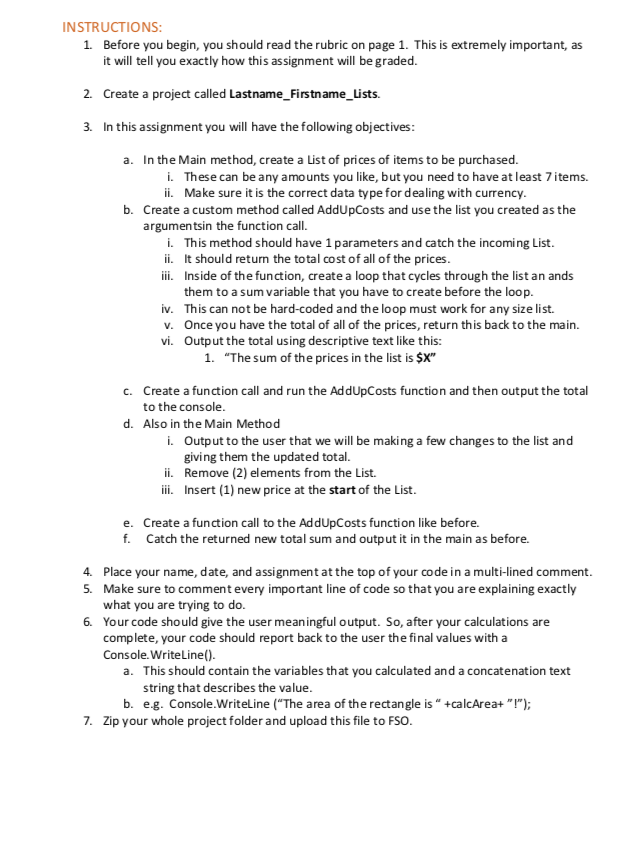
INSTRUCTIONS 1. Before you begin, you should read the rubric on page 1. This is extremely important, as it will tell you exactly how this assignment will be graded 2. Create a project caled Lastname_Firstname_Lists. 3. In this assignment you will have the following objectives a. In the Main method, create a List of prices of items to be purchased These can be any amounts you like, but you need to have atleast 7 items. i. ii. Make sure it is the correct data type for dealing with currency b. Create a custom method called AddUpCosts and use the list you created as the argumentsin the function call i. This method should have 1 parameters and catch the incoming List ii. It should return the total cost of all of the prices iii. Inside of the function, create a loop that cycles through the list an ands them to a sum variable that you have to create before the loop iv. This can not be hard-coded and the loop must work for any size list. v. Once you have the total of all of the prices, return this back to the main. vi. Output the total using descriptive text like this: 1. "The sum of the prices in the list is X" Create a function call and run the AddUpCosts function and then output the total to the console Also in the Main Method c. d. i. Output to the user that we will be making a few changes to the list and giving them the updated total ii. Remove (2) elements from the List. ii. Insert (1) new price at the start of the List e. Create a function call to the AddUpCosts function like before. f. Catch the returned new total sum and output it in the main as before. 4. 5. Place your name, date, and assignment at the top of your code in a multi-lined comment. Make sure to comment every important line of code so that you are explaining exactly what you are trying to do. Your code should give the user meaningful output. So, after your calculations are complete, your code should report back to the user the final values with a Console.WriteLine() 6. This should contain the variables that you calculated and a concatenation text string that describes the value a. b. e.g. Console.WriteLine ("The area of the rectangle is " +calcArea+ "!"); Zip your whole project folder and upload this file to FSO 7
Step by Step Solution
There are 3 Steps involved in it

Get step-by-step solutions from verified subject matter experts
 Study Help