







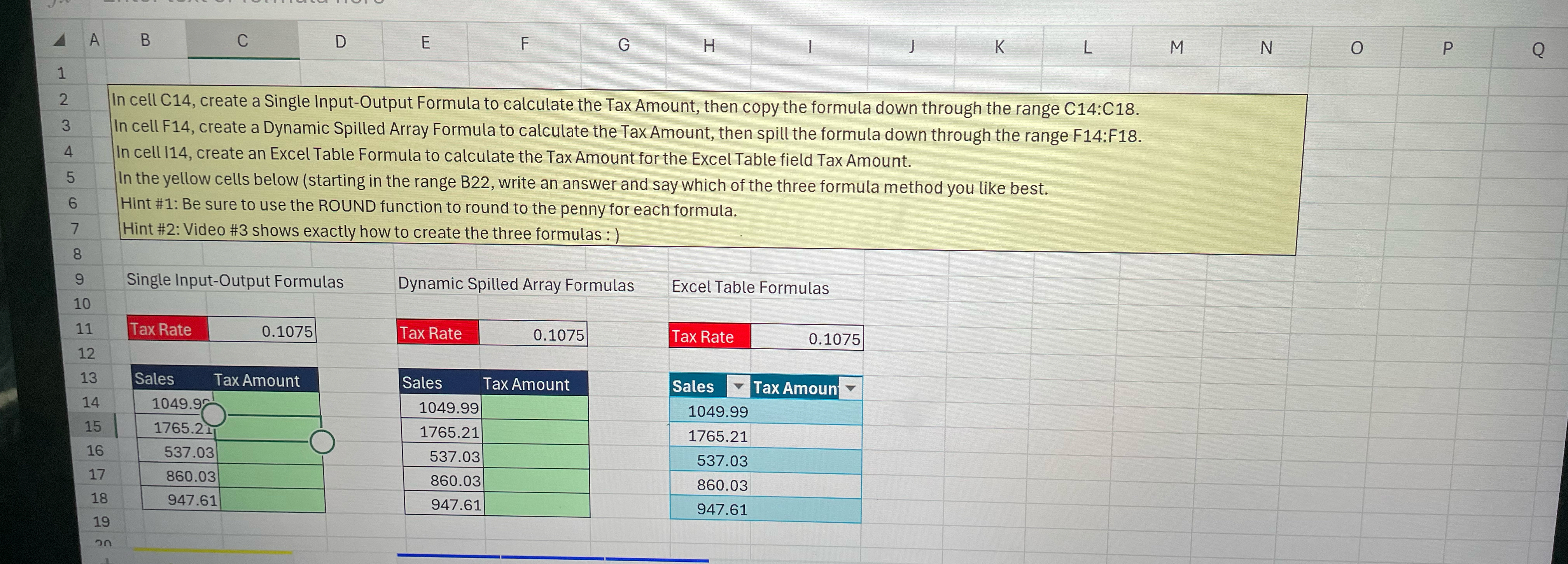
Question: In cell C 1 4 , create a Single Input - Output Formula to calculate the Tax Amount, then copy the formula down through the
In cell C create a Single InputOutput Formula to calculate the Tax Amount, then copy the formula down through the range C:C In cell F create a Dynamic Spilled Array Formula to calculate the Tax Amount, then spill the formula down through the range F:F In cell create an Excel Table Formula to calculate the Tax Amount for the Excel Table field Tax Amount.
In the yellow cells below starting in the range B write an answer and say which of the three formula method you like best.
Hint #: Be sure to use the ROUND function to round to the penny for each formula.
Hint #: Video # shows exactly how to create the three formulas :
tableSingle InputOutput Formulas,Dynamic Spilled Array Formulas,Excel Table FormulasTax Rate,Tax Rate,Tax Rat,SalesTax Amount,Sales,Tax Amount,Sales,Tax Amoun
Step by Step Solution
There are 3 Steps involved in it
1 Expert Approved Answer
Step: 1 Unlock

Question Has Been Solved by an Expert!
Get step-by-step solutions from verified subject matter experts
Step: 2 Unlock
Step: 3 Unlock
 Study Help