







Question: In Cell E 6 enter a formula to calculate the price of the menu item by looking up the price of the menu item from
In Cell E enter a formula to calculate the price of the menu item by looking up the
price of the menu item from within the Price range.
COMP Excel Project Page of
Originated by Kim On Modified by Esther Leroy Ubah.
f In Cell F enter a formula to calculate the Total Revenue on each menu item based
upon the Total Qty Sold and the Price of the menu item.
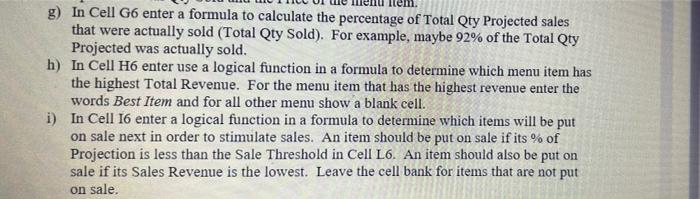
g In Cell G enter a formula to calculate the percentage of Total Qty Projected sales that
were actually sold Total Qty Sold For example, maybe of the Total Qty
Projected was actually sold.
h In Cell H enter use a logical function in a formula to determine which menu item has
the highest Total Revenue. For the menu item that has the highest revenue enter the
words Best Item and for all other menu show a blank cell.
i In Cell I enter a logical function in a formula to determine which items will be put
on sale next in order to stimulate sales. An item should be put on sale if its of
Projection is less than the Sale Threshold in Cell L An item should also be put on
sale if its Sales Revenue is the lowest. Enter the word Next On Sale if the item will
be put on sales and leave the cell bank for items that are not put on sale.
j Copy the formulas and functions down their respective columns.
k In Cell L enter a formula that display the number of days between the Start of the
sale and the End of the sale. The Start and End dates have been provided by the
poultry company and are entered in Cells L and L
Step by Step Solution
There are 3 Steps involved in it
1 Expert Approved Answer
Step: 1 Unlock

Question Has Been Solved by an Expert!
Get step-by-step solutions from verified subject matter experts
Step: 2 Unlock
Step: 3 Unlock
 Study Help