







Question: In copying the VLOOKUP function in column F down through each transaction, Sally went a row past the recorded data and noticed a #N/A error.
![VLOOKUP function--well get to is technical details in time] 6. In calculating](https://dsd5zvtm8ll6.cloudfront.net/si.experts.images/questions/2024/10/671e21efd1276_015671e21ef45b83.jpg)
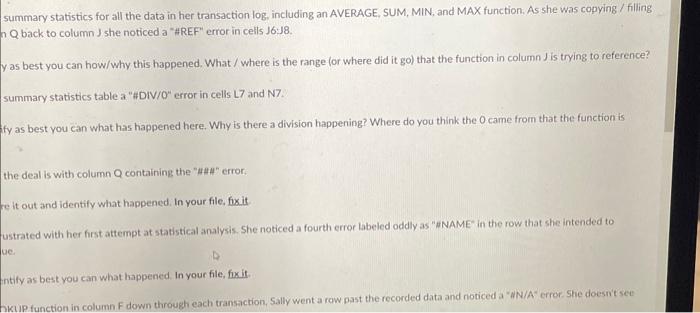
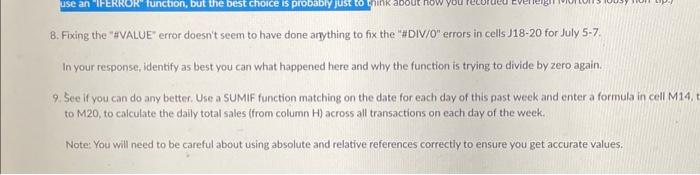
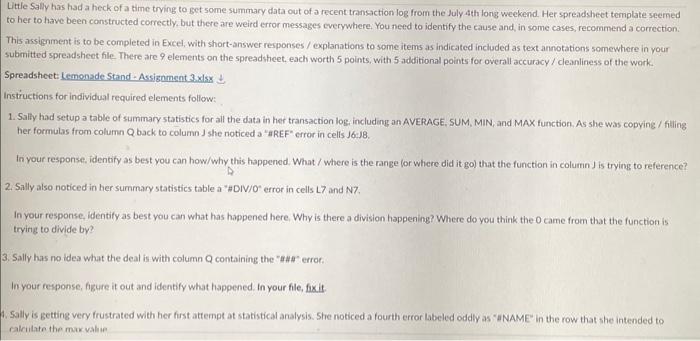
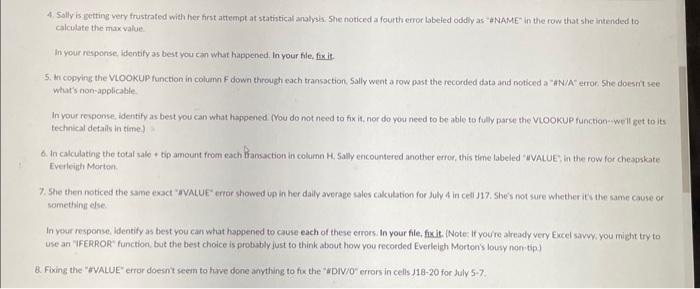
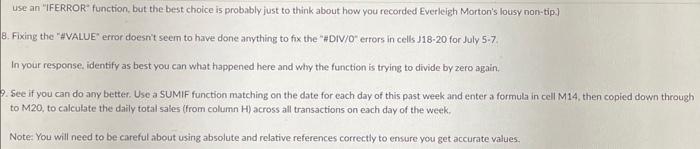
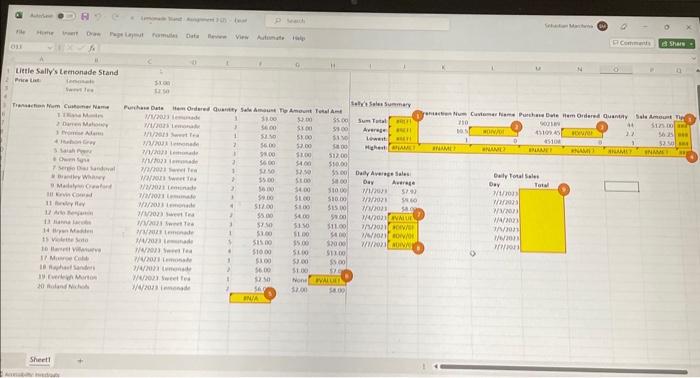
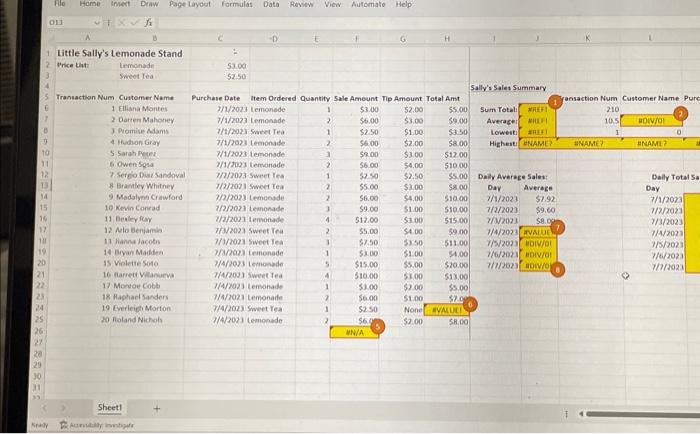
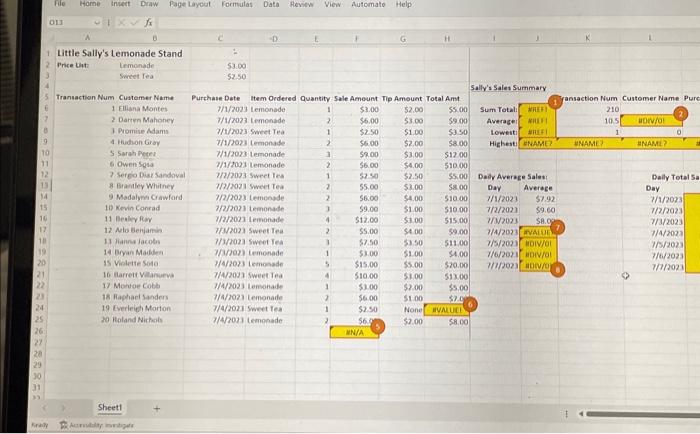
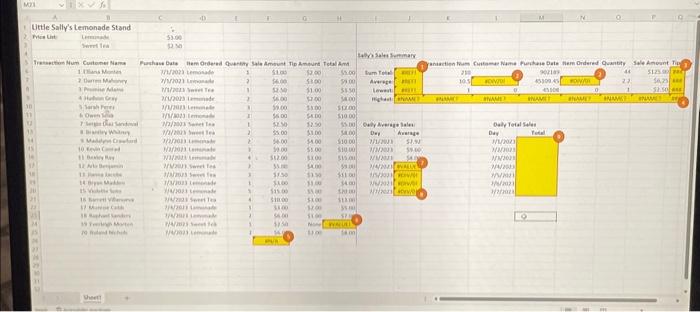
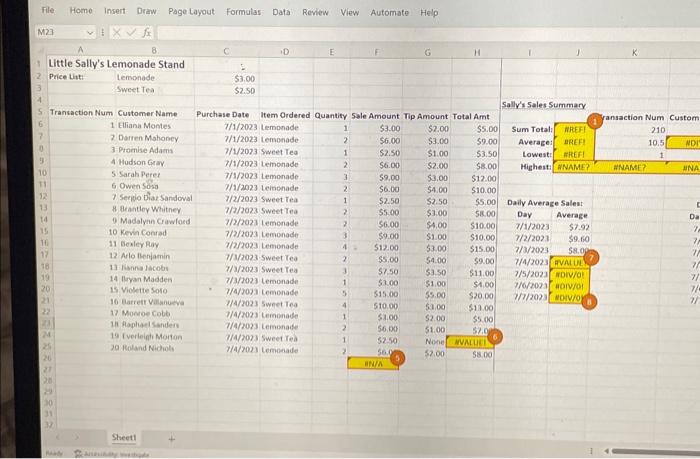
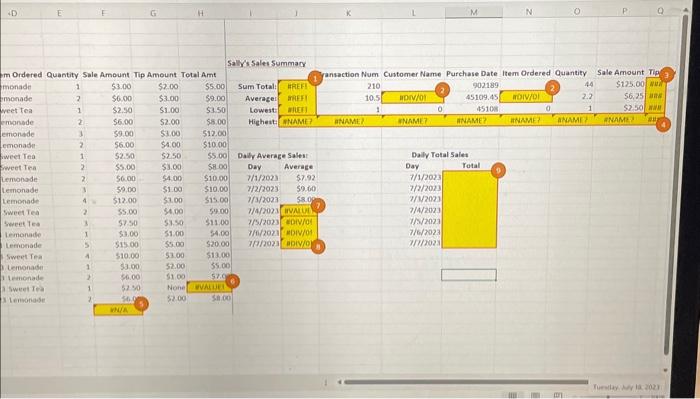
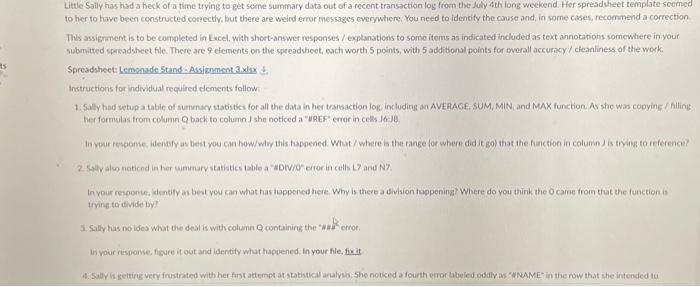
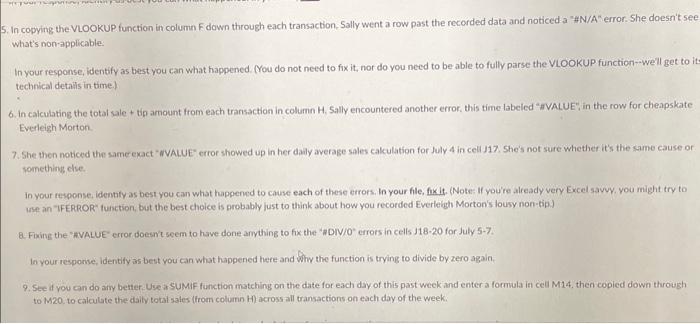
In copying the VLOOKUP function in column F down through each transaction, Sally went a row past the recorded data and noticed a "\#N/A" error. She doesn't se what's non applicable: In your response, identify as best you can what happened. (You do not need to fix it, nor do you need to be able to fully parse the VLOOKUP function--well get to is technical details in time] 6. In calculating the total sale + tip amount from each transaction in column H, Sally encountered another error, this time labeled "\$VALUE", in the row for cheapskate Everleigh Morton. 7.5he then noticed the same exact " WALUE* error showed up in her daly average sales cakulation for July 4 in cell 117 . She's not sure whether it's the same cause or something clise. in your tesponse, identity as best you can what happened to cause each of these errors. In your file, fix it. (Note: If you're already very Excel savvy, you might try to irse an "IFERROR' function, but the best choice is arobably just to think about how you recorded Everleigh Morton's lousy non-tips) Q. Fixing the "WVALUE" error doesn't seem to have done arything to fix the "aDV/0" errors in cells J18-20 for July 57. In your resporve, identify as best you can what happened here and Why the function is trying to divide by zero again. 9.5ee if you can do airy better. Use a SUMIF function matching on the date for each day of this past week and enter a formula in cell M14. then copied down through to M20. to calculate the daily total sales (from column H ) across all transactions on each day of the week: summary statistics for all the data in her transaction log, including an AVERAGE, SUM, MIN, and MAX function. As she was copying / filling Q back to column J she noticed a "\#REF" error in cells 16.18. y as best you can how/ why this happened. What / where is the range (or where did it go) that the function in column J is trying to reference? summary statistics table a "\#DIV/O" error in cells L7 and N7. fy as best you can what has happened here. Why is there a division happening? Where do you think the 0 came from that the function is the deal is with column Q containing the "H\#" "error. it out and identify what happened, In your file, fix it ustrated with her first attempt at statistical analysis. She noticed a fourth error labeled oddly as "\#NAME" in the row that she intended to ntify as best you can what happened. In your file, fux it. KIIP function in column F down through each transaction, Sally went a row past the recorded data and noticed a " WN/A" erroe She doesrit see Use an "IFERROR' function, but the best choice is probably just to think about how you recorded Everleigh Morton's lousy non-tip.] 9. Fixing the "HVALUE" error doesn't seem to have done anything to fix the "BDIV/O" errors in cells J18-20 for July 57. In your response. identify as best you can what happened here and why the function is trying to divide by zero again. See if you can do any better. Use a SUMIF function matching on the date for each day of this past week and enter a formula in cell M14, then copied down through to M2O, to calculate the daily total sales (from column H ) across all transactions on each day of the week. Note: You will need to be careful about using absolute and relative references correctly to ensure you get accurate values: Instructions for individual required elements follow: 1. Sally had setup a table of summary statistics for all the data in her transaction log, including an AVERAGE, SUM. MIN, and MA her formulas from column Q back to column J she noticed a "\#REF" error in cells J6:J8. In your response, identify as best you can how/ why this happened. What/ where is the range (or where did it go) that the func 2. Sally also noticed in her summary statistics table a "HDIV/O" error in cells L7 and N7. In your response, identify as best you can what has happened here. Why is there a division happening? Where do you think the trying to divide by? 3. Sally has no idea what the deal is with column Q containing the " # \#\#" error. In your response, figure it out and identify what happened, In your file, fix it 4. Sally is getting very frustrated with her first attempt at statistical analysis. She noticed a fourth error labeled oddly as "\#NAME" calculate the max value. In your response, identify as best you can what happened. In your file, fix it. 5. In copying the VLOOKUP function in column F down through each transaction, Sally went a row past the recorded data and notic what's non-applicable. 8. Fixing the "\#VALUE" error doesn't seem to have done arything to fix the "\#DIV/0" errors in cells J18-20 for July 5-7. In your response, identify as best you can what happened here and why the function is trying to divide by zero again. 9. See if you can do any better. Use a SUMIF function matching on the date for each day of this past week and enter a formula in cell M14, to M20, to calculate the daily total sales (from column H ) across all transactions on each day of the week. Note: You will need to be careful about using absolute and relative references correctly to ensure you get accurate values. Little Saily has had a heck of a tirne trying to get seene summary data out of a recent transaction log from the July 4 th long weekend. Her spresdsheet template scenged to her to have been constructed correctly, but there are weird error messages cverywhere, You need to identity the cause and, in sorne cases, recormend a correction This assignment is to be completed in Excel, with short-answer responses / explanstions to some items as indicated included as text annotations somewhere in your submitted speadsheet file. There are 9 eiements on the spreadsheet, esch worth 5 points, with 5 additional points for overall accuracy / cleanliness of the work. Spreadsheet: Lempaide Stand-Assiznment 3 ixlix of Instructions for individual recuired elements follow 1. 5ally had setupa tabie of sumenury statistics for all the data in her transaction log including an AVEAAOf, SUM, MIN, and MAX function. As she Was copyine / filling her formulas from column Q back to column I she noticed a "UREF" error in cells 1610 In your respome, Identify as best vou can what has happened here. Why is there a division hapening? Where do you think the o carne from that the function is tivine to idivide by? 3. Sally has no idea what the deal is with column Q containirg the "ana' errot. In vour response, figure it out and identily whot happened. In your file, fix it Tile Home insert Draw Page Layout formulas Data Review View Automate Help M calculate the max value. In your response, identify as best you can what happened, In your fle, fix it 5. An copying the VLOOKUP function in column F down through each transaction. Sally went a row past the recorded data and noticed a "a N/A" error. She does it see whit's nonsapplicable. In your response, identify as best you can what happened. (You do not need to fix it, nor do you need to be able to fully parse the Viookup function - weil get to its technical details in time.) Eveileith Morton. something else. In your response, identify as best you can what happened to cause each of these errors. In your file, fixit. (Note: If youre already very Excel savry. you might try to use an "FERROR" function, but the best choice is probably just to think about how you recorded Everleigh Morton's lousy non: tip ) 8. Fixing the "aVALUE" error doesnt seen to hwe done anything to fos the "wDIV/0" errors in cells J1820 for luly 57. Fle Horne InMert Draw Page Layout formulas Data Roview View Automato Help 011 +1xx=fx 1 Little Sally's Lemonade Stand Price thit Lempnade Siret Fea 53.00 3 . 52.50 Sally's Sales Summary Transaction Num Custemer Name Purchase Dote Item Oedered Quantity-Sale Ameunt Tp Amount Total Amt- 1EllianaMontes7/1/2023Lemonode 2 Darten Mahoney 3 Promise Adams 4 inathon Gray 5. Sarah peere 7 Sergo Dise Sandoval 8 Brantey Whitney 9) Madalyrei Crawford 10 Kevin Conrad 11 Dealic for 12. Noto Bervans 7/1/2023 Lemonade 7/1/2023 sweet Tea 7/1/2023 Lemonade 7/1/2023 lemonade 7/1/2003 temonode Wh/2023 Sweet tea 7h/ro Sweet Tea T/R/2023 Lemenade if frozi temonade m/2021 Lemonade 13 hanne lacots IrMP027 Sweet Tra 14 Brvan Madden 7/3/hans sweot Jea is Violette Sote H/har) temonade 16 Alarreti Vianueva //4/3023 temonade 17 Montoe Cotb 7/4/202) Sweet Tea 1/4/2023 Lemonade 18 Haphael sanden 19 Everieich Morton 7/4/7027 Lemonade 7/4/2021 Sweet Tea $3.00 wo Noland Nirheis 7/4202) (emonade 1. Sheet! Aermitily inotoger Fle Home Inset Draw Page Layout formulas Data Review View Automato Help 011 fx 1 Little Sally's Lemonade Stand 2 Price that: Lemonade5meetfea53.0052.50 D E G. H J 1. Smeetfea52.50 Sally's Salet Summary 5 Transaction Num Cuntomer Name Purchase Date Item Ordered Quantity Sale Ameunt Dip Amount Total Amt 1 Elliana Montes 7/1/2023 Lemonade 2 Darter Mahoney 3 Promise Nams 4 thathon Gray 5. Sarah peyen 6. Owen Soga 7 Sergo Diue Sandoval 8 Brankey Whitney 7/1/2023 Lemonade 9 Madalymo Crawford 10 Kevin Conrad 11 Bealicy for 7/f/Razis sweet Tea H1/pozs lemonade 7/1/2023: lemonade 7/1/2003 temonade m/2023 Sweet tra Th/2027 sweet tea Th/2023 Lemenade ifh/2021 temonade. m/2021 temonade 12. Noto Beriania T/3/2027 Sweet Tra 11 hanm lacotn 7/1/hazz sweet Iea 14 Bryan Madden T/R/Raz) temonade is Violette 50t0 //4/3023 temonade 16 Alarreit Vianueva 7/4/2097 sweet Tea 17 Monoe Cote 1/4/2023 lemonade 18 Haphacl Sanders 7/4/7027 Lemonade 19 Everleich Morton 7/4/207] Sivet Tea $3.00$2.00 ss.00 Num Customer Name 210 1/4/202) Lemonade 53.0051.0052.0053.0054.0059.0053.5058.00512.00510.00 $4.0052.5057.00510,00$5.005800 Dadr Averege Salet: 530054.00510058005100051000 Dar Averoge Dally Total Sa do Iloland Nichols 51.0051.0054.00510.00515.0059.00 \begin{tabular}{l|l} 7/1/2023 & $7.92 \\ 7/2/2023 & $9.60 \\ 7/0/2021 & 58.04 \end{tabular} Day 7/1/2023 7/7/2023 7/3/2023 1/4/2027 7/5/2027 1/6/2023 7/7/2021 Sheet1 Ex Aerwitity invigats In copying the VLOOKUP function in column F down through each transaction, Sally went a row past the recorded data and noticed a "\#N/A" error. She doesn't se what's non applicable: In your response, identify as best you can what happened. (You do not need to fix it, nor do you need to be able to fully parse the VLOOKUP function--well get to is technical details in time] 6. In calculating the total sale + tip amount from each transaction in column H, Sally encountered another error, this time labeled "\$VALUE", in the row for cheapskate Everleigh Morton. 7.5he then noticed the same exact " WALUE* error showed up in her daly average sales cakulation for July 4 in cell 117 . She's not sure whether it's the same cause or something clise. in your tesponse, identity as best you can what happened to cause each of these errors. In your file, fix it. (Note: If you're already very Excel savvy, you might try to irse an "IFERROR' function, but the best choice is arobably just to think about how you recorded Everleigh Morton's lousy non-tips) Q. Fixing the "WVALUE" error doesn't seem to have done arything to fix the "aDV/0" errors in cells J18-20 for July 57. In your resporve, identify as best you can what happened here and Why the function is trying to divide by zero again. 9.5ee if you can do airy better. Use a SUMIF function matching on the date for each day of this past week and enter a formula in cell M14. then copied down through to M20. to calculate the daily total sales (from column H ) across all transactions on each day of the week: summary statistics for all the data in her transaction log, including an AVERAGE, SUM, MIN, and MAX function. As she was copying / filling Q back to column J she noticed a "\#REF" error in cells 16.18. y as best you can how/ why this happened. What / where is the range (or where did it go) that the function in column J is trying to reference? summary statistics table a "\#DIV/O" error in cells L7 and N7. fy as best you can what has happened here. Why is there a division happening? Where do you think the 0 came from that the function is the deal is with column Q containing the "H\#" "error. it out and identify what happened, In your file, fix it ustrated with her first attempt at statistical analysis. She noticed a fourth error labeled oddly as "\#NAME" in the row that she intended to ntify as best you can what happened. In your file, fux it. KIIP function in column F down through each transaction, Sally went a row past the recorded data and noticed a " WN/A" erroe She doesrit see Use an "IFERROR' function, but the best choice is probably just to think about how you recorded Everleigh Morton's lousy non-tip.] 9. Fixing the "HVALUE" error doesn't seem to have done anything to fix the "BDIV/O" errors in cells J18-20 for July 57. In your response. identify as best you can what happened here and why the function is trying to divide by zero again. See if you can do any better. Use a SUMIF function matching on the date for each day of this past week and enter a formula in cell M14, then copied down through to M2O, to calculate the daily total sales (from column H ) across all transactions on each day of the week. Note: You will need to be careful about using absolute and relative references correctly to ensure you get accurate values: Instructions for individual required elements follow: 1. Sally had setup a table of summary statistics for all the data in her transaction log, including an AVERAGE, SUM. MIN, and MA her formulas from column Q back to column J she noticed a "\#REF" error in cells J6:J8. In your response, identify as best you can how/ why this happened. What/ where is the range (or where did it go) that the func 2. Sally also noticed in her summary statistics table a "HDIV/O" error in cells L7 and N7. In your response, identify as best you can what has happened here. Why is there a division happening? Where do you think the trying to divide by? 3. Sally has no idea what the deal is with column Q containing the " # \#\#" error. In your response, figure it out and identify what happened, In your file, fix it 4. Sally is getting very frustrated with her first attempt at statistical analysis. She noticed a fourth error labeled oddly as "\#NAME" calculate the max value. In your response, identify as best you can what happened. In your file, fix it. 5. In copying the VLOOKUP function in column F down through each transaction, Sally went a row past the recorded data and notic what's non-applicable. 8. Fixing the "\#VALUE" error doesn't seem to have done arything to fix the "\#DIV/0" errors in cells J18-20 for July 5-7. In your response, identify as best you can what happened here and why the function is trying to divide by zero again. 9. See if you can do any better. Use a SUMIF function matching on the date for each day of this past week and enter a formula in cell M14, to M20, to calculate the daily total sales (from column H ) across all transactions on each day of the week. Note: You will need to be careful about using absolute and relative references correctly to ensure you get accurate values. Little Saily has had a heck of a tirne trying to get seene summary data out of a recent transaction log from the July 4 th long weekend. Her spresdsheet template scenged to her to have been constructed correctly, but there are weird error messages cverywhere, You need to identity the cause and, in sorne cases, recormend a correction This assignment is to be completed in Excel, with short-answer responses / explanstions to some items as indicated included as text annotations somewhere in your submitted speadsheet file. There are 9 eiements on the spreadsheet, esch worth 5 points, with 5 additional points for overall accuracy / cleanliness of the work. Spreadsheet: Lempaide Stand-Assiznment 3 ixlix of Instructions for individual recuired elements follow 1. 5ally had setupa tabie of sumenury statistics for all the data in her transaction log including an AVEAAOf, SUM, MIN, and MAX function. As she Was copyine / filling her formulas from column Q back to column I she noticed a "UREF" error in cells 1610 In your respome, Identify as best vou can what has happened here. Why is there a division hapening? Where do you think the o carne from that the function is tivine to idivide by? 3. Sally has no idea what the deal is with column Q containirg the "ana' errot. In vour response, figure it out and identily whot happened. In your file, fix it Tile Home insert Draw Page Layout formulas Data Review View Automate Help M calculate the max value. In your response, identify as best you can what happened, In your fle, fix it 5. An copying the VLOOKUP function in column F down through each transaction. Sally went a row past the recorded data and noticed a "a N/A" error. She does it see whit's nonsapplicable. In your response, identify as best you can what happened. (You do not need to fix it, nor do you need to be able to fully parse the Viookup function - weil get to its technical details in time.) Eveileith Morton. something else. In your response, identify as best you can what happened to cause each of these errors. In your file, fixit. (Note: If youre already very Excel savry. you might try to use an "FERROR" function, but the best choice is probably just to think about how you recorded Everleigh Morton's lousy non: tip ) 8. Fixing the "aVALUE" error doesnt seen to hwe done anything to fos the "wDIV/0" errors in cells J1820 for luly 57. Fle Horne InMert Draw Page Layout formulas Data Roview View Automato Help 011 +1xx=fx 1 Little Sally's Lemonade Stand Price thit Lempnade Siret Fea 53.00 3 . 52.50 Sally's Sales Summary Transaction Num Custemer Name Purchase Dote Item Oedered Quantity-Sale Ameunt Tp Amount Total Amt- 1EllianaMontes7/1/2023Lemonode 2 Darten Mahoney 3 Promise Adams 4 inathon Gray 5. Sarah peere 7 Sergo Dise Sandoval 8 Brantey Whitney 9) Madalyrei Crawford 10 Kevin Conrad 11 Dealic for 12. Noto Bervans 7/1/2023 Lemonade 7/1/2023 sweet Tea 7/1/2023 Lemonade 7/1/2023 lemonade 7/1/2003 temonode Wh/2023 Sweet tea 7h/ro Sweet Tea T/R/2023 Lemenade if frozi temonade m/2021 Lemonade 13 hanne lacots IrMP027 Sweet Tra 14 Brvan Madden 7/3/hans sweot Jea is Violette Sote H/har) temonade 16 Alarreti Vianueva //4/3023 temonade 17 Montoe Cotb 7/4/202) Sweet Tea 1/4/2023 Lemonade 18 Haphael sanden 19 Everieich Morton 7/4/7027 Lemonade 7/4/2021 Sweet Tea $3.00 wo Noland Nirheis 7/4202) (emonade 1. Sheet! Aermitily inotoger Fle Home Inset Draw Page Layout formulas Data Review View Automato Help 011 fx 1 Little Sally's Lemonade Stand 2 Price that: Lemonade5meetfea53.0052.50 D E G. H J 1. Smeetfea52.50 Sally's Salet Summary 5 Transaction Num Cuntomer Name Purchase Date Item Ordered Quantity Sale Ameunt Dip Amount Total Amt 1 Elliana Montes 7/1/2023 Lemonade 2 Darter Mahoney 3 Promise Nams 4 thathon Gray 5. Sarah peyen 6. Owen Soga 7 Sergo Diue Sandoval 8 Brankey Whitney 7/1/2023 Lemonade 9 Madalymo Crawford 10 Kevin Conrad 11 Bealicy for 7/f/Razis sweet Tea H1/pozs lemonade 7/1/2023: lemonade 7/1/2003 temonade m/2023 Sweet tra Th/2027 sweet tea Th/2023 Lemenade ifh/2021 temonade. m/2021 temonade 12. Noto Beriania T/3/2027 Sweet Tra 11 hanm lacotn 7/1/hazz sweet Iea 14 Bryan Madden T/R/Raz) temonade is Violette 50t0 //4/3023 temonade 16 Alarreit Vianueva 7/4/2097 sweet Tea 17 Monoe Cote 1/4/2023 lemonade 18 Haphacl Sanders 7/4/7027 Lemonade 19 Everleich Morton 7/4/207] Sivet Tea $3.00$2.00 ss.00 Num Customer Name 210 1/4/202) Lemonade 53.0051.0052.0053.0054.0059.0053.5058.00512.00510.00 $4.0052.5057.00510,00$5.005800 Dadr Averege Salet: 530054.00510058005100051000 Dar Averoge Dally Total Sa do Iloland Nichols 51.0051.0054.00510.00515.0059.00 \begin{tabular}{l|l} 7/1/2023 & $7.92 \\ 7/2/2023 & $9.60 \\ 7/0/2021 & 58.04 \end{tabular} Day 7/1/2023 7/7/2023 7/3/2023 1/4/2027 7/5/2027 1/6/2023 7/7/2021 Sheet1 Ex Aerwitity invigats
Step by Step Solution
There are 3 Steps involved in it

Get step-by-step solutions from verified subject matter experts
 Study Help