



Question: Routing & Switching Use Packet Tracer and build the given Topology. The Addressing table and VLAN table have been provided. Save the file with NAME-ID-Q22
Routing & Switching
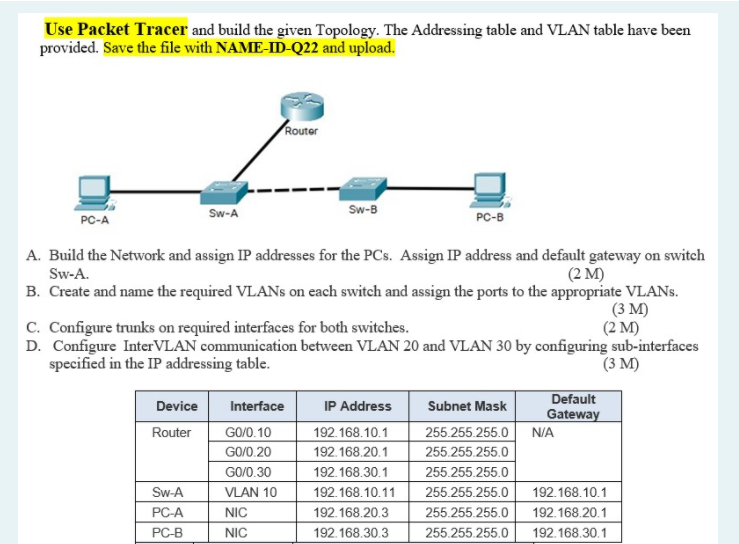

Use Packet Tracer and build the given Topology. The Addressing table and VLAN table have been provided. Save the file with NAME-ID-Q22 and upload. Router PC-A Sw-A Sw-B PC-B A. Build the Network and assign IP addresses for the PCs. Assign IP address and default gateway on switch Sw-A. (2 M) B. Create and name the required VLANs on each switch and assign the ports to the appropriate VLANs. (3 M) C. Configure trunks on required interfaces for both switches. (2 M) D. Configure Inter VLAN communication between VLAN 20 and VLAN 30 by configuring sub-interfaces specified in the IP addressing table. (3 M) Device Router Interface GO/0.10 GO/0.20 GO/0.30 VLAN 10 NIC NIC IP Address 192.168.10.1 192.168.20.1 192.168.30.1 192.168.10.11 192.168.20.3 192.168.30.3 Subnet Mask Default Gateway 255.255.255.0 NA 255.255.255.0 255.255.255.0 255.255.255.0 192.168.10.1 255.255.255.0 192.168.20.1 255.255.255.0 192.168.30.1 Sw-A PC-A PC-B VLAN 10 Interface/Device Assigned Sw-A: VLAN 10 Name Management Student Staff 20 30 PC-A PC-B
Step by Step Solution
There are 3 Steps involved in it

Get step-by-step solutions from verified subject matter experts