







Question: In JAVA, I need help completing these milestones. Disregard the first milestone, but the other milestones need to be added in the code at the
In JAVA, I need help completing these milestones. Disregard the first milestone, but the other milestones need to be added in the code at the bottom. The two screenshots are what the milestones should be / how to do them. Thank you!
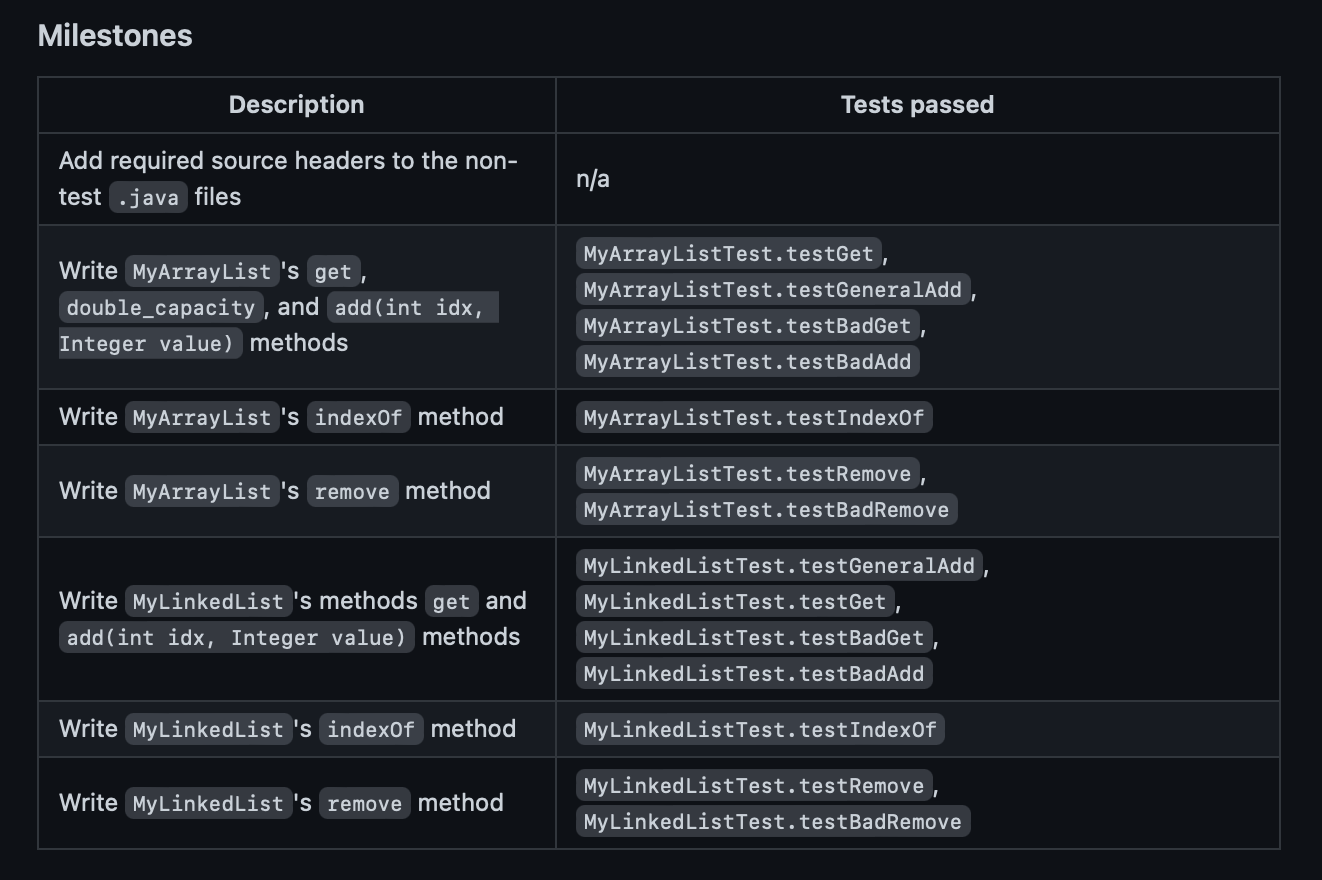
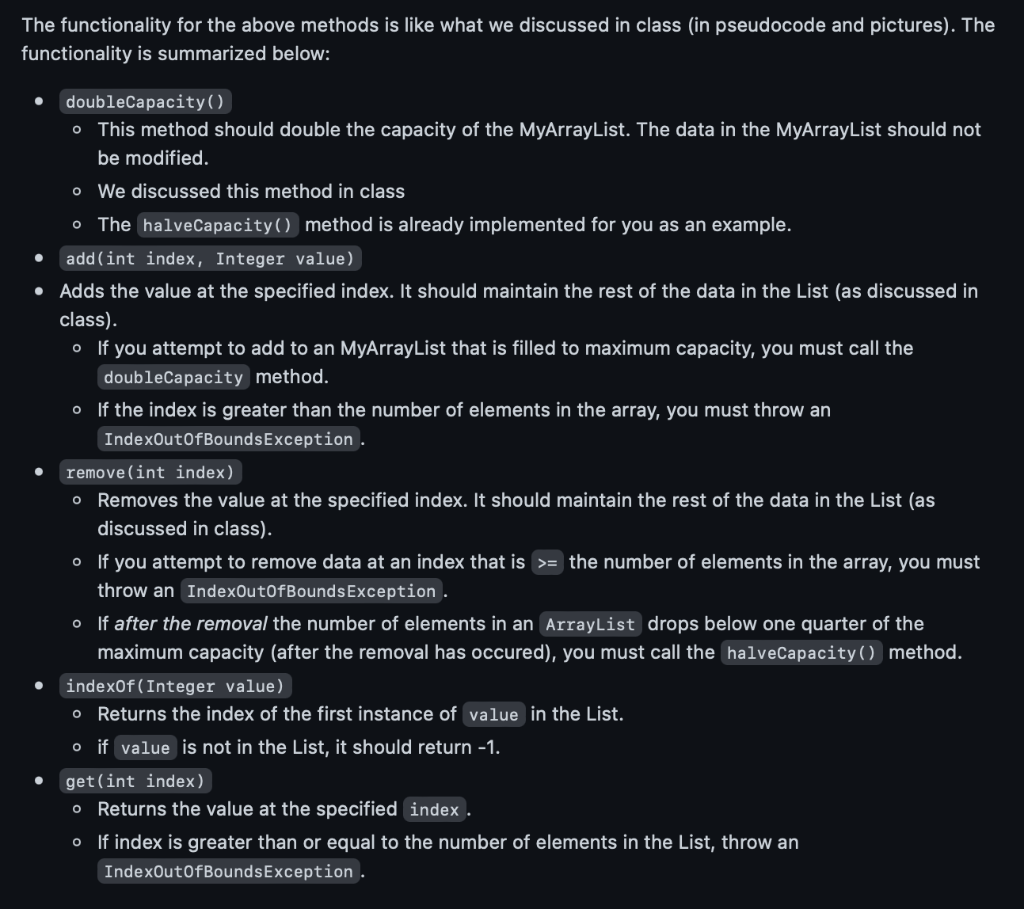
Code w Milestones markers: MyArrayList Class (Milestones 2, 3 and 4): public class MyArrayList implements MyListInterface { private int m_size; private Integer m_data[];
public MyArrayList() { m_size = 0; m_data = new Integer[2]; }
public int max_size() { return m_data.length; } public int size() { return m_size; } public void doubleCapacity() { // TODO Milestone 2 } public void halveCapacity() { Integer temp[] = m_data; m_data = new Integer[temp.length/2]; for (int i=0; i public void add(Integer val) { add(m_size, val); } public void add(int index, Integer val) { // TODO Milestone 2 } public void remove(int index) { // TODO Milestone 4 } public int indexOf(Integer value) { // TODO Milestone 3 // -2 will never be right return -2; } public Integer get(int index) { // TODO Milestone 2 // This should not return null return null; } public void set(int index, Integer value) { if (index >= m_size) throw new IndexOutOfBoundsException(); m_data[index] = value; } } MyLinkedList Class (Milestones 5,6,7): public class MyLinkedList implements MyListInterface { private class Node { public Node next; Integer data; public Node(Integer data) { this.data = data; this.next = null; } public Node(Integer data, Node n) { this.data=data; this.next = n; } } private Node head, tail; private int m_size; public MyLinkedList() { head = null; tail = null; m_size = 0; } public Integer get(int index) throws IndexOutOfBoundsException { // TODO Milestone 5 return null; } public int size() { return m_size; } public void addAtFront(Integer data) { Node newnode = new Node(data); if (m_size == 0) { head = newnode; tail = newnode; } else { newnode.next = head; head = newnode; } m_size ++; } public void addAtBack(Integer data) { Node newnode = new Node (data); if (m_size == 0) { head = newnode; tail = newnode; } else { tail.next = newnode; tail = newnode; } m_size ++; } public void add(Integer data) { addAtBack(data); } public int indexOf(Integer data) { // TODO Milestone 6 return -2; } public void set(int idx, Integer data) throws IndexOutOfBoundsException { if (idx >= m_size) throw new IndexOutOfBoundsException("Index too large."); Node n = head; for (int i=0; i public void add(int idx, Integer data) throws IndexOutOfBoundsException { // TODO Milestone 5 } Integer removeFront() throws IndexOutOfBoundsException { if (m_size == 0) throw new IndexOutOfBoundsException("Cannot pop from empty list"); Integer data = head.data; m_size --; head = head.next; if (head == null) { tail = null; } return data; } Integer removeLast() throws IndexOutOfBoundsException { if (m_size == 0) throw new IndexOutOfBoundsException("Cannot pop from empty list"); Integer data = tail.data; Node n = head; m_size--; if (m_size == 0) { head = null; tail = null; } else { for (int i = 0; i public void remove(int idx) throws IndexOutOfBoundsException { // TODO Milestone 7 } public Integer front() { return head.data; } public Integer back() { return tail.data; } } Thanks Again!
Step by Step Solution
There are 3 Steps involved in it

Get step-by-step solutions from verified subject matter experts
 Study Help