







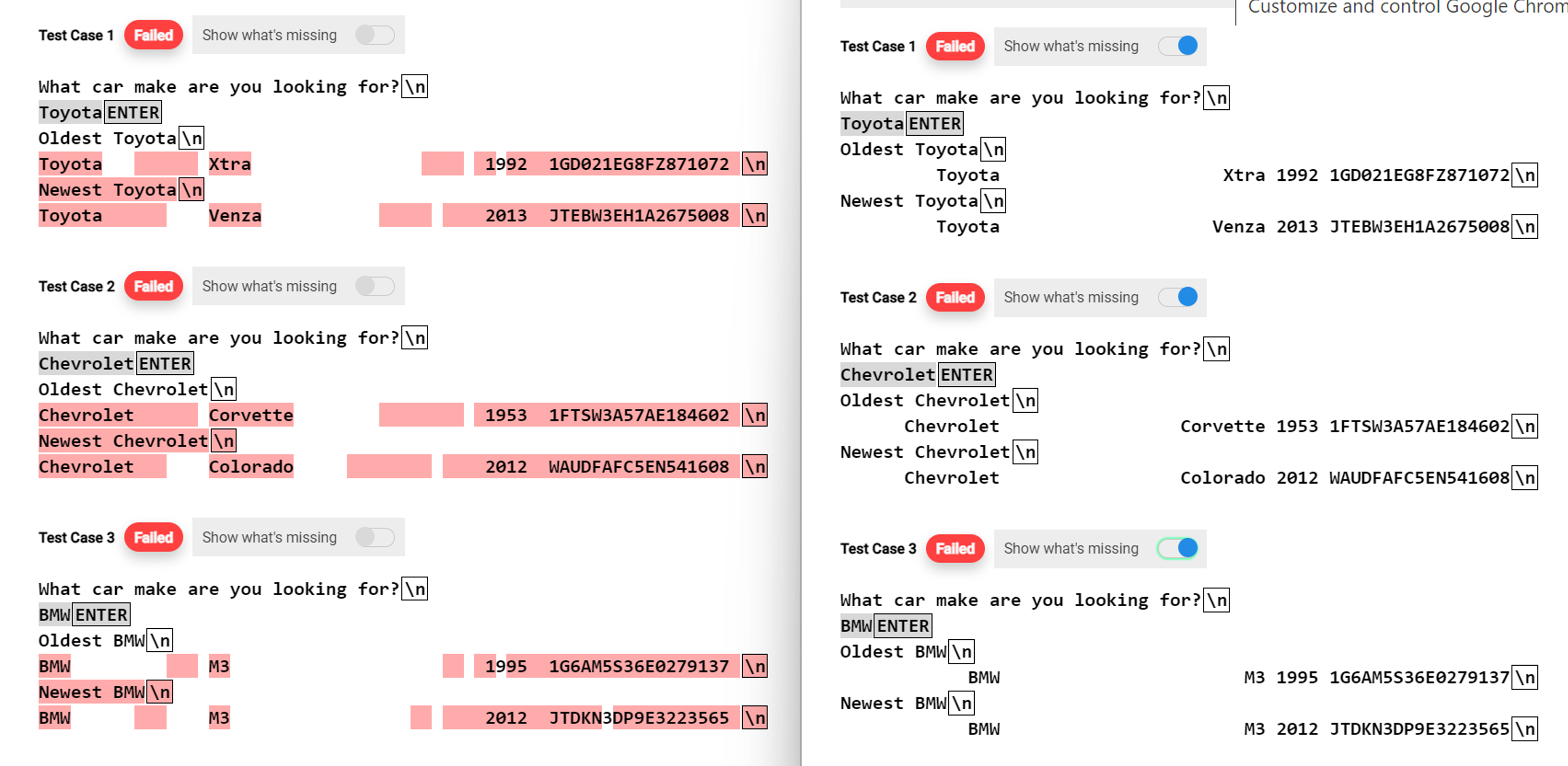
Question: IN JAVA. I need help with my code it is outputting on left in red when I need it to display what is shown on
IN JAVA. I need help with my code it is outputting on left in red when I need it to display what is shown on the right. My spacing for my output is off. Question is:
Ask the use for the name of a car maker. Display the oldest and newest car from that maker. Modify your display to include the VIN of the car.
Format the output in columns of and If two cars have the same year, compare based on the VIN. Text file is carslist.txt which contains over characters of car information. My code below:
import java.io;
import java.util.Scanner;
public class SortCars
public static void mainString args
Scanner sc new ScannerSystemin;
System.out.printWhat car make are you looking for?
;
String carName scnextLine;
String oldestCarYear ;
String oldestCarVin ;
String newestCarYear ;
String newestCarVin ;
String newCar ;
String oldCar ;
File file new Filecarlist.txt;
try
BufferedReader br new BufferedReadernew FileReaderfile;
String st;
while st brreadLine null
String result stsplit;
if resultequalscarName
if oldestCarYearcompareToresult
oldestCarYear result;
oldestCarVin result;
oldCar st;
else if oldestCarYearequalsresult && oldestCarVin.compareToresult
oldestCarVin result;
oldCar st;
if newestCarYearcompareToresult
newestCarYear result;
newestCarVin result;
newCar st;
else if newestCarYearequalsresult && newestCarVin.compareToresult
newestCarVin result;
newCar st;
catch Exception e
eprintStackTrace;
System.out.printlnOldest carName;
if oldCar
String carInfo oldCar.split;
System.out.formats s s sn carInfo carInfo carInfo carInfo;
else
System.out.printlnNo car is Available ;
System.out.printlnNewest carName;
if newCar
String carInfo newCar.split;
System.out.formats s s sn carInfo carInfo carInfo carInfo;
else
System.out.printlnNo car is Available ;
Step by Step Solution
There are 3 Steps involved in it
1 Expert Approved Answer
Step: 1 Unlock

Question Has Been Solved by an Expert!
Get step-by-step solutions from verified subject matter experts
Step: 2 Unlock
Step: 3 Unlock
 Study Help