







Question: IN JAVA: PLEASE COMPLETE TASK IN YELLOW class XYPoint{ double x; //this is like creating a struct but in java double y; public double distance
IN JAVA: PLEASE COMPLETE TASK IN YELLOW
class XYPoint{ double x; //this is like creating a struct but in java double y; public double distance (){ return Math.sqrt(x*x +y*y); } }
public class Main{ public static void main(String[] argv){ //make a new instandce of an XY point XYPoint p=new XYPoint();
//assign values to its varaiables p.x =2; p.y=3;
double d= p.distance(); System.out.println("Distance =" +d); } }
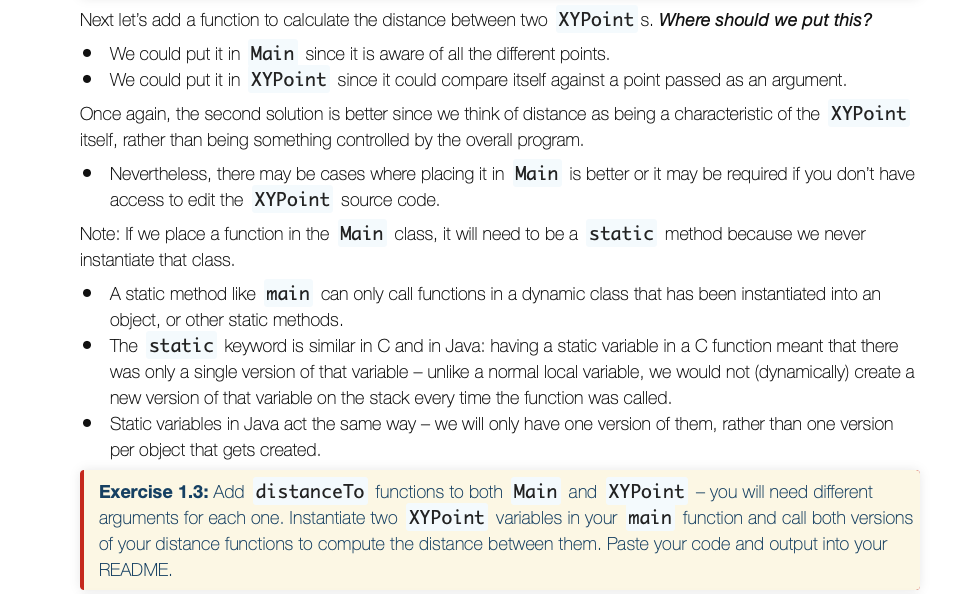
Next let's add a function to calculate the distance between two XYPoint sWhere should we put this? We could put it in Main since it is aware of all the different points . We could put it in XYPoint since it could compare itself against a point passed as an argument Once again, the second solution is better since we think of distance as being a characteristic of the XYPoint itself, rather than being something controlled by the overall program * Nevertheless, there may be cases where placing it in Main is better or it may be required if you don't have access to edit the XYPoint source code Note: If we place a function in the Main class, it will need to bea static method because we never instantiate that class A static method like main can only call functions in a dynamic class that has been instantiated into an object, or other static methods The static keyword is similar in C and in Java: having a static variable in a C function meant that there was only a single version of that variable-unlike a normal local variable, we would not (dynamically) create a new version of that variable on the stack every time the function was called Static variables in Java act the same way - we will only have one version of them, rather than one version per object that gets created * Exercise 1.3: Add distanceTo functions to both Main and XYPoint - you will need different arguments for each one. Instantiate two XYPoint variables in your main function and call both versions of your distance functions to compute the distance between them. Paste your code and output into your README
Step by Step Solution
There are 3 Steps involved in it

Get step-by-step solutions from verified subject matter experts
 Study Help