







Question: In MATLAB Command Window and using format short g, do the following in sequence The output of each command must be displayed in the Command
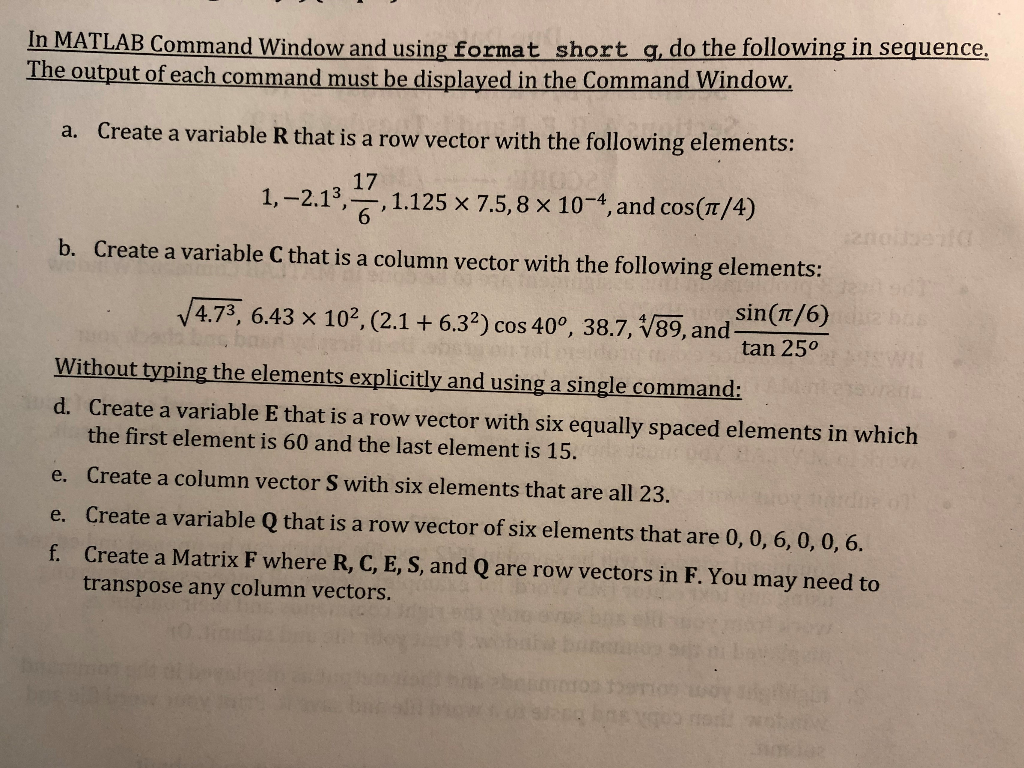
In MATLAB Command Window and using format short g, do the following in sequence The output of each command must be displayed in the Command Window a. Create a variable R that is a row vector with the following elements: 1,-2.13, ,1.125 x 7.5,8 x 10-4, and cos(t/4) 17 6 b. Create a variable C that is a column vector with the following elements: sin (Tt/6) V4.73, 6.43 x 10², (2.1 +6.32) cos 40, 38.7, V89, and tan 250 Without typing the elements explicitly and using a single command: d. Create a variable E that is a row vector with six equally spaced elements in which the first element is 60 and the last element is 15. e. Create a column vector S with six elements that are all 23. e. Create a variable Q that is a row vector of six elements that are 0, 0, 6, 0, 0, . f. Create a Matrix F where R, C, E, S, and Q are row vectors in F. You may need to transpose any column vectors
Step by Step Solution
There are 3 Steps involved in it

Get step-by-step solutions from verified subject matter experts
 Study Help