



Question: ***In MATLAB*** please do the following questions: 6. Modify the M-file in EXAMPLE 8 adding translations that bring the square to its original position using
***In MATLAB*** please do the following questions:

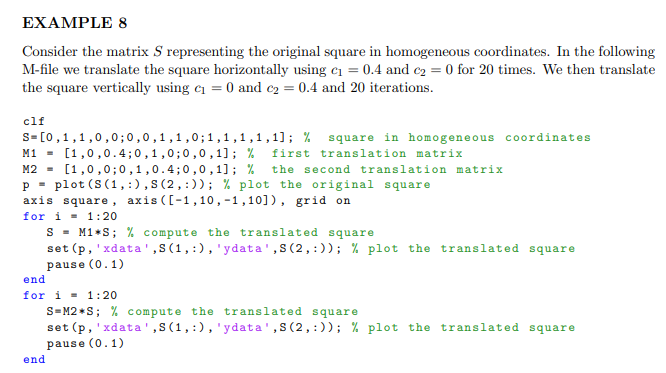
6. Modify the M-file in EXAMPLE 8 adding translations that bring the square to its original position using 20 iterations and a single additional for loop (for a total of three loops). Include the M-file. You do not need to include the figure. EXAMPLE 8 Consider the matrix S representing the original square in homogeneous coordinates. In the following M-file we translate the square horizontally using c = 0.4 and C2 = 0 for 20 times. We then translate the square vertically using c = 0 and C2 = 0.4 and 20 iterations. clf S=[0,1,1,0,0;0,0,1,1,0;1,1,1,1,1); % square in homogeneous coordinates M1 = [1,0,0.4;0,1,0;0,0,1); % first translation matrix M2 = [1,0,0,0,1,0.4;0,0,1); % the second translation matrix p = plot (S(1,:),(2,:)); % plot the original square axis square, axis ([-1,10,-1,10]), grid on for i = 1:20 S = M1+S; % compute the translated square set(p, 'xdata',S(1,:), 'ydata',s(2,:)); % plot the translated square pause (0.1) end for i = 1:20 S=M2 S; % compute the translated square set(p, 'xdata',S(1,:), 'ydata',S(2,:)); % plot the translated square pause (0.1) end
Step by Step Solution
There are 3 Steps involved in it

Get step-by-step solutions from verified subject matter experts