







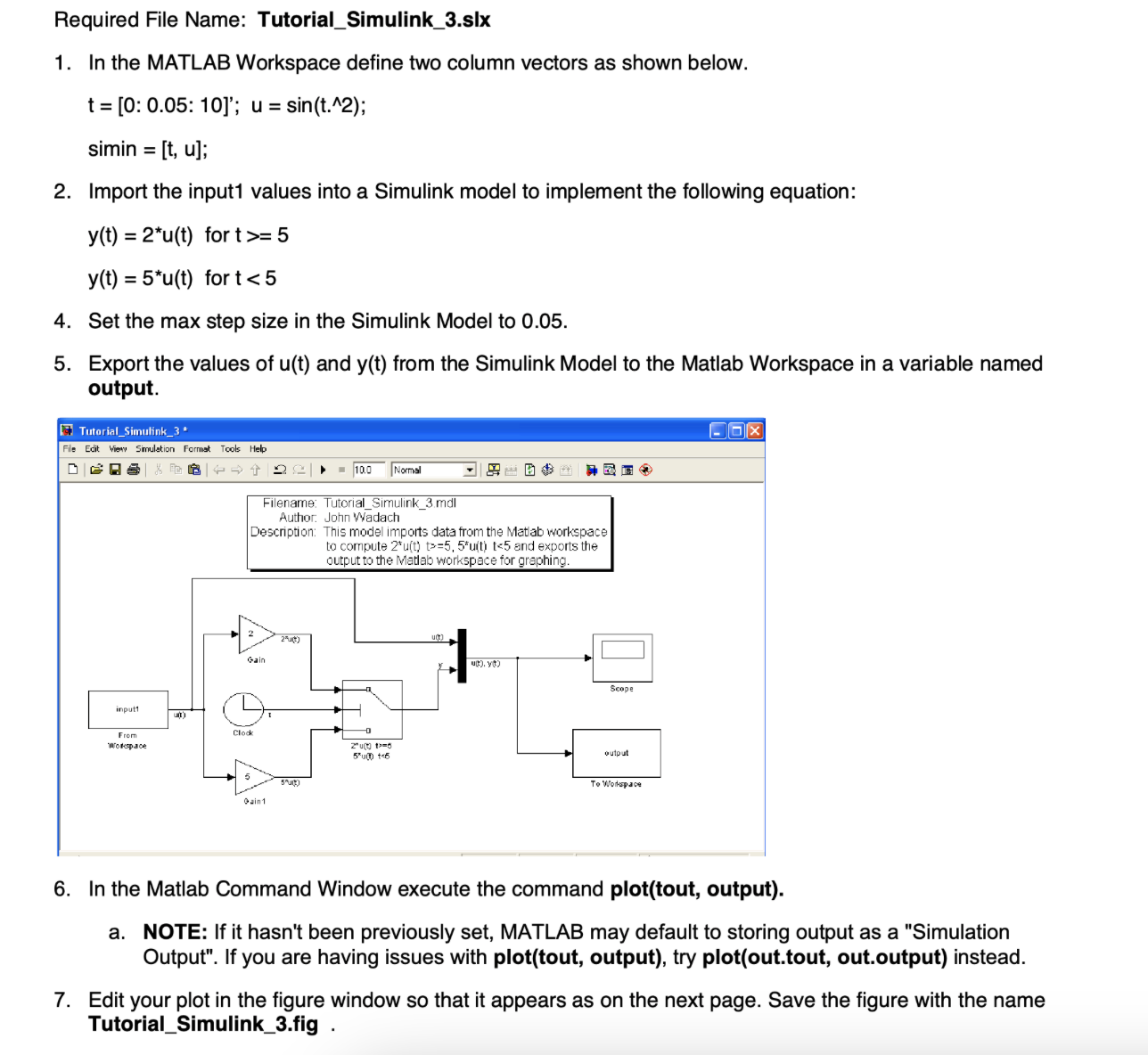
Question: in matlab using Simulink Required File Name: Tutorial_Simulink_3.slx 1. In the MATLAB Workspace define two column vectors as shown below. t=[0:0.05:10];u=sin(t.2);simin=[t,u] 2. Import the input1
in matlab using Simulink
![Workspace define two column vectors as shown below. t=[0:0.05:10];u=sin(t.2);simin=[t,u] 2. Import the](https://s3.amazonaws.com/si.experts.images/answers/2024/09/66d969bb53515_41066d969bab590e.jpg)
Required File Name: Tutorial_Simulink_3.slx 1. In the MATLAB Workspace define two column vectors as shown below. t=[0:0.05:10];u=sin(t.2);simin=[t,u] 2. Import the input1 values into a Simulink model to implement the following equation: y(t)=2u(t)fort>=5y(t)=5u(t)fort
Step by Step Solution
There are 3 Steps involved in it
1 Expert Approved Answer
Step: 1 Unlock

Question Has Been Solved by an Expert!
Get step-by-step solutions from verified subject matter experts
Step: 2 Unlock
Step: 3 Unlock
 Study Help