







Question: In order to handle the missing data marked with NaN when creating your table of statistics (related to p4 of the project), you can use
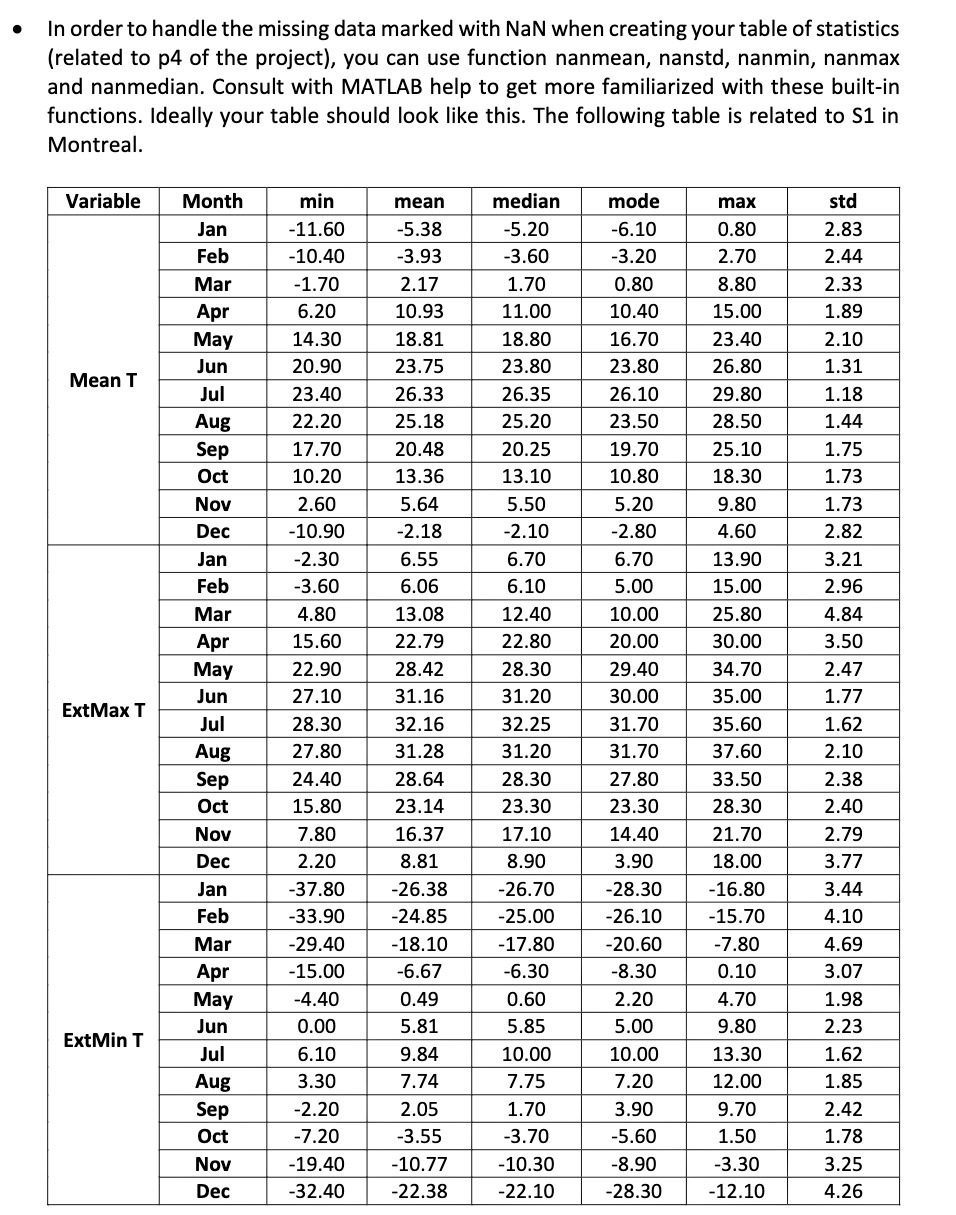
In order to handle the missing data marked with NaN when creating your table of statistics (related to p4 of the project), you can use function nanmean, nanstd, nanmin, nanmax and nanmedian. Consult with MATLAB help to get more familiarized with these built-in functions. Ideally your table should look like this. The following table is related to S1 in Montreal. Variable Month min mean median mode max std Jan -11.60 -5.38 -5.20 6.10 0.80 2.83 Feb -10.40 -3.93 -3.60 -3.20 2.70 2.44 Mar -1.70 2.17 1.70 0.80 8.80 2.33 Apr 6.20 10.93 11.00 10.40 15.00 1.89 May 14.30 18.81 18.80 16.70 23.40 2.10 Mean T Jun 20.90 23.75 23.80 23.80 26.80 1.31 Jul 23.40 26.33 26.35 26.10 29.80 1.18 Aug 22.20 25.18 25.20 23.50 28.50 1.44 Sep 17.70 20.48 20.25 19.70 25.10 1.75 Oct 10.20 13.36 13.10 10.80 18.30 1.73 Nov 2.60 5.64 5.50 5.20 9.80 1.73 Dec -10.90 -2.18 -2.10 -2.80 4.60 2.82 Jan -2.30 6.55 6.70 6.70 13.90 3.21 Feb -3.60 6.06 6.10 5.00 15.00 2.96 Mar 4.80 13.08 12.40 10.00 25.80 1.84 Apt 15.60 22.79 22.80 20.00 30.00 3.50 May 22.90 28.42 28.30 29.40 34.70 2.47 ExtMax T Jun 27.10 31.16 31.20 30.00 35.00 1.77 Jul 28.30 32.16 32.25 31.70 35.60 1.62 Aug 27.80 31.28 31.20 31.70 37.60 2.10 Sep 24.40 28.64 28.30 27.80 33.50 2.38 Oct 15.80 23.14 23.30 23.30 28.30 2.40 Nov 7.80 16.37 17.10 14.40 21.70 2.79 Dec 2.20 8.81 8.90 3.90 18.00 3.77 Jan -37.80 -26.38 -26.70 -28.30 -16.80 3.44 Feb -33.90 -24.85 -25.00 -26.10 -15.70 4.10 Mar -29.40 -18.10 17.80 -20.60 -7.80 4.69 Apr -15.00 -6.67 -6.30 -8.30 0.10 3.07 May -4.40 0.49 0.60 2.20 4.70 1.98 ExtMin T Jun 0.00 5.81 5.85 5.00 9.80 2.23 Jul 6.10 9.84 10.00 10.00 13.30 1.62 Aug 3.30 7.74 7.75 7.20 12.00 1.85 Sep -2.20 2.05 1.70 3.90 9.70 2.42 Oct -7.20 -3.55 3.70 -5.60 1.50 1.78 Nov -19.40 -10.77 -10.30 -8.90 -3.30 3.25 Dec -32.40 -22.38 -22.10 -28.30 -12.10 4.26
Step by Step Solution
There are 3 Steps involved in it

Get step-by-step solutions from verified subject matter experts
 Study Help