



Question: in packet tracer Create the network topology as shown below: You have to do the basic configuration for the Router as below: 1. Set hostname
in packet tracer 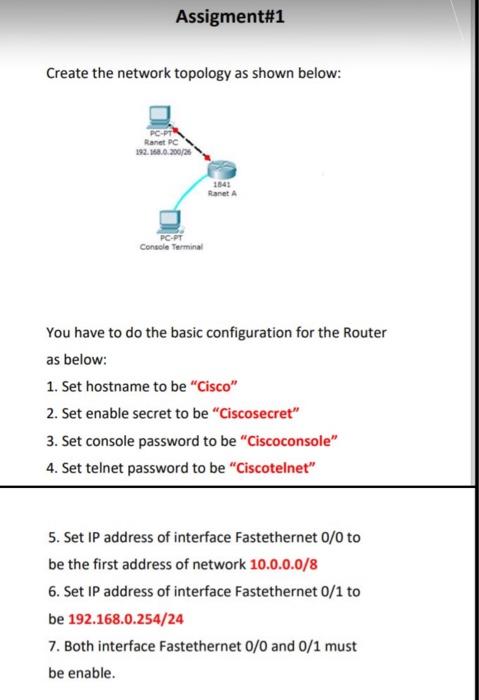
Create the network topology as shown below: You have to do the basic configuration for the Router as below: 1. Set hostname to be "Cisco" 2. Set enable secret to be "Ciscosecret" 3. Set console password to be "Ciscoconsole" 4. Set telnet password to be "Ciscotelnet" 5. Set IP address of interface Fastethernet 0/0 to be the first address of network 10.0.0.0/8 6. Set IP address of interface Fastethernet 0/1 to be 192.168.0.254/24 7. Both interface Fastethernet 0/0 and 0/1 must be enable
Step by Step Solution
There are 3 Steps involved in it
1 Expert Approved Answer
Step: 1 Unlock

Question Has Been Solved by an Expert!
Get step-by-step solutions from verified subject matter experts
Step: 2 Unlock
Step: 3 Unlock