







Question: in Python Please From problem 3a, we learned how a color image is represented in computers, A color image in RGB color can be converted
![be converted to grayscale image with the following calculation: [red, green", blue']](https://dsd5zvtm8ll6.cloudfront.net/si.experts.images/questions/2024/09/66f3a3c750173_20666f3a3c6cd462.jpg)
in Python Please
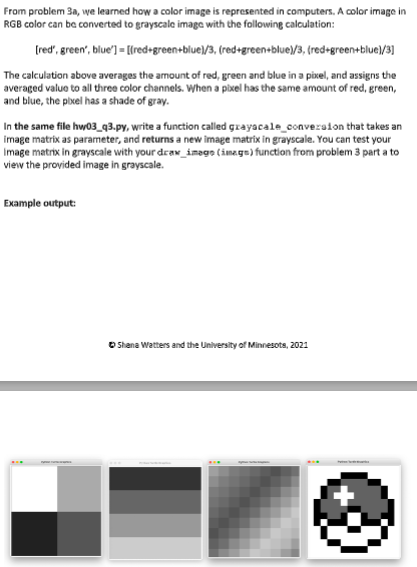
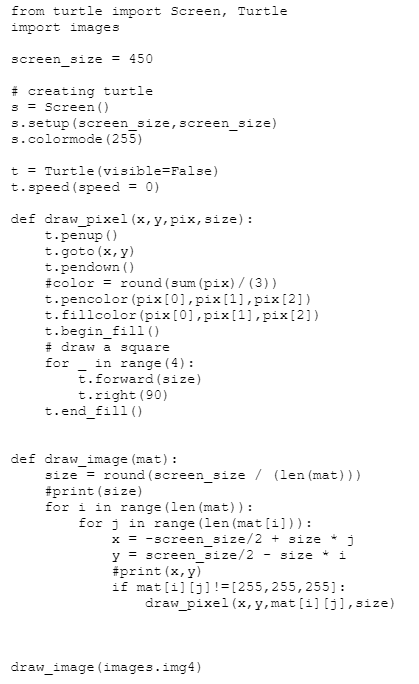
From problem 3a, we learned how a color image is represented in computers, A color image in RGB color can be converted to grayscale image with the following calculation: [red, green", blue'] = [(red=green+blue)/3, (red+green+blue)/3, (red#green+blue)/3] The calculation above averages the amount of red, green and blue in a pixel, and assigns the averaged value to all three color channels. When a pixel has the same amount of red, green, and blue, the pleel has a shade of gray. In the same file hw03_93.py, write a function called grayacale_conversion that takes an Image matrix as parameter, and returns a new image matrix in grayscale. You can test your Image matrix in grayscale with your draw_image (image) function from problem 3 part a to view the provided image in grayscale. Example output: Shane Watters and the University of Minnesota, 2021 from turtle import Screen, Turtle import images screen_size = 450 # creating turtle 3 = Screen() 3. setup (screen_size, screen_size) 3.colormode (255) t = Turtle (visible=False) t.speed (speed = 0) def draw_pixel (x, y, pix, size): t.penup() t.goto (x, y) t.pendown() #color = round (sum (pix)/(3)) t.pencolor (pix[0], pix[1], pix[2]) t.fillcolor (pix[0], pix[1], pix[2]) t.begin_fill() #draw a square for in range (4): t.forward(size) t.right (90) t.end_fill() def draw_image (mat): size = round (screen_size / (len (mat))) #print (size) for i in range (len (mat)): for j in range (len (mat[i])): x = -screen_size/2 + size j y = screen_size/2 - size #print (x,y) if mat[i][j] != [255, 255, 255]: draw_pixel (x, y,mat[i][j],size) draw_image (images.img4) *** Image matrices - all in grayscale for test cases ### a four color square img1_gray = [[[255, 255, 255], [170, 170, 170]], [[33, 33, 33], [85, 85, 85]]] ### a color gradient img2_gray = [[[51, 51, 51], [51, 51, 51], [51, 51, 51], [51, 51, 51]], [[102, 102, 102], [102, 102, 102], [102, 102, 102], [102, 102, 102]], [[153, 153, 153], [153, 153, 153], [153, 153, 153], [153, 153, 153]], [1204, 204, 204], [204, 204, 2041, 204, 204, 204], [204, 204, 204]]] ### another color gradient img3_gray = [[[160, 160, 160], [142, 142, 142], [124, 124, 124], [115, 115, 115], [104, 104, 104], [93, 93, 93], [82, 82, 82], [97, 97, 97], [113, 113, 113]], [[142, 142, 142], [126, 126, 126], [115, 115, 115], [105, 105, 105], [94, 94, 94], [82, 82, 82], 195, 95, 95], [110, 110, 110], [138, 138, 138]], [[124, 124, 124], [116, 116, 116), (105, 105, 105], [94, 94, 94], [82, 82, 82], [95, 95, 95], [111, 111, 111], [138, 138, 138], [156, 156, 156]], [[115, 115, 115], [105, 105, 105], 194, 94, 94], [82, 82, 82], [95, 95, 95], [111, 111, 111], [138, 138, 138], [156, 156, 156], [180, 180, 180]], [[104, 104, 104], 194, 94, 94], [82, 82, 82], [95, 95, 95], [111, 111, 111], [138, 139, 138], [156, 156, 156], [180, 180, 180], [199, 199, 199]], 1193, 93, 93], 183, 83, 83], 195, 95, 95], [11i, 111, 1111, 1138, 138, 138], 1156, 156, 156, 1180, 180, 1901, 1199, 199, 1991, 1191, 191, 191]], [181, 81, 81], 195, 95, 951, 1111, 111, 1111, [138, 138, 1381, [156, 156, 156], [180, 180, 1801, [199, 199, 1991, [192, 192, 1921, [181, 181, 181]], [197, 97, 97], [110, 110, 110], [138, 138, 1381, [156, 156, 156], [180, 180, 180], [199, 199, 199], [192, 192, 1921, [182, 182, 182], [157, 157, 157]], [[113, 113, 113], [138, 138, 138], [157, 157, 157], [180, 180, 180], [199, 199, 199], [191, 191, 191], [181, 181, 181], [157, 157, 157], [135, 135, 135]]] ### 14x14 poke ball img4_gray = [[[255, 255, 255], [255, 255, 255], [255, 255, 255], [255, 255, 255], [255, 255, 255], [255, 255, 255], [255, 255, 255], [255, 255, 255], [255, 255, 255], [255, 255, 255], [255, 255, 255], [255, 255, 255], [255, 255, 255], [255, 255, 255]], [[255, 255, 255], [255, 255, 255], [255, 255, 255], [255, 255, 255], [255, 255, 255], [0, 0, 0], [0, 0, 0], [0, 0, 0], [0, 0, 0], [255, 255, 255], [255, 255, 255], [255, 255, 255], [255, 255, 255], [255, 255, 255]], [[255, 255, 255], [255, 255, 255], [255, 255, 255], [0, 0, 0], [0, 0, 0], [97, 97, 97], [97, 97, 97], [97, 97, 97], [97, 97, 97], [0, 0, 0], [0, 0, 0], [255, 255, 255), [255, 255, 255], [255, 255, 255]], [(255, 255, 255], [255, 255, 255], [0, 0, 0], [97, 97, 97], [97, 97, 97], [255, 255, 255], [97, 97, 97], [97, 97, 97], [97, 97, 97], [97, 97, 97], [97, 97, 97], [0, 0, 0], [255, 255, 255], [255, 255, 255]], [(255, 255, 255], [255, 255, 255], [0, 0, 0], [97, 97, 97], [255, 255, 255], [255, 255, 255], [255, 255, 255], [97, 97, 97], [97, 97, 97], [97, 97, 97], [97, 97, 97], [0, 0, 0], [255, 255, 255], [255, 255, 255]], [1255, 255, 255], [0, 0, 0], [97, 97, 97], [97, 97, 97], [97, 97, 97], [255, 255, 255], [97, 97, 97], [97, 97, 97], [97, 97, 97], [97, 97, 97], [97, 97, 97, [97, 97, 97], [0, 0, 0], [255, 255, 255]], [(255, 255, 255], [0, 0, 0], [97, 97, 97], [97, 97, 97], [97, 97, 97], [97, 97, 97], [0, 0, 0], [0, 0, 0], [97, 97, 97], [97, 97, 97], [97, 97, 97], [97, 97, 97], [0, 0, 0], [255, 255, 255]], [[255, 255, 255], [0, 0, 0], [0, 0, 0], [97, 97, 971, [97, 97, 97], [0, 0, 0], [255, 255, 255], [255, 255, 255], [0, 0, 0], [97, 97, 971, [97, 97, 97], [0, 0, 0], [0, 0, 0], [255, 255, 255]], [[255, 255, 255], [0, 0, 0], [255, 255, 255], [0, 0, 0], [0, 0, 0], [0, 0, 0], [255, 255, 255], [255, 255, 255], [0, 0, 0], [0, 0, 0], [0, 0, 0], [255, 255, 255], [0, 0, 0], [255, 255, 255]], [[255, 255, 255], [255, 255, 255], [0, 0, 0], [255, 255, 255], [255, 255, 255], [255, 255, 255], [0, 0, 0], [0, 0, 0], [255, 255, 255], [255, 255, 255], [255, 255, 255), [0, 0, 0], [255, 255, 255], [255, 255, 255]], [1255, 255, 255], [255, 255, 255], [0, 0, 0], [255, 255, 255], [255, 255, 255], [255, 255, 255], [255, 255, 255], [255, 255, 255], [255, 255, 255], [255, 255, 255], [255, 255, 255], [0, 0, 0], [255, 255, 255], [255, 255, 255]], [[255, 255, 255], [255, 255, 255], [255, 255, 255], [0, 0, 0], [0, 0, 0], [255, 255, 255], [255, 255, 255], [255, 255, 255], [255, 255, 255], [0, 0, 0], [0, 0, 0], [255, 255, 255], [255, 255, 255], [255, 255, 255]], [[255, 255, 255], [255, 255, 255], [255, 255, 255], [255, 255, 255], [255, 255, 255], [0, 0, 0], [0, 0, 0], [0, 0, 0], [0, 0, 0], [255, 255, 255], [255, 255, 255], [255, 255, 255], [255, 255, 255], [255, 255, 255]], [(255, 255, 255], [255, 255, 255], [255, 255, 255], [255, 255, 255], [255, 255, 255], [255, 255, 255], [255, 255, 255], [255, 255, 255], [255, 255, 255], [255, 255, 255), [255, 255, 255], [255, 255, 255], [255, 255, 255], [255, 255, 255]]]
Step by Step Solution
There are 3 Steps involved in it

Get step-by-step solutions from verified subject matter experts
 Study Help