







Question: In SQL using MAMP 1. Write the statements to remove (drop) the previous tables: Booking and Guest. 2. Write new CREATE TABLE statements to create
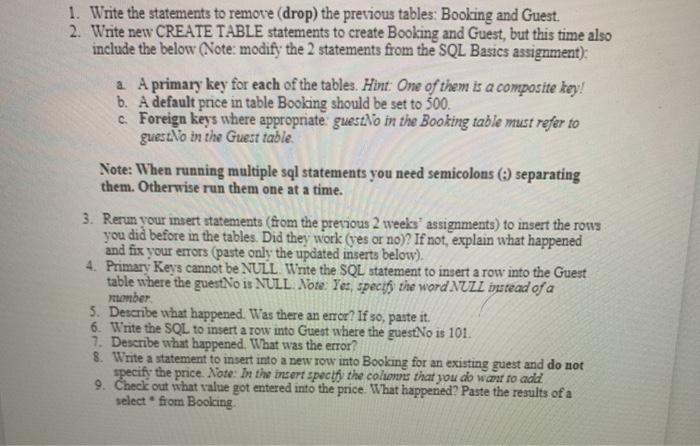
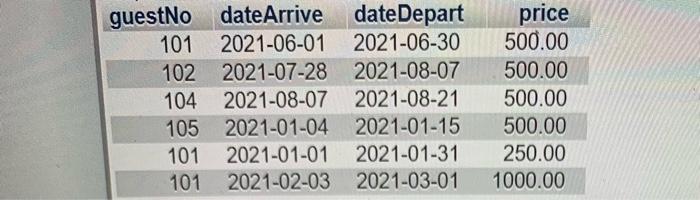
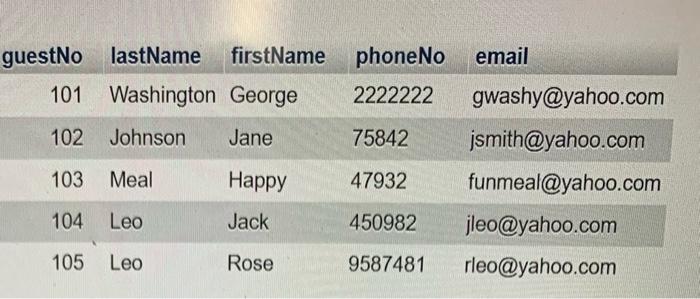
1. Write the statements to remove (drop) the previous tables: Booking and Guest. 2. Write new CREATE TABLE statements to create Booking and Guest, but this time also include the below (Note: modify the 2 statements from the SQL Basics assignment): a. A primary key for each of the tables. Hint: One of them is a composite key! b. A default price in table Booking should be set to 500 c. Foreign keys where appropriate guests in the Booking table must refer to gues.No in the Guest table: Note: When running multiple sql statements you need semicolons separating them. Otherwise run them one at a time. 3. Rerun your insert statements (from the previous 2 weeks' assignments) to insert the rows you did before in the tables. Did they work (yes or no)? If not, explain what happened and fix your errors (paste only the updated inserts below). 4. Primary Keys cannot be NULL Write the SQL statement to insert a row into the Guest table where the guestNo is NULL. Note: Yes, specify the word NULL instead of a member 5. Describe what happened. Was there an error? If so, paste it. 6. Write the SQL to insert a row into Guest where the guest No is 101. 7. Describe what happened. What was the error? 8. Write a statement to insert into a new row into Booking for an existing guest and do not specify the price. Note: In the insert specify the columnes that you do want to add 9. Check out what value got entered into the price. What happened? Paste the results of a select from Booking guestNo date Arrive date Depart 101 2021-06-01 2021-06-30 102 2021-07-28 2021-08-07 104 2021-08-07 2021-08-21 105 2021-01-04 2021-01-15 101 2021-01-01 2021-01-31 101 2021-02-03 2021-03-01 price 500.00 500.00 500.00 500.00 250.00 1000.00 phoneNo email guestNo lastName firstName 101 Washington George 2222222 102 Johnson Jane 75842 103 Meal Happy 47932 gwashy@yahoo.com jsmith@yahoo.com funmeal@yahoo.com jleo@yahoo.com rleo@yahoo.com 104 Leo Jack 450982 105 Leo Rose 9587481
Step by Step Solution
There are 3 Steps involved in it

Get step-by-step solutions from verified subject matter experts
 Study Help