







Question: in the query.php file, the query is for counting the number of customers in each country (which was used in the class for an exercise).
in the "query.php" file, the query is for counting the number of customers in each country (which was used in the class for an exercise). Modify the query so that it returns the number of cities in each country. The query result needs to be sorted in descending order. When "form_viz.php" is opened on the browser, the bar chart should look like this:
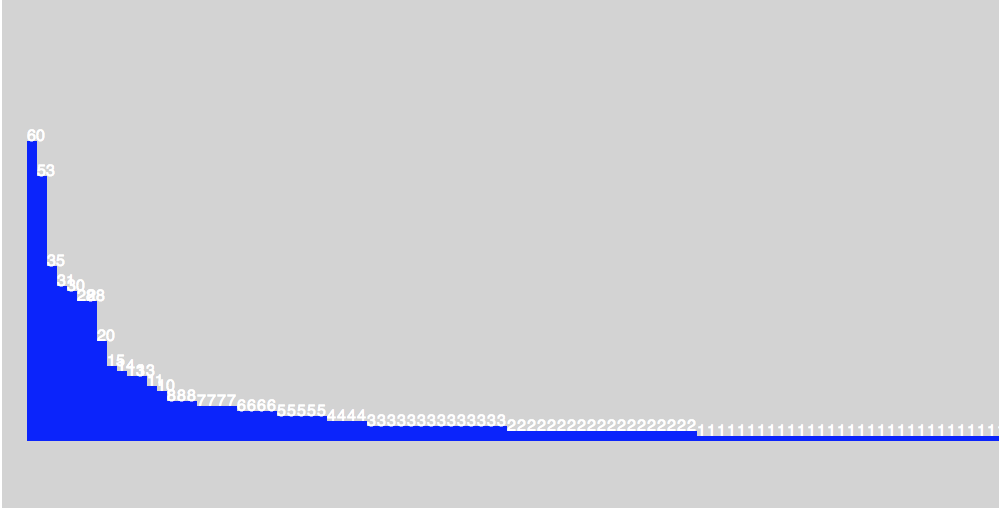
Here is my code so far fo query.php
require "config.php";
// Create connection
$conn = mysqli_connect($server, $username, $password, $db);
// Check connection
if (!$conn) {
die("Connection failed: " . mysqli_connect_error());
}
// For now, this query select the nubmer of customers from each country.
// For assignment 3: change this part so that you can get the number of cities for each country. Then, sort the result in descending order.
$sql = "Select country_id, count(*) as count from customer as c
JOIN address as a on a.address_id=c.address_id
JOIN city as t on t.city_id=a.city_id
GROUP BY country_id;";
$result = mysqli_query($conn, $sql);
// This loop outputs the query result in a CSV format.
echo "country_id,num_customers ";
if (mysqli_num_rows($result) > 0) {
while($row = mysqli_fetch_assoc($result)) {
// var_dump($row);
echo $row["country_id"] . "," . $row['count'];
echo " ";
}
} else {
echo "No results..";
}
?>
Here is my code for "form_viz.php"
svg {
background-color: lightgray;
float: left;
}
.bar {
fill: blue;
}
.bar:hover {
fill: yellow;
}
.text {
fill: white;
font-family: sans-serif
}
#message {
background: yellow;
max-width: 500px;
margin: 10px;
}
#submit {
width: 300px;
height: 50px;
font-size: 20px;
margin: 10px;
}
#city_form div {
border: 1px solid gray;
max-width: 900px;
}
$(document).ready(function(){
// bar chart
// Data
// var dataArray = [];
var svg = d3.select(".bar");
d3.csv("query.php", function(error, dataArray) {
if (error) throw error;
console.log(dataArray);
// Creating bars
svg.selectAll("rect")
.data(dataArray)
.enter()
.append("rect")
.attr("class", "bar")
.attr("height", function(d, i) {return (d.num_customers * 5)})
.attr("width","10")
.attr("x", function(d, i) {return (i * 10) + 25})
.attr("y", function(d, i) {return 500 - (d.num_customers * 5)});
// Creating numbers for each bar
svg.selectAll("text")
.data(dataArray)
.enter()
.append("text")
.text(function(d) {return d.num_customers})
.attr("class", "text")
.attr("x", function(d, i) {return (i * 10) + 25})
.attr("y", function(d, i) {return 500 - (d.num_customers * 5)});
});
$("#submit").click(function(){
// for now, these variables are fake. You need to get these data from the form.
city_name = "test";
country_id = 0;
$.post("insert.php",
{
city_name: city_name,
country_id: country_id
}, function(data, status){
$("#city_form").trigger('reset');
$("#message").html(data).fadeIn(2000).delay(3000).fadeOut(2000);
}
);
});
});
Step by Step Solution
There are 3 Steps involved in it

Get step-by-step solutions from verified subject matter experts
 Study Help