







Question: In this exercise, you code the Professor Schneider application, which displays a grade based on the number of points entered by the user. The number
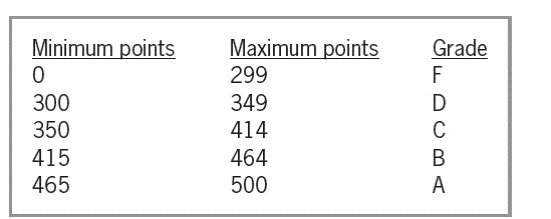
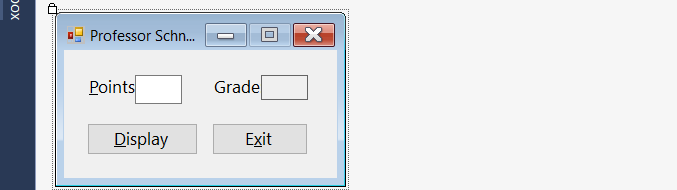
In this exercise, you code the Professor Schneider application, which displays a grade based on the number of points entered by the user. The number of points should always be less than or equal to 500. The grading scale is shown in Figure 8-48. Open the Schneider Solution.sln file contained in the VB2017\Chap08\Schneider Solution folder. Store the minimum points and grades in two parallel one-dimensional arrays named intMins and strGrades. The btnDisplay_Click procedure should use the number of points entered by the user to search the intMins array and then display the corresponding grade from the strGrades array. If the user enters a number that is greater than 500, the procedure should display an appropriate message and then display N/A as the grade. Code the application. Save the solution and then start and test the application.
This is Visual Basic: chapter 8 Excersice 10
Name: Schneider Project ' Purpose: Displays a grade based on the number of points the user enters. ' Programmer:
Option Explicit On Option Strict On Option Infer Off
Public Class frmMain
Private Sub btnExit_Click(sender As Object, e As EventArgs) Handles btnExit.Click Me.Close() End Sub
Private Sub txtPoints_Enter(sender As Object, e As EventArgs) Handles txtPoints.Enter txtPoints.SelectAll() End Sub
Private Sub txtPoints_KeyPress(sender As Object, e As KeyPressEventArgs) Handles txtPoints.KeyPress ' Accept only numbers and the Backspace key.
If (e.KeyChar "9") AndAlso e.KeyChar ControlChars.Back Then e.Handled = True End If End Sub
Private Sub txtPoints_TextChanged(sender As Object, e As EventArgs) Handles txtPoints.TextChanged lblGrade.Text = String.Empty End Sub
Private Sub frmMain_Load(sender As Object, e As EventArgs) Handles MyBase.Load
End Sub End Class
Minimum points Maximum points Grade 0 300 350 415 465 299 349 414 464 500 Minimum points Maximum points Grade 0 300 350 415 465 299 349 414 464 500
Step by Step Solution
There are 3 Steps involved in it

Get step-by-step solutions from verified subject matter experts
 Study Help