







Question: In this exercise, you modify the application created in Exercise 2. Use Windows to make a copy of the Hales Solution folder. Rename the copy
In this exercise, you modify the application created in Exercise 2. Use Windows to make a copy of the Hales Solution folder. Rename the copy Hales Solution-Select Case. Open the Hales Solution.sln file contained in the Hales Solution-Select Case folder. Modify the Display cost button's Click event procedure to use the Select Case statement to determine the comforter's price. (Hint: You can use a Boolean value as the selectorExpression.) Save the solution and then start and test the application. (F4.1, F4.3, F4.9, A4.1A4.5, A4.7)
Public Class frmMain
Dim twin As Double = 39.99 Dim full As Double = 49.99 Dim queen As Double = 49.99 Dim king As Double = 69.99 Dim totalCost As Double = 0 Dim shippingFee As Double Private Sub btnCost_Click(sender As Object, e As EventArgs) Handles btnCost.Click txtCost.Text = String.Format("$" + Math.Round((totalCost + shippingFee), 2).ToString()) End Sub Private Sub btnExit_Click(sender As Object, e As EventArgs) Handles btnExit.Click Application.Exit() End Sub
Private Sub chkpickup_CheckedChanged(sender As Object, e As EventArgs) Handles chkpickup.CheckedChanged If (chkpickup.Checked = True) Then shippingFee = 5 Else shippingFee = 0 End If End Sub Private Sub rbtTwin_CheckedChanged(sender As Object, e As EventArgs) Handles rbtTwin.CheckedChanged
txtCost.Text = "" If (rbtTwin.Checked = True) Then totalCost = twin Else
totalCost = 0 End If End Sub
Private Sub rbtFull_CheckedChanged(sender As Object, e As EventArgs) Handles rbtFull.CheckedChanged
txtCost.Text = "" If (rbtFull.Checked = True) Then
totalCost = full Else
totalCost = 0 End If End Sub
Private Sub rbtQueen_CheckedChanged(sender As Object, e As EventArgs) Handles rbtQueen.CheckedChanged
txtCost.Text = "" If (rbtQueen.Checked = True) Then
totalCost = queen Else
totalCost = 0 End If End Sub
Private Sub rbtKing_CheckedChanged(sender As Object, e As EventArgs) Handles rbtKing.CheckedChanged
txtCost.Text = "" If (rbtKing.Checked = True) Then
totalCost = king Else
totalCost = 0 End If End Sub End Class
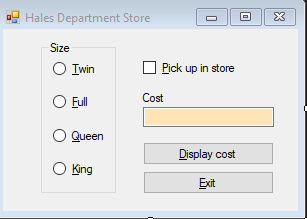
This is the original form and design Pls help. This is VB. Pls put Main Forms code and Designer code as well if changes
Hales Department Store Size Iwin Pick up in store Full Cost Queen King
Step by Step Solution
There are 3 Steps involved in it

Get step-by-step solutions from verified subject matter experts
 Study Help