







Question: In this lab, you will create a generic Container class that will hold a list of objects that can be easily accessible. The Container class
In this lab, you will create a generic Container class that will hold a list of objects that can be easily accessible. The Container class will consist of a static array of references to ArrayLists. The following diagram shows a Container
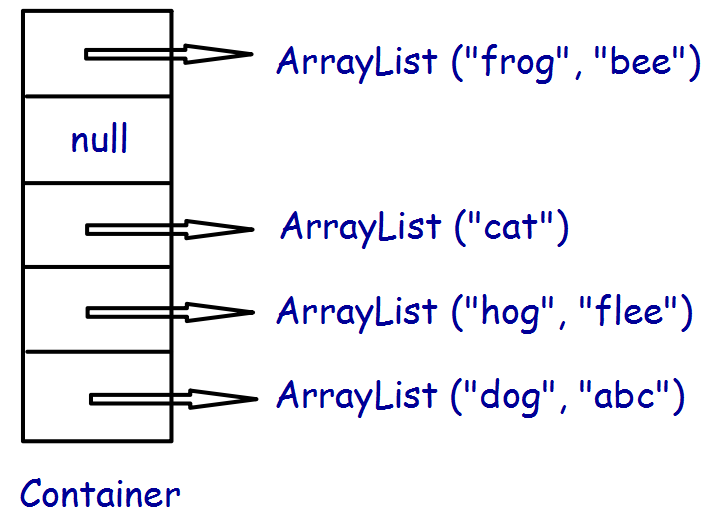
A hash function is used to access the ArrayList of where the String will be stored and accessed. The Object class has a hashCode() method, so all object types can be stored and accessed in this type of data structure.
Instance Variables
The Container class will have an instance variable for the static array:
private ArrayList
Constructor
The Constructor will intialize the static array given a passed value for size:
myHashArray = (ArrayList
Methods
The Container class will have the following methods that you will need to implement:
public boolean add(T element)
public boolean contains(T element)
public String toString()
public int size()
public void getContainerStats()
boolean add(T element)
In the method add, compute the hashCode of the String you are adding. Then use the modulus function to get an index into the static array.
int index = Math.abs(element.hashCode()) % myHashArray.length;
Note, hashCode() can return negative values, so youll need to take the absolute value to insure the index is positive. You can then access the ArrayList, but first make sure the reference is not null. If it is, youll need to create a new ArrayList and add it into myHashArray (at index).
ArrayList
After you have the reference to the corresponding ArrayList, first check to see if the String is already in the ArrayList. Our Container class will not contain duplicates. If its in the ArrayList, return false, otherwise, add it to the corresponding ArrayList and return true.
String toString()
Create a toString() method which will display the contents of the Container class. To verify the structure, display the index as well as the contents of the corresponding Array List. For example:
0: frog bee
1: null
2: cat
3: hog flea
4: dog abc
If the element of the static array (reference to an ArrayList) is null, display null, otherwise display each String in the ArrayList. Note the length of the static array is 5, and at index 0, there are 2 Strings in the ArrayList; frog and bee. At index 1, an ArrayList has not been created, so no Strings have yet been added with a hashCode() % 5 = 1.
boolean contains(T element)
For the contains() method, you will return true if the specified String is in the Container, otherwise return false. This is an accessor method that will not change the contents of the Container.
int size()
Return the number of Strings in the Container class.
void getContainerStats()
return the following stats:
static array size
number of elements
max ArrayList size
average ArrayList size
AL size threshold
num null entries in the hash table
number of times static array was resized:
last time it took to resize array: (usecs)
total time it took to resize array: (usecs)
Phase 2
The Container becomes inefficent when an ArrayList gets very large, because it is not sorted and the lookup to see if it exists is O(m), where m is the size of the ArrayList. Therefore, we will need to expand the static array if one of the ArrayLists has a size of a given threshhold (start with a default of 20). To expand the static array, first create a new static array that is twice the size. Then traverse each ArrayList and add each String element to the new structure. Finally, set the reference, myHashArray, to the new static array. Use toString() and size to verify your structure with a small data set and a small threshold.
Make the threshold a constant so that you can easily change and access in a method that retrieves the stats.
ArrayList ("frog", "bee") null ArrayList ("cat") ArrayList ("hog", "flee") ArrayList ("dog", "abc") _ Container ArrayList ("frog", "bee") null ArrayList ("cat") ArrayList ("hog", "flee") ArrayList ("dog", "abc") _ Container
Step by Step Solution
There are 3 Steps involved in it

Get step-by-step solutions from verified subject matter experts
 Study Help