







Question: In this problem, you are asked to develop a Jinja template to generate the configuration of a Layer-3 switch according to the following specification:
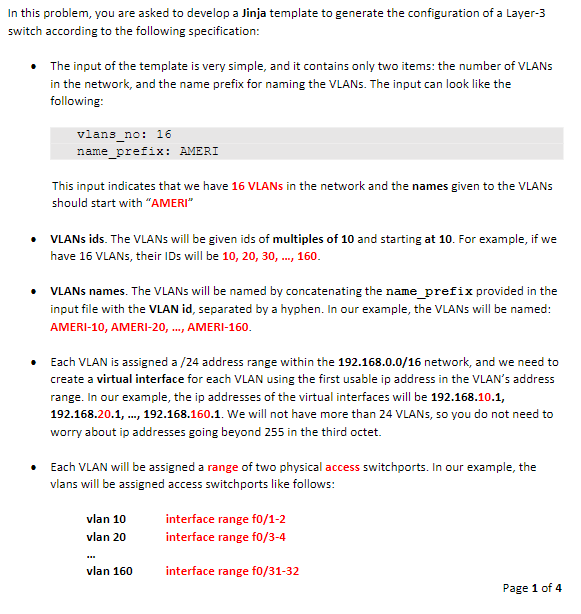
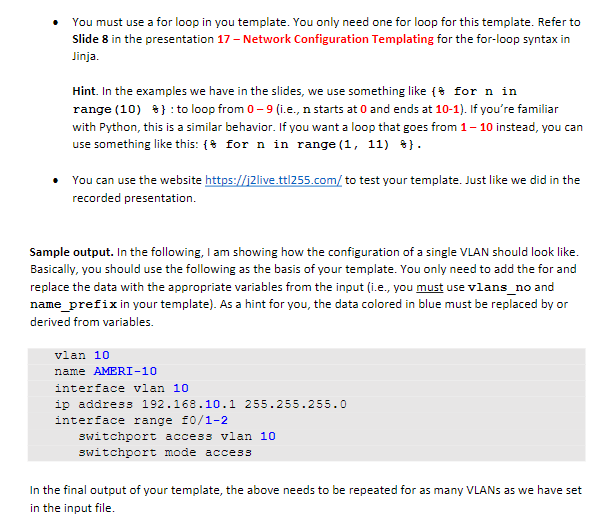
In this problem, you are asked to develop a Jinja template to generate the configuration of a Layer-3 switch according to the following specification: The input of the template is very simple, and it contains only two items: the number of VLANS in the network, and the name prefix for naming the VLANs. The input can look like the following: vlans_no: 16 name_prefix: AMERI This input indicates that we have 16 VLANs in the network and the names given to the VLANS should start with "AMERI" VLANS ids. The VLANs will be given ids of multiples of 10 and starting at 10. For example, if we have 16 VLANs, their IDs will be 10, 20, 30, ..., 160. VLANs names. The VLANs will be named by concatenating the name_prefix provided in the input file with the VLAN id, separated by a hyphen. In our example, the VLANs will be named: AMERI-10, AMERI-20, ..., AMERI-160. Each VLAN is assigned a /24 address range within the 192.168.0.0/16 network, and we need to create a virtual interface for each VLAN using the first usable ip address in the VLAN's address range. In our example, the ip addresses of the virtual interfaces will be 192.168.10.1, 192.168.20.1, ..., 192.168.160.1. We will not have more than 24 VLANs, so you do not need to worry about ip addresses going beyond 255 in the third octet. Each VLAN will be assigned a range of two physical access switchports. In our example, the vlans will be assigned access switchports like follows: vlan 10 vlan 20 vlan 160 interface range f0/1-2 interface range f0/3-4 interface range f0/31-32 Page 1 of 4 You must use a for loop in you template. You only need one for loop for this template. Refer to Slide 8 in the presentation 17 - Network Configuration Templating for the for-loop syntax in Jinja. Hint. In the examples we have in the slides, we use something like { for n in range (10) }: to loop from 0-9 (i.e., n starts at 0 and ends at 10-1). If you're familiar with Python, this is a similar behavior. If you want a loop that goes from 1-10 instead, you can use something like this: { for n in range (1, 11) @}. You can use the website https://j2live.tt/255.com/to test your template. Just like we did in the recorded presentation. Sample output. In the following, I am showing how the configuration of a single VLAN should look like. Basically, you should use the following as the basis of your template. You only need to add the for and replace the data with the appropriate variables from the input (i.e., you must use vlans_no and name_prefix in your template). As a hint for you, the data colored in blue must be replaced by or derived from variables. vlan 10 name AMERI-10 interface vlan 10 ip address 192.168.10.1 255.255.255.0 interface range f0/1-2 switchport access vlan 10 switchport mode access In the final output of your template, the above needs to be repeated for as many VLANs as we have set in the input file.
Step by Step Solution
There are 3 Steps involved in it

Get step-by-step solutions from verified subject matter experts
 Study Help