







Question: In this task you will create an Order Entry Application. The purpose of this application is to allow the end user to enter orders into
In this task you will create an Order Entry Application. The purpose of this application is to allow the end user to enter orders into a Java application that uses a database to store information. Use programming concepts from the course text and resources provided on the Blackboard site for the Course. Task: Note: Be sure to follow the SDLC lifecycle as you complete all subtasks
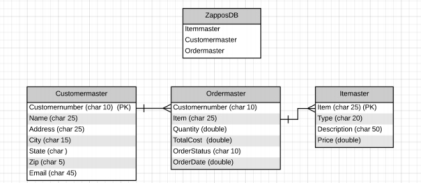
A Design Phase Flow charts, database diagrams, etc. B Creation of Database Development Task Create a java project that when executed, will do the following: Create database using JDBC named: ZapposDB Create table named: Itemmaster and populate it with to items Create table named: Customermaster and populate with at least customers Create table named: Ordermaster your user will enter the data that your code will insert into the table Create database and run a connection test. Demonstrate Database Using SQL commands in Java, demonstrate the creation of the database, and the tables as specified above. Query the tables and display their contents. Take a snip of your code, the successful connection output and the results of the queries to submit to Blackboard..
C Creation of Program Application Development Task Create an Order Entry Application that allows the end user to enter orders into the database tables. All order data is to be stored in the Ordermaster table as the end user submits their order request. The program application should have the following INPUTS: Customer Id User enters in must be a valid Customer stored in your database you will have to check it ItemUser should enter a valid item stored in the database Quantity user enters in Order Date user enters in Order status set equal to OPEN CALCULATIONS: Total Cost you will need to calculate this using Order Quantity and Priceretrieved from Itemmaster table
Step by Step Solution
There are 3 Steps involved in it
1 Expert Approved Answer
Step: 1 Unlock

Question Has Been Solved by an Expert!
Get step-by-step solutions from verified subject matter experts
Step: 2 Unlock
Step: 3 Unlock
 Study Help