







Question: #include #include #include int main ( ) { / / Initialize GLFW if ( ! glfwInit ( ) ) { std::cerr Failed to initialize GLFW
#include
#include
#include
int main
Initialize GLFW
if glfwInit
std::cerr "Failed to initialize GLFW std::endl;
return ;
Create a GLFW window
GLFWwindow window glfwCreateWindow "OpenGL Window", nullptr, nullptr;
if window
std::cerr "Failed to create GLFW window" std::endl;
glfwTerminate;
return ;
glfwMakeContextCurrentwindow;
Initialize GLEW
glewExperimental GLTRUE;
if glewInit GLEWOK
std::cerr "Failed to initialize GLEW" std::endl;
return ;
Define vertices for two rightangle triangles
GLfloat vertices
First triangle
fff
fff
fff
Secondtriangle
ff
ff
ff
;
GLuint VBO, VAO;
glGenVertexArrays &VAO;
glGenBuffers &VBO;
glBindVertexArrayVAO;
glBindBufferGLARRAYBUFFER, VBO;
glBufferDataGLARRAYBUFFER, sizeofvertices vertices, GLSTATICDRAW;
glVertexAttribPointer GLFLOAT, GLFALSE, sizeofGLfloatGLvoid;
glEnableVertexAttribArray;
glBindBufferGLARRAYBUFFER, ;
glBindVertexArray;
Vertex shader
const char vertexShaderSource #version core
"layout location in vec position;
"void main
glPosition vecposition;
;
GLuint vertexShader glCreateShaderGLVERTEXSHADER;
glShaderSourcevertexShader &vertexShaderSource, NULL;
glCompileShadervertexShader;
Fragment shader
const char fragmentShaderSource #version core
"out vec color;
"void main
"color vec;
;
GLuint fragmentShader glCreateShaderGLFRAGMENTSHADER;
glShaderSourcefragmentShader &fragmentShaderSource, NULL;
glCompileShaderfragmentShader;
Link shaders
GLuint shaderProgram glCreateProgram;
glAttachShadershaderProgram vertexShader;
glAttachShadershaderProgram fragmentShader;
glLinkProgramshaderProgram;
glDeleteShadervertexShader;
glDeleteShaderfragmentShader;
Render loop
while glfwWindowShouldClosewindow
glClearColorffff;
glClearGLCOLORBUFFERBIT;
glUseProgramshaderProgram;
glBindVertexArrayVAO;
glDrawArraysGLTRIANGLES, ;
glBindVertexArray;
glfwSwapBufferswindow;
glfwPollEvents;
glDeleteVertexArrays &VAO;
glDeleteBuffers &VBO;
glDeleteProgramshaderProgram;
glfwTerminate;
return ;
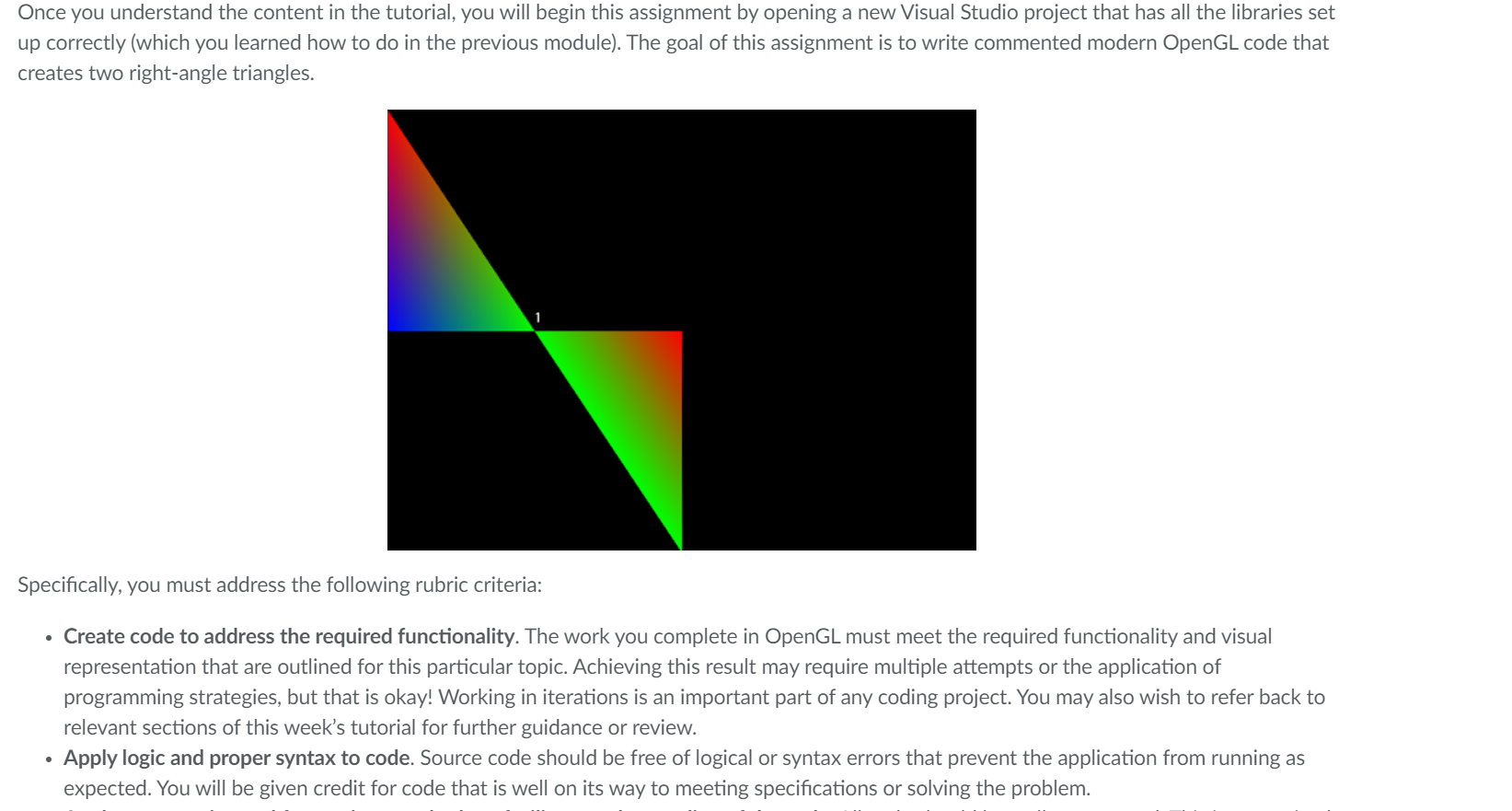
Once you understand the content in the tutorial, you will begin this assignment by opening a new Visual Studio project that has all the libraries set
up correctly which you learned how to do in the previous module The goal of this assignment is to write commented modern OpenGL code that
creates two rightangle triangles.
Specifically, you must address the following rubric criteria:
Create code to address the required functionality. The work you complete in OpenGL must meet the required functionality and visual
representation that are outlined for this particular topic. Achieving this result may require multiple attempts or the application of
programming strategies, but that is okay! Working in iterations is an important part of any coding project. You may also wish to refer back to
relevant sections of this week's tutorial for further guidance or review.
Apply logic and proper syntax to code. Source code should be free of logical or syntax errors that prevent the application from running as
expected. You will be given credit for code that is well on its way to meeting specifications or solving the problem.
Step by Step Solution
There are 3 Steps involved in it
1 Expert Approved Answer
Step: 1 Unlock

Question Has Been Solved by an Expert!
Get step-by-step solutions from verified subject matter experts
Step: 2 Unlock
Step: 3 Unlock
 Study Help