







Question: #include #include using namespace std; / / Function to convert a single pixel to grayscale short pixelToGrayscale ( short red, short green, short blue )
#include
#include
using namespace std;
Function to convert a single pixel to grayscale
short pixelToGrayscaleshort red, short green, short blue
return staticcast red green blue;
Function to convert a photo to grayscale
short photoToGrayscaleshort pixels int size
Validate that the size is a multiple of each pixel has red, green, blue components
if size
return nullptr;
Number of pixels in the image
int numPixels size ;
Allocate memory for grayscale pixels
short grayscalePixels new shortnumPixels;
Convert each pixel to grayscale
for int i ; i numPixels; i
short red pixels i;
short green pixels i ;
short blue pixels i ;
grayscalePixelsi pixelToGrayscalered green, blue;
return grayscalePixels;
int main
Open the file "picture" for reading
ifstream inputFilepicture;
if inputFile
cout "INVALID" endl;
return ;
int width, height;
Read the width and height of the picture
inputFile width height;
Validate width and height
if width height
cout "INVALID" endl;
return ;
Calculate the total size of the pixel data
int size width height ;
short pixels new shortsize;
Read pixel data from the file
for int i ; i size; i
if inputFile pixelsi
cout "INVALID" endl;
delete pixels;
return ;
Close the input file
inputFile.close;
Convert the photo to grayscale
short grayscale photoToGrayscalepixels size;
If conversion failed, the size was invalid
if grayscale
cout "INVALID" endl;
delete pixels;
return ;
Print each grayscale value on a new line
int numPixels size ;
for int i ; i numPixels; i
cout grayscalei endl;
Clean up
delete pixels;
delete grayscale;
return ;
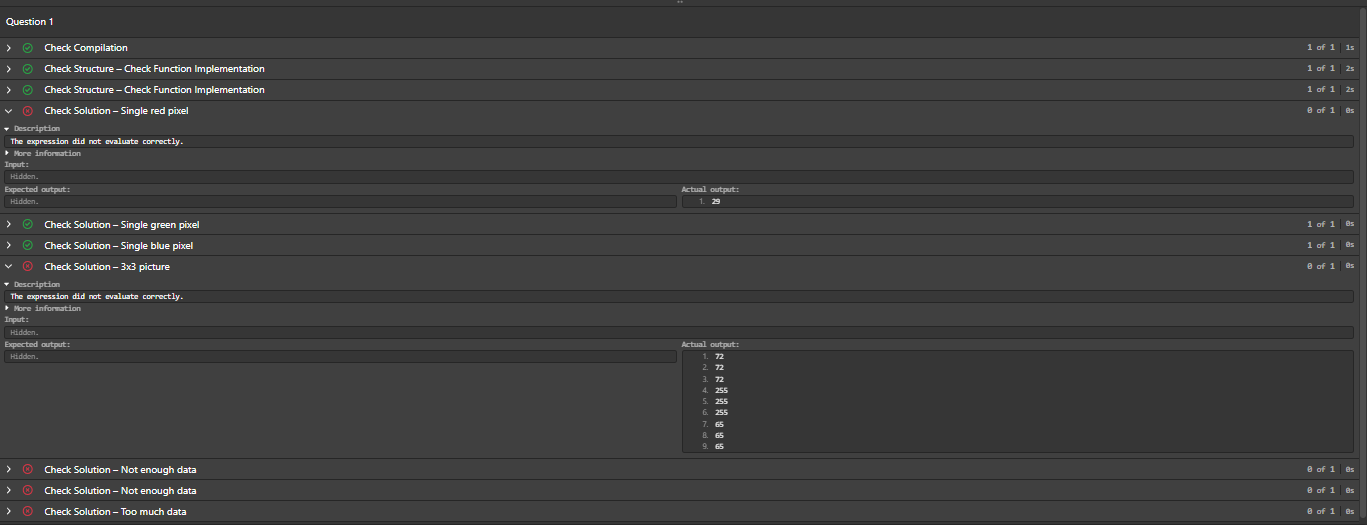
Question Check CompilationCheck Structure Check Function ImplementationCheck Structure Check Function ImplementationCheck Solution Single red pixel
The expression did not evaluate correctly.
More information
Hiddson.
Expocted autput:Check Solution Single green pixelCheck Solution Single blue pixelCheck Solution times picture
The expression did not evaluate correctly.
P Mare infornationCheck Solution Not enough dataCheck Solution Not enough dataCheck Solution Too much data checkmark Question
Goal: Learn how to read an array from a file and process the data. following formula:
red green blue until the end of the array.
Next, define a phototocrayscale function that takes the short pixels array as its first argument and int size as its second argument. To convert this photo to grayscale, you need to:
Validate that the size is valid. Each pixel is described by three values, so the size must be a multiple of
Allocate a new array with enough space to store the grayscale values of the pixels.
Convert all the pixels to grayscale and store them in the new array.
Return a pointer to the new array. If the input size is not valid, this function should return nullptr.
Finally, you need to demonstrate this function by using it in a main program that
Opens a file named picture for reading as input.
This file contains many values that all fall in the short range and describe a picture.
The first value in this file is the width of the picture. Read this into a width variable.
The second value is the height of the picture. Read this into a height variable.
Use the width and height to determine the size of the picture. Use this size to allocate an array to store the pixel data from the file.
Read the RGB data from the file and store it in the allocated array.
If the file does not contain the exact amount of data as indicated by width and height print INVALID to the output and exit.
Use the photoToGrayscale function to convert the picture to grayscale.
If the data in picture is valid, print each grayscale value on a new line. Otherwise print INVALID to the output.
Step by Step Solution
There are 3 Steps involved in it
1 Expert Approved Answer
Step: 1 Unlock

I have opened the image you up... View full answer
Question Has Been Solved by an Expert!
Get step-by-step solutions from verified subject matter experts
Step: 2 Unlock
Step: 3 Unlock
 Study Help