







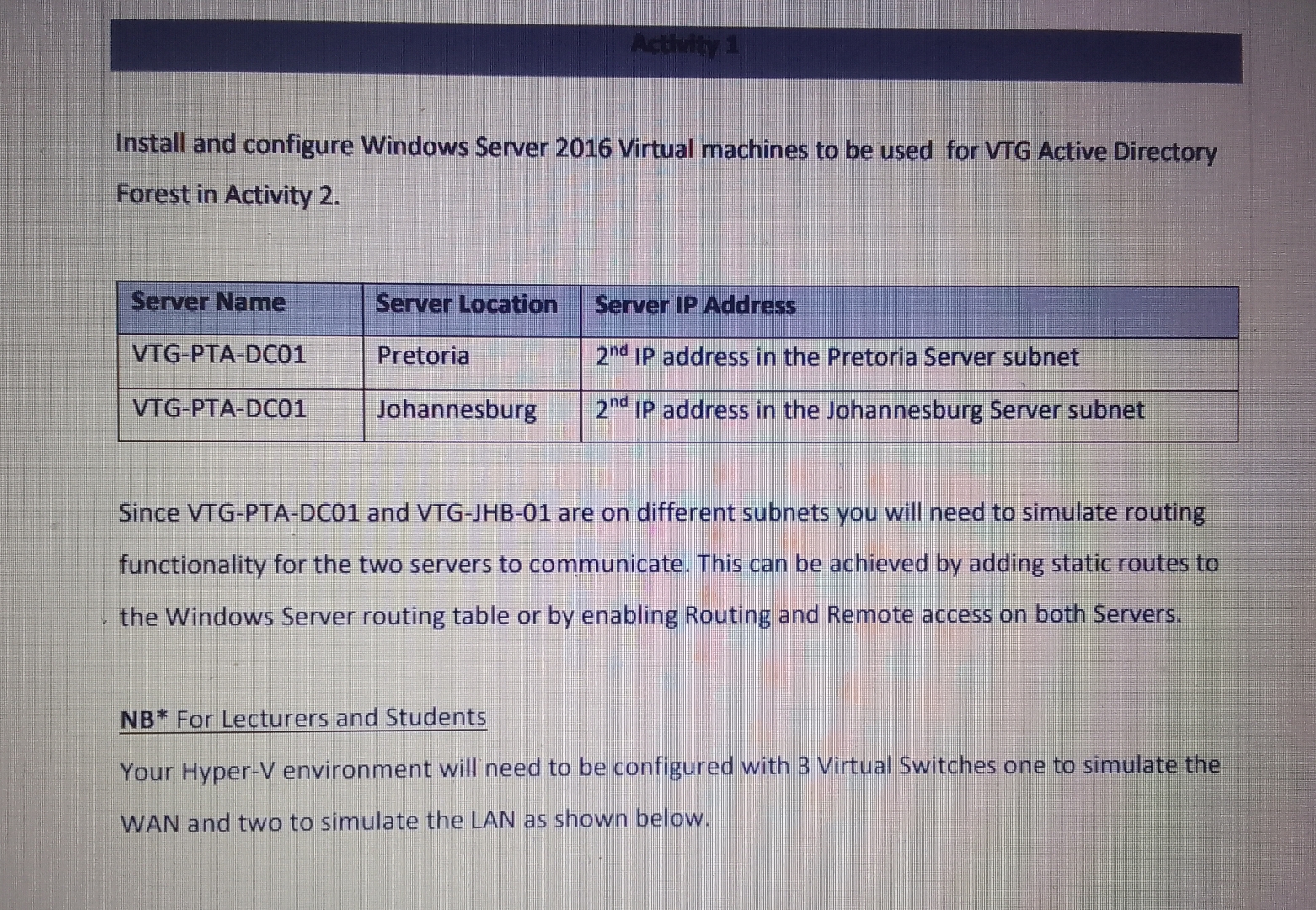
Question: Install and configure Windows Server 2 0 1 6 Virtual machines to be used for VTG Active Directory Forest in Activity 2 . table
Install and configure Windows Server Virtual machines to be used for VTG Active Directory Forest in Activity
tableServer Name,Server Location,Server IP AddressVTGPTADCPretoria, IP address in the Pretoria Server subnetVTGPTADCJohannesburg, IP address in the Johannesburg Server subnet
Since VTGPTADC and VTGJHB are on different subnets you will need to simulate routing functionality for the two servers to communicate. This can be achieved by adding static routes to the Windows Server routing table or by enabling Routing and Remote access on both Servers.
NB For Lecturers and Students
Your HyperV environment will need to be configured with Virtual Switches one to simulate the WAN and two to simulate the LAN as shown below.
Step by Step Solution
There are 3 Steps involved in it
1 Expert Approved Answer
Step: 1 Unlock

Question Has Been Solved by an Expert!
Get step-by-step solutions from verified subject matter experts
Step: 2 Unlock
Step: 3 Unlock
 Study Help