







Question: Instructions: You have been tasked with planning a project. 1. Develop an App to help not for profit organizations create a business plan. As the
Instructions: You have been tasked with planning a project.
1. Develop an App to help not for profit organizations create a business plan.
As the project manager you must:
- Estimate the activities required to complete the project (your best guess). There should be at least 10 activities.
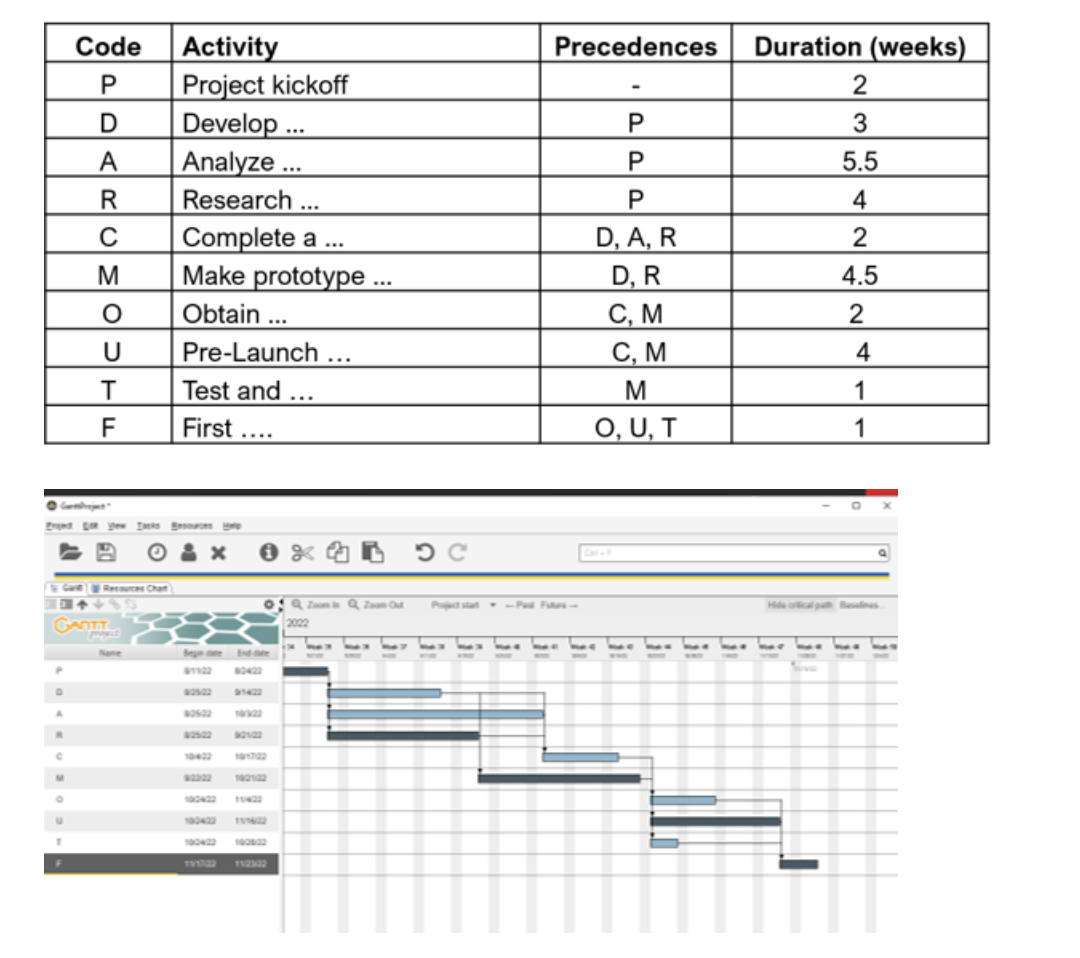
- Estimate their duration in days and their precedence relationships. Activities should not be all in sequence. At least three activities must have 2+ direct predecessors. See the table below as an example: activity C has 3 predecessors, activities M, O, and have two each, while F has three. The figure shows a Gantt chart of this project data (activities in dark tone are in the critical path). Your project plan should have several activities not in the critical path.
- Establish resources (you and your team + external) and assign resources to activities.
- Use Gannt Project to setup the project and to determine the project completion time, the critical path, and the utilization of resources. If using MS Project be sure to use Auto Schedule in the task mode for all the activities.
Develop a report with the following elements:
- Short introduction.
- Table with activities, durations, precedences, and resources.
- Outputs from software (as images). Outputs to be included are: Gantt Chart, Network Diagram, and Resource Usage.
- A brief written analysis of the outputs/graphs which includes the estimated completion time of the project and the activities the project manager must focus on.
Step by Step Solution
There are 3 Steps involved in it
1 Expert Approved Answer
Step: 1 Unlock

Question Has Been Solved by an Expert!
Get step-by-step solutions from verified subject matter experts
Step: 2 Unlock
Step: 3 Unlock
 Study Help