Question: INSY 3304 Project 2 This project must be completed using an Oracle database with all statements manually typed into an SQL file and run as
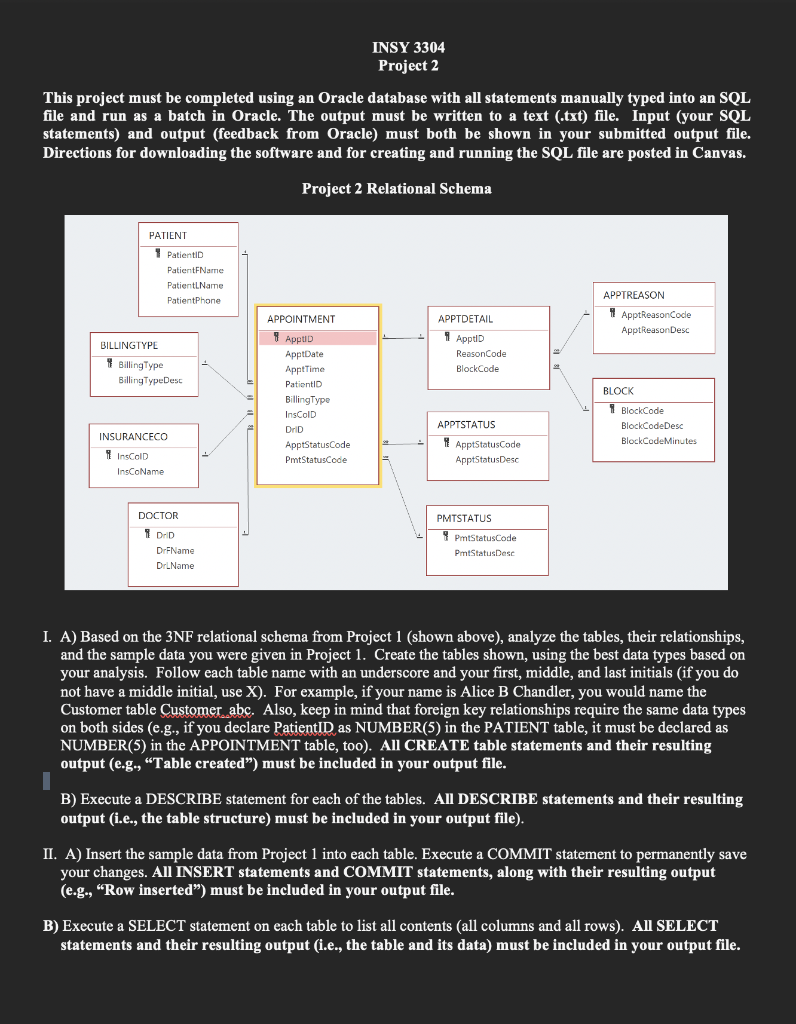
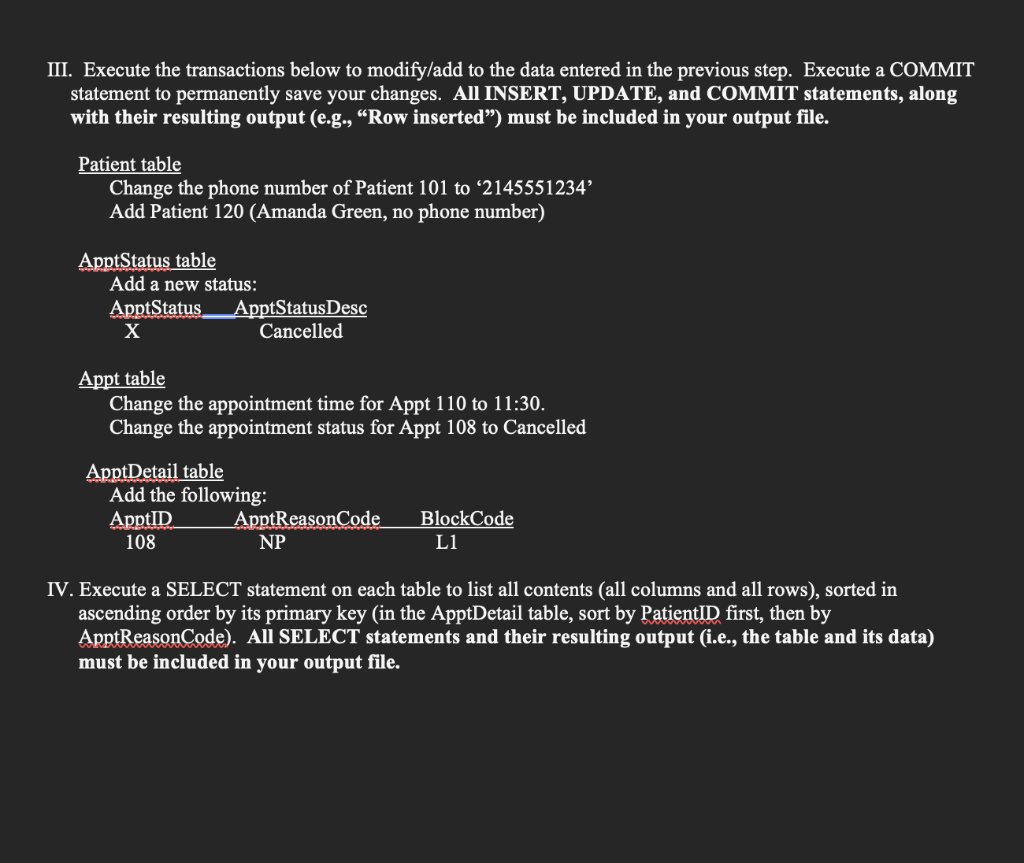
INSY 3304 Project 2 This project must be completed using an Oracle database with all statements manually typed into an SQL file and run as a batch in Oracle. The output must be written to a text (.txt) file. Input (your SQL statements) and output (feedback from Oracle) must both be shown in your submitted output file. Directions for downloading the software and for creating and running the SQL file are posted in Canvas. Project 2 Relational Schema PATIENT 1 Patientin Patient Name Patient Name PatientPhone APPTDETAIL APPTREASON 1 ApptReasonCode ApptReasonDesc AppD BILLINGTYPE Billing Type BillingTypeDesc ReasonCode BlockCode APPOINTMENT 1 AppuD AppDate Appt Time Patient ID BillingType InsCOID DrD AppStatusCode PmtStatusCode BLOCK BlockCode BlockCodeDesc BlockCode Minutes APPTSTATUS 1 ApptStatusCode Appt StatusDesc INSURANCECO 4 InsCold InsCoName DOCTOR 1 DID DrName Dr. Name PMTSTATUS 9 pmtStatusCode PmtStatusDesc I. A) Based on the 3NF relational schema from Project 1 (shown above), analyze the tables, their relationships, and the sample data you were given in Project 1. Create the tables shown, using the best data types based on your analysis. Follow each table name with an underscore and your first, middle, and last initials (if you do not have a middle initial, use X). For example, if your name is Alice B Chandler, you would name the Customer table Customer abc. Also, keep in mind that foreign key relationships require the same data types on both sides (e.g., if you declare PatientID as NUMBER(5) in the PATIENT table, it must be declared as NUMBER(5) in the APPOINTMENT table, too). All CREATE table statements and their resulting output (e.g., "Table created") must be included in your output file. B) Execute a DESCRIBE statement for each of the tables. All DESCRIBE statements and their resulting output (i.e., the table structure) must be included in your output file). II. A) Insert the sample data from Project 1 into each table. Execute a COMMIT statement to permanently save your changes. All INSERT statements and COMMIT statements, along with their resulting output (e.g., "Row inserted) must be included in your output file. B) Execute a SELECT statement on each table to list all contents (all columns and all rows). All SELECT statements and their resulting output (i.e., the table and its data) must be included in your output file. III. Execute the transactions below to modify/add to the data entered in the previous step. Execute a COMMIT statement to permanently save your changes. All INSERT, UPDATE, and COMMIT statements, along with their resulting output (e.g., Row inserted) must be included in your output file. Patient table Change the phone number of Patient 101 to 2145551234' Add Patient 120 (Amanda Green, no phone number) ApptStatus table Add a new status: ApptStatus ApptStatusDesc X Cancelled Appt table Change the appointment time for Appt 110 to 11:30. Change the appointment status for Appt 108 to Cancelled ApptDetail table Add the following: ApptID ApptReasonCode 108 NP BlockCode L1 IV. Execute a SELECT statement on each table to list all contents (all columns and all rows), sorted in ascending order by its primary key (in the ApptDetail table, sort by PatientID first, then by ApptReasonCode). All SELECT statements and their resulting output (i.e., the table and its data) must be included in your output file









 Study Help