







Question: Subject : Database Management System This project must be completed using an Oracle database with all statements manually typed into an sql file and run
Subject : Database Management System
This project must be completed using an Oracle database with all statements manually typed into an sql file and run as a batch in Oracle. The output must be written to a text (.txt) file with both the statements and results (feedback from Oracle) included in the output file and printed for submission. Directions for creating and running the sql file are in posted in Blackboard.
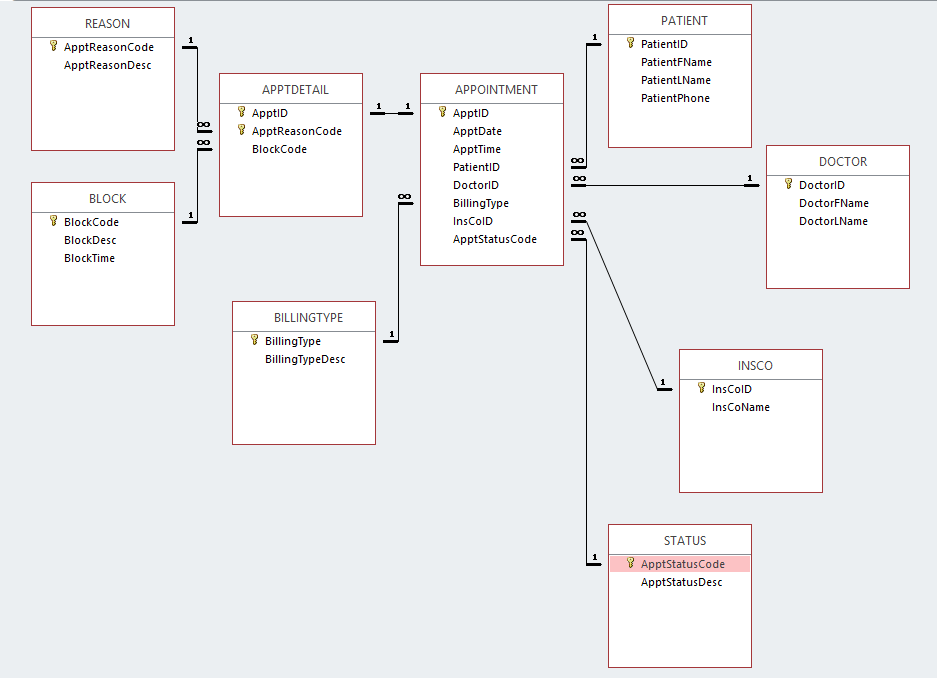
I. Based on the relational schema (3NF) from Project 1, analyze the tables, their relationships, and the sample data you were given in Project 1.
a. CREATE THE TABLES, using the best data types based on your analysis. Follow each table name with an underscore and your first, middle, and last initials (if you do not have a middle initial, use X). For example, if your name is Alice B Chandler, you would name the Patient table PATIENT_abc. Also, keep in mind that foreign key relationships require the same data types on both sides (e.g., if you declare PatientID as INTEGER in the Patient table, it must be declared as INTEGER in the Rental table, too).
b. Execute a DESCRIBE statement for each table to show its general structure.
II. Load data into the tables.
a. Insert the sample data from Project 1 into each table, making sure to commit the rows.
b. After all rows have been inserted, run a SELECT statement on each table to list all contents (all columns and all rows).
III. Execute the transactions below to modify/add to the data entered in the previous step, making sure commit the transactions.
PATIENT table
Change the phone number of Patient 15 to 2145551234
Add Patient 120, Amanda Green, no phone number
BLOCK_LEVEL table
Add BlockLevelCode 5, 45 minutes
REASON_CODE table
ReasonCode CSW, Complete Spinal Workup
INS_CO table
Add InsCoID 324, Cigna
APPOINTMENT table
Change the date for appointments 109, 110, and 111 to 9/2/2018
Add an appointment:
ApptID ApptDate ApptTime PatientID BillType InsCo DrID ApptStatus
112 9/3/2018 10:30 120 WC 324 2 NC
APPT_DETAIL table
Add appointment details:
ApptID ReasonCode BlockLevelID
112 NP 1
112 CSW 5
Execute a SELECT statement on each of the tables, sorting by PK, to list the final data.
PATIENT REASON ApptReasonCode ApptReasonDesc PatientID PatientFName PatientLName PatientPhone APPTDETAIL APPOINTMENT ApptID ApptReasonCode BlockCode 8 ApptID ApptDate ApptTime PatientID DoctorID BillingType InsColD ApptStatusCode DOCTOR DoctorlD DoctorFName DoctorLName BLOCK BlockCode BlockDesc BlockTime BILLINGTYPE BillingType BillingTypeDesc INSCO InsColD InsCoName STATUS ApptstatusCode ApptStatusDesc
Step by Step Solution
There are 3 Steps involved in it

Get step-by-step solutions from verified subject matter experts
 Study Help