







Question: Intel x86 assembly code Random Numbers The Random subroutine takes in a single argument in the %rax register. From this, it will create a random
Intel x86 assembly code
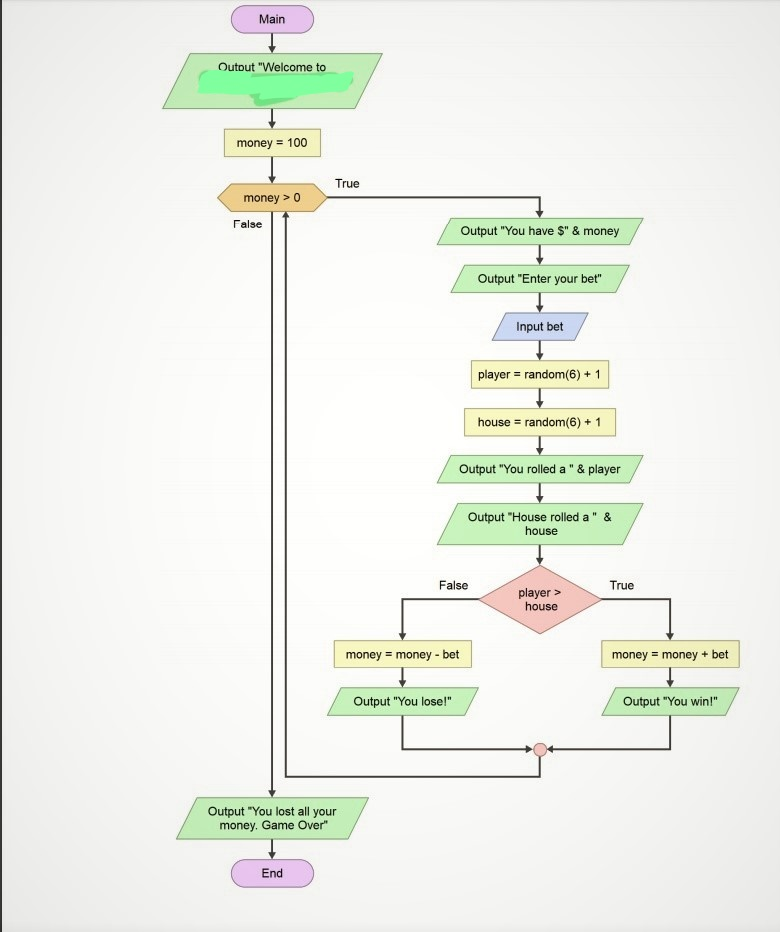
Random Numbers The Random subroutine takes in a single argument in the %rax register. From this, it will create a random number and return it in %rax. A normal (non-Dungeons and Dragons) die has six sides. So we can use 6 in %rax to produce 6 different values. However, rather than returning a value from 1 to 6, the subroutine starts counting at zero. So, it will return 0 to 5. But there is an easy fix! Don't you love easy fixes! Well, if it returns a value from 0 to 5, and we want 1 to 6, we can just add one. Examine the expression below. This is how the game it is played The player enters a bet. (Without betting, it's not much of a gambling game, is it?) The player rolls a die. The house (or computer in this case) roles a die. If the player's dice has a larger value, then they win! Otherwise, the house wins. If both dice have the same value, the house wins! Your Challenge Your challenge is to create this algorithm in Intel x86 assembly code. Your program must be all your own work and must work correctly. The algorithm is the bare minimum required to work. Example Your solution doesn't have to look exactly like the example below. But, make sure to fulfill all the requirements. User input is displayed in red and underlined. Welcome to Gunchy Dice You have $100 Enter your bet: 45 You rolled a 3 House rolled a 1 You win! You have $145 Enter your bet: 125 You rolled a 2 House rolled a 2 You lose! You have $20 Enter your bet: 20 You rolled a 4 House rolled a 4 You lose! You have $0 Done playing Requirements 1. Display the title (of your choice) 2. Set the initial amount (you can use a literal or scan it from the keyboard) 3. Display the current balance for each bet 4. Input the user's bet. 5. Random dice values 6. Conditional logic for the If Statement 7. Correct math 8. Looping 9. Comments 1. Exit program The basic version of the program will continue to loop until the player runs out of money. That is one harsh casino!!! So, make it so the player can exit the program if they enter a bet of zero. 2. Input validation Prevent the user from entering a bet less than 0 or greater than their current balance. 3. COLOR Use color in your program. Don't just set the color for the whole program use it to make the game easier to understand. 4. Multiple dice Make the game more interesting by using two dice for both the player and the house. 5. Random messages. Getting the same message each time you win or lose can be quite boring. Instead, come up with at least 3 random "win" and "lose" messages.
Main Outout "Welcome to money 100 True money>0 False Output "You have $" & money Output "Enter your bet Input bet player random(6)+ 1 house random(6)+1 Output "You rolled a " & player Output House rolled a" & house False True player> house money- money - bet money money + bet Output "You lose!" Output "You win!" Output "You lost all your money. Game Over" End Main Outout "Welcome to money 100 True money>0 False Output "You have $" & money Output "Enter your bet Input bet player random(6)+ 1 house random(6)+1 Output "You rolled a " & player Output House rolled a" & house False True player> house money- money - bet money money + bet Output "You lose!" Output "You win!" Output "You lost all your money. Game Over" End
Step by Step Solution
There are 3 Steps involved in it

Get step-by-step solutions from verified subject matter experts
 Study Help