







Question: Inter-VLAN Routing Practice Addressing Table VLAN and Port Assignments Table Scenario In this activity, you will demonstrate and reinforce your ability to implement inter-VLAN routing.
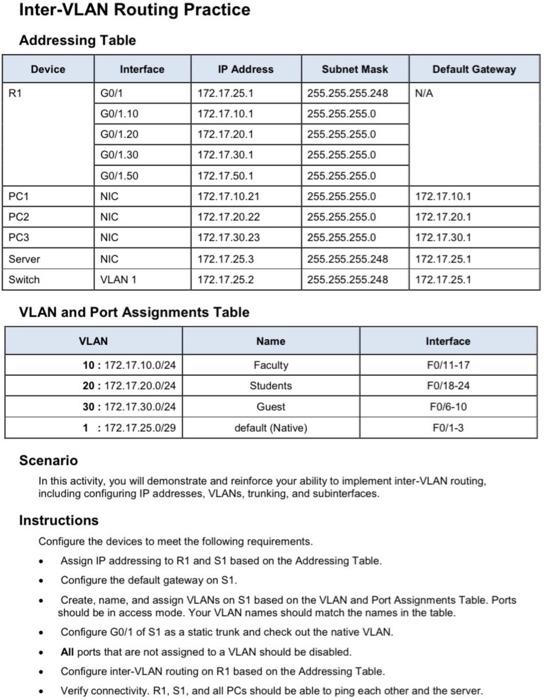
Inter-VLAN Routing Practice Addressing Table VLAN and Port Assignments Table Scenario In this activity, you will demonstrate and reinforce your ability to implement inter-VLAN routing. including configuring IP addresses, VLANs, trunking, and subinterfaces. Instructions Configure the devices to meet the following requirements. - Assign IP addressing to R1 and S1 based on the Addressing Table. - Configure the default gateway on S1. - Create, name, and assign VLANs on S1 based on the VLAN and Port Assignments Table. Ports should be in access mode. Your VLAN names should match the names in the table. - Configure G0/1 of S1 as a static trunk and check out the native VLAN. - All ports that are not assigned to a VLAN should be disabled. - Configure inter-VLAN routing on R1 based on the Addressing Table. - Verify connectivity. R1, S1, and all PCs should be able to ping each other and the server
Step by Step Solution
There are 3 Steps involved in it

Get step-by-step solutions from verified subject matter experts
 Study Help