







Question: (iv) Refine readcontact () to use array of objects from profile class to store user input as in Figure Q1(c) for information details of two
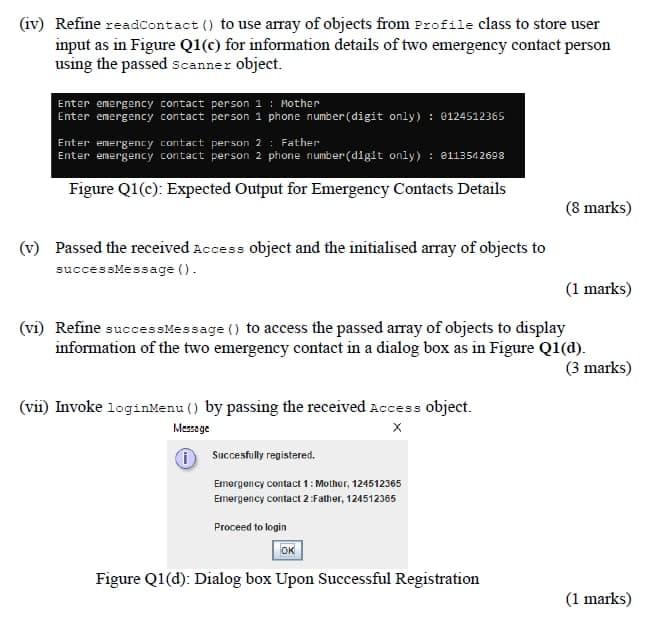
(iv) Refine readcontact () to use array of objects from profile class to store user input as in Figure Q1(c) for information details of two emergency contact person using the passed scanner object. Enter emergency contact person 1 : Mother Enter energency contact person 1 phone number (digit only) : 012451 2365 Enter emergency contact person 2 : Father Enter emergency contact person 2 phone number(digit only): 8113542698 Figure Q1(c): Expected Output for Emergency Contacts Details (8 marks) (v) Passed the received Access object and the initialised array of objects to successMessage(). (1 marks) (vi) Refine successMessage () to access the passed array of objects to display information of the two emergency contact in a dialog box as in Figure Qi(a). (3 marks) (vi) Invoke loginMenu () by passing the received Access object. Message i Succesfully registered Emergency contact 1: Mother, 124512365 Emergency contact 2 Father, 124512365 Proceed to login OK Figure Q1(d): Dialog box Upon Successful Registration (1 marks) (iv) Refine readcontact () to use array of objects from profile class to store user input as in Figure Q1(c) for information details of two emergency contact person using the passed scanner object. Enter emergency contact person 1 : Mother Enter energency contact person 1 phone number (digit only) : 012451 2365 Enter emergency contact person 2 : Father Enter emergency contact person 2 phone number(digit only): 8113542698 Figure Q1(c): Expected Output for Emergency Contacts Details (8 marks) (v) Passed the received Access object and the initialised array of objects to successMessage(). (1 marks) (vi) Refine successMessage () to access the passed array of objects to display information of the two emergency contact in a dialog box as in Figure Qi(a). (3 marks) (vi) Invoke loginMenu () by passing the received Access object. Message i Succesfully registered Emergency contact 1: Mother, 124512365 Emergency contact 2 Father, 124512365 Proceed to login OK Figure Q1(d): Dialog box Upon Successful Registration (1 marks)
Step by Step Solution
There are 3 Steps involved in it

Get step-by-step solutions from verified subject matter experts
 Study Help