







Question: java beginner help AVE Let's add to our program involving sentences from the last activity. We will also calculate the number of letters in the
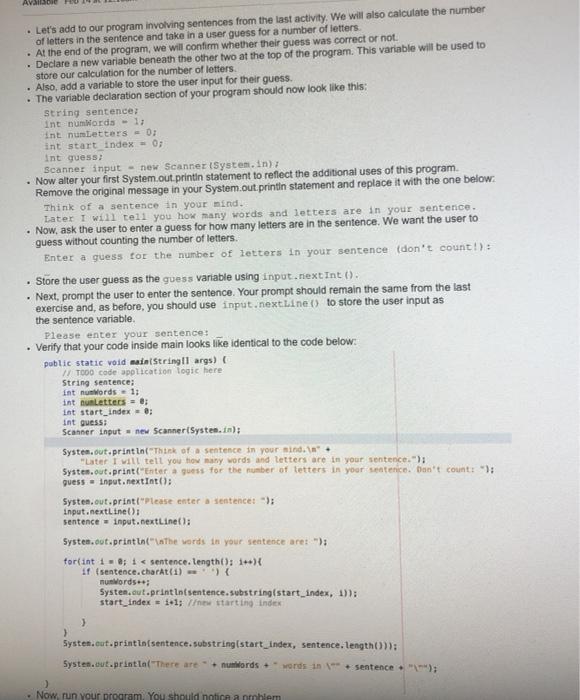
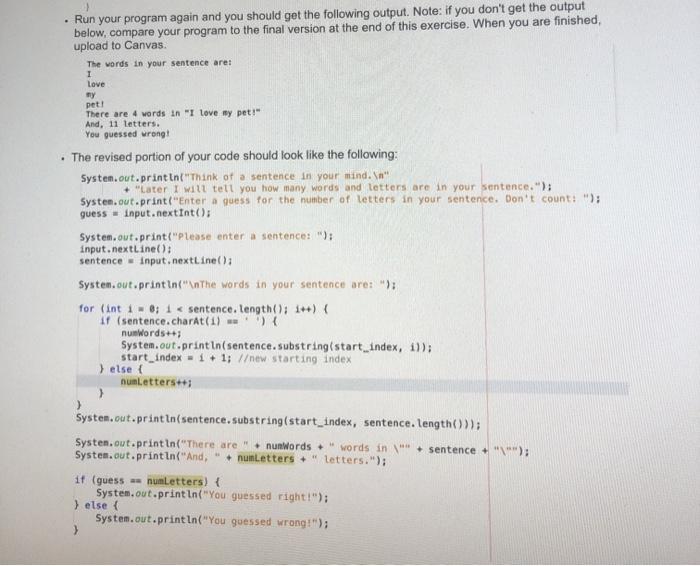
AVE Let's add to our program involving sentences from the last activity. We will also calculate the number of letters in the sentence and take in a user guess for a number of letters. . At the end of the program, we will confirm whether their guess was correct or not. Declare a new variable beneath the other two at the top of the program. This variable will be used to store our calculation for the number of letters. . Also, add a variable to store the user input for their guess The variable declaration section of your program should now look like this: String sentence: int numWords - 1; int numLetters - 0; int start index = 0; int guess: Scanner input - new Scanner(System.in); Now alter your first System.out.printin statement to reflect the additional uses of this program Remove the original message in your System.out.printin statement and replace it with the one below: Think of a sentence in your mind. Later I will tell you how many words and letters are in your sentence. Now, ask the user to enter a guess for how many letters are in the sentence. We want the user to guess without counting the number of letters. Enter a guess for the number of letters in your sentence (don't count !): . Store the user guess as the guess variable using input.nextInt(). Next, prompt the user to enter the sentence. Your prompt should remain the same from the last exercise and, as before, you should use input.nextLine() to store the user input as the sentence variable. Please enter your sentence: Verify that your code inside main looks like identical to the code below: public static void main(String[] args) TOO Code application logic here String sentence; int nu words = 1; int unlettes = 0; int start_index = 0; int guess: Scanner input = new Scanner(System.in); System.out.println("Think of a sentence in your sind.in". "Later I will tell you how many words and letters are in your sentence."); System.out.print("Enter a guess for the number of letters in your sentence. Don't count: "); guess = Input.nextInt(); System.out.print("Please enter a sentence: "); Input.nextLine(); Sentence - input.nextLine(); System.out.println("The words in your sentence are: "); for(int i = 0; i System.out.println(sentence.substring(start_index, sentence.length())); Systen.out.println("There are + nunWords words in sentence + "\""); System.out.println("And, nunletters +" letters."); if (guess a numLetters) { System.out.println("You guessed right!"); } else { System.out.println("You guessed wrong!"); >
Step by Step Solution
There are 3 Steps involved in it

Get step-by-step solutions from verified subject matter experts
 Study Help