







Question: java code 6 7 Extra exereises for Murach's ASP.NET 4 . 6 with C# 2 0 1 5 Extra 4 - 1 Enhance the the
java code
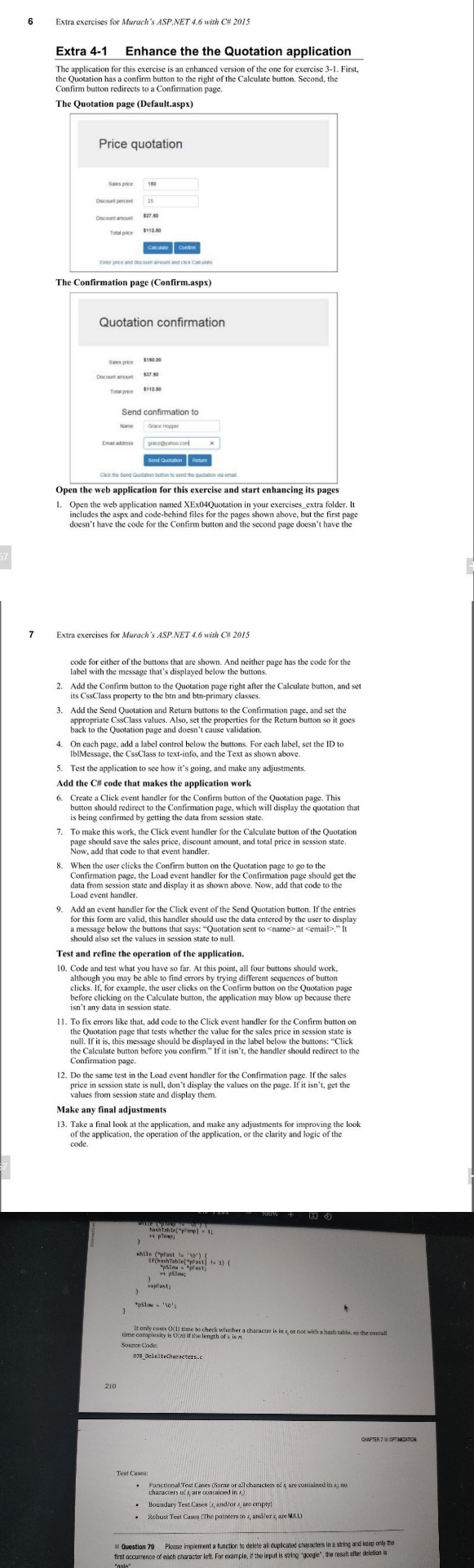
Extra exereises for Murach's ASP.NET with C# Extra Enhance the the Quotation applicationThe application for this exercise is an enhanced version of the one for exercise First,Confim button redirects to a Confirmation nageThe Quotation page DefaultaspxPrice quotationies pceThe Confirmation page ConfirmaspxTe oce sSaes pe sDcoet ancutQuotation confirmationTo preEmat ataessCKK he Send$Send confirmation toOpen the web application for this exercise and start enhancing its pages Open the web application named XExQuotation in your exercises extra folder. Iodedck CGxe oergceghoo conExtra exercises for Murach s ASP NET with CH includes the aspx and codebehind files for the pages shown above, but the first pagedoesn't have the code for the Confirm button and the second page doesn't have thesend Cutton Add the Confirm button to the Quotation page right after the Calculate button, and setits CssClass property to the btn and btnprimary classes.code for either of the buttons that are shown. And neither page has the code for thelabel with the message that's displayed below the buttons Add the Send Quotation and Return buttons to the Confirmation page, and set thebadk to she Otns, se the procrhes tor the Retun button so it goes On each page, adda label control below the buttons. For each label, set the ID toIblMessage, the CssClass to textinfo, and the Text as shown above Test the application to see how it's going, and make any adjustments.code.Add the C# code that makes the application workFthe Calculate button. Second, the Create a Click eyent handler for the Confirm button of the Ouotation nbutton should redirect to the Confimation page, which will display the quotation thatis being confirmed by getting the data from session state To make this work, the Click event handler for the Calculate button of the Quotationpage should save thec sales price, discount amount, and total price in session state.Now, add that code to that event handler.When the user clicks the Contim button on the Quotation page to go to thedata from session state and display it as shown above. NOW, add that code to theLoad event handier Add an event handler for the Click event of the Send Quotation button. If the entriesfor this fom are valid, this handler should use the data entered by the user to displayshould alse sot theys.uoion sent to name at
Step by Step Solution
There are 3 Steps involved in it
1 Expert Approved Answer
Step: 1 Unlock

Question Has Been Solved by an Expert!
Get step-by-step solutions from verified subject matter experts
Step: 2 Unlock
Step: 3 Unlock
 Study Help