







Question: *JAVA* Hello, I am having trouble with this program and would like so help, the favoites combobox option doesn't work and the artist and year
*JAVA*
Hello, I am having trouble with this program and would like so help, the favoites combobox option doesn't work and the artist and year doesn't show up:
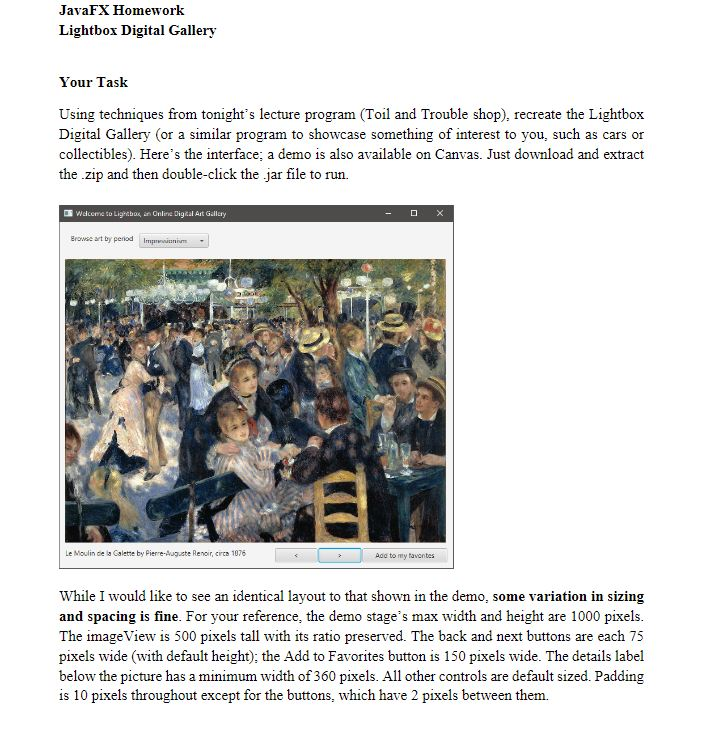
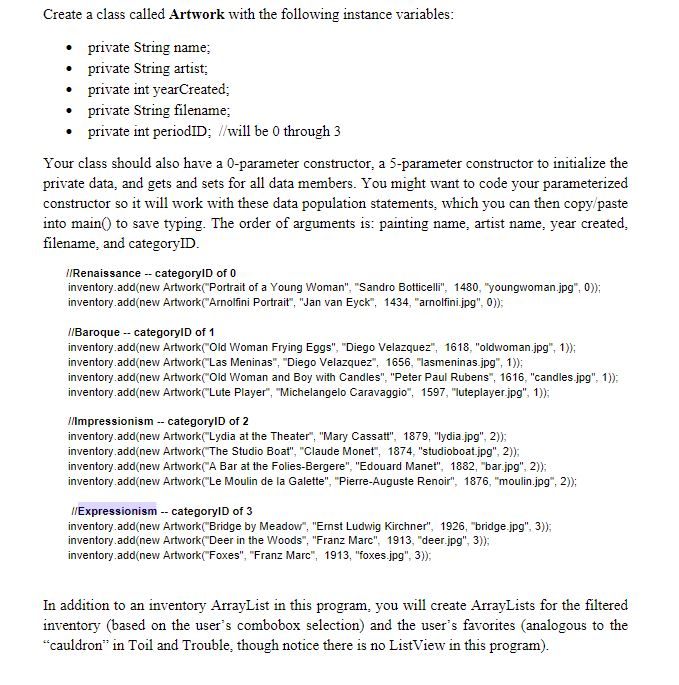
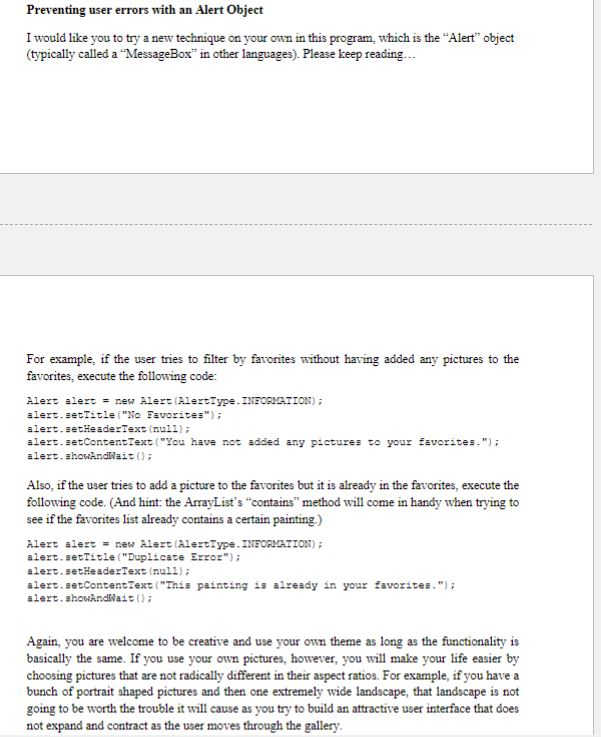
Here is my Output:
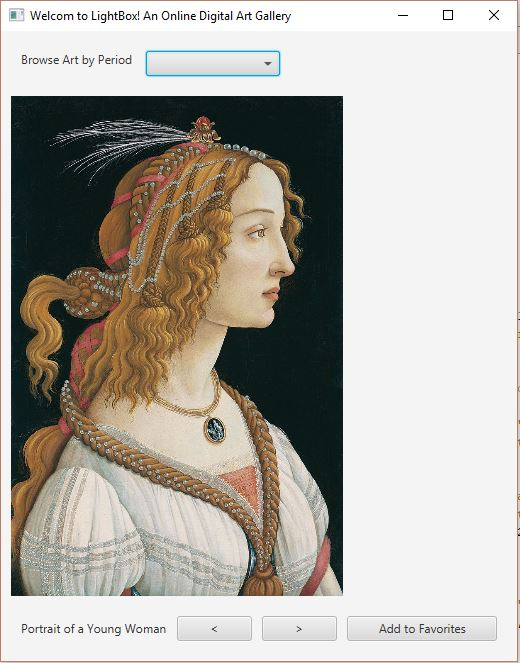
Text code:
Gallery.Java
package gallery;
import javafx.application.Application; import javafx.event.ActionEvent; import javafx.event.EventHandler; import javafx.stage.Stage; import javafx.scene.Scene; import javafx.geometry.Pos; import javafx.scene.control.Button; import javafx.scene.control.Label; import javafx.scene.image.Image; import javafx.scene.image.ImageView; import javafx.scene.layout.HBox; import javafx.scene.layout.VBox; import java.util.ArrayList; import javafx.geometry.Insets; import javafx.geometry.Rectangle2D; import javafx.scene.control.ComboBox; import javafx.stage.Screen;
public class Gallery extends Application { static ArrayList inventory, filteredinventory, favorites; int currentIndex =0;
Label lbldetail; Image imgartwork; ImageView imgviewartwork; ComboBoxCategories;
public static void main(String[] args) { inventory = new ArrayList(); //Renaissance -- categoryID of 0 inventory.add(new Artwork("Portrait of a Young Woman", "Sandro Botticelli", 1480, "youngwoman.jpg", 0)); inventory.add(new Artwork("Arnolfini Portrait", "Jan van Eyck", 1434, "arnolfini.jpg", 0)); //Baroque -- categoryID of 1 inventory.add(new Artwork("Old Woman Frying Eggs", "Diego Velazquez", 1618, "oldwoman.jpg", 1)); inventory.add(new Artwork("Las Meninas", "Diego Velazquez", 1656, "lasmeninas.jpg", 1)); inventory.add(new Artwork("Old Woman and Boy with Candles", "Peter Paul Rubens", 1616, "candles.jpg", 1)); inventory.add(new Artwork("Lute Player", "Michelangelo Caravaggio", 1597, "luteplayer.jpg", 1)); //Impressionism -- categoryID of 2 inventory.add(new Artwork("Lydia at the Theater", "Mary Cassatt", 1879, "lydia.jpg", 2)); inventory.add(new Artwork("The Studio Boat", "Claude Monet", 1874, "studioboat.jpg", 2)); inventory.add(new Artwork("A Bar at the Folies-Bergere", "Edouard Manet", 1882, "bar.jpg", 2)); inventory.add(new Artwork("Le Moulin de la Galette", "Pierre-Auguste Renoir", 1876, "moulin.jpg", 2)); //Expressionism -- categoryID of 3 inventory.add(new Artwork("Bridge by Meadow", "Ernst Ludwig Kirchner", 1926, "bridge.jpg", 3)); inventory.add(new Artwork("Deer in the Woods", "Franz Marc", 1913, "deer.jpg", 3)); inventory.add(new Artwork("Foxes", "Franz Marc", 1913, "foxes.jpg", 3)); filteredinventory = inventory; favorites = new ArrayList(); launch(args); }
@Override public void start(Stage stage) { stage.setTitle("Welcom to LightBox! An Online Digital Art Gallery"); stage.setMaxWidth(1000); stage.setMaxHeight(1000); //----------------------ComboBox------------------------------------- Label lblArtPeriod = new Label("Browse Art by Period "); //instantiate and populate combobox for product categories Categories = new ComboBox(); Categories.getItems().addAll("Renaissance", "Baroque", "Impressionism", "Expressionism", "View All Artwork", "Favorites"); Categories.setOnAction(new CategorySelectHandler()); HBox topbox = new HBox(10, lblArtPeriod, Categories); topbox.setPadding(new Insets(10)); //----------------------Controls to display Artwork details-------------------- imgartwork = new Image("file:youngwoman.jpg"); imgviewartwork = new ImageView(imgartwork);
imgviewartwork.setFitHeight(500); imgviewartwork.setPreserveRatio(true); lbldetail = new Label(""); //*********************NAVIGATION BUTTONS***************************** Button btnNext = new Button(">"); Button btnPrevious = new Button("(); for(Artwork p: inventory) if(p.getPeriodID() == Categories.getSelectionModel().getSelectedIndex()) filteredinventory.add(p); }
currentIndex = 0; //set browsing position to first item in filtered results refreshProductDetails(); } } class btnNextClickHandler implements EventHandler { @Override public void handle(ActionEvent event) { if(currentIndex
class btnPreviousClickHandler implements EventHandler { @Override public void handle(ActionEvent event) { if(currentIndex > 0){ currentIndex--; refreshProductDetails(); } }//end handle method } //end inner class class btnAddClickHandler implements EventHandler { @Override public void handle(ActionEvent event) { favorites.add(filteredinventory.get(currentIndex)); }//end handle method } }
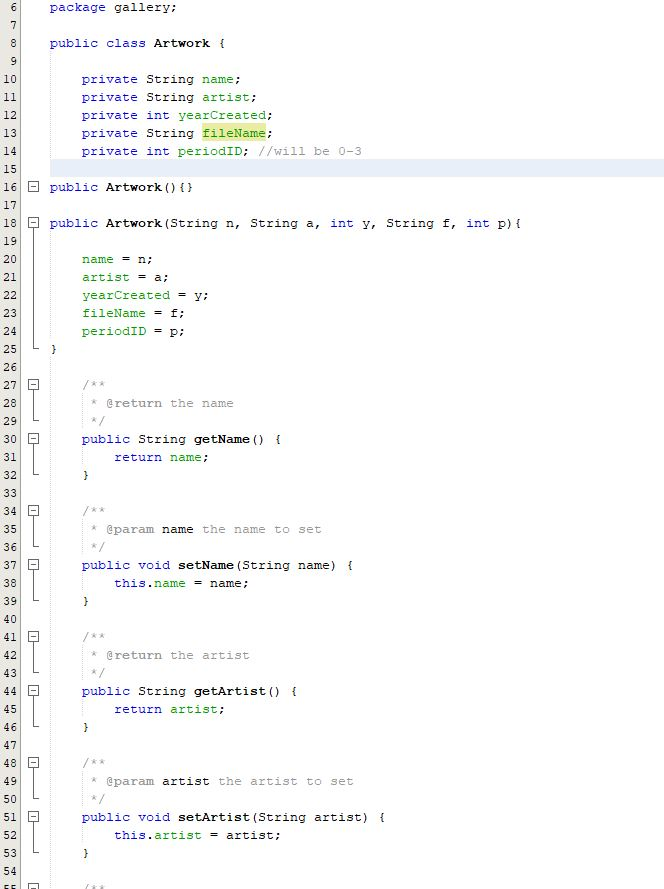
Artwork.Java
JavaFX Homework Lightbox Digital Gallery Your Task Using techniques from tonight's lecture program Toil and Trouble shop), recreate the Lightbox Digital Gallery (or a similar program to showcase something of interest to you, such as cars or collectibles). Here's the interface; a demo is also available on Canvas. Just download and extract the zip and then double-click the jar file to run. Wdcome to Lightbag an Online Digital Ast Gallery Browse rt ty perioadm Le Moulin de la Calete by Pierre-Auguste Renoir, crcs 1076 Adc to my taventes While I would like to see an identical layout to that shown in the demo, some variation in sizing and spacing is fine. For your reference, the demo stage's max width and height are 1000 pixels. The imageView is 500 pixels tall with its ratio preserved. The back and next buttons are each 75 pixels wide (with default height); the Add to Favorites button is 150 pixels wide. The details label below the picture has a minimum width of 360 pixels. All other controls are default sized. Padding is 10 pixels throughout except for the buttons, which have 2 pixels between them. JavaFX Homework Lightbox Digital Gallery Your Task Using techniques from tonight's lecture program Toil and Trouble shop), recreate the Lightbox Digital Gallery (or a similar program to showcase something of interest to you, such as cars or collectibles). Here's the interface; a demo is also available on Canvas. Just download and extract the zip and then double-click the jar file to run. Wdcome to Lightbag an Online Digital Ast Gallery Browse rt ty perioadm Le Moulin de la Calete by Pierre-Auguste Renoir, crcs 1076 Adc to my taventes While I would like to see an identical layout to that shown in the demo, some variation in sizing and spacing is fine. For your reference, the demo stage's max width and height are 1000 pixels. The imageView is 500 pixels tall with its ratio preserved. The back and next buttons are each 75 pixels wide (with default height); the Add to Favorites button is 150 pixels wide. The details label below the picture has a minimum width of 360 pixels. All other controls are default sized. Padding is 10 pixels throughout except for the buttons, which have 2 pixels between them
Step by Step Solution
There are 3 Steps involved in it

Get step-by-step solutions from verified subject matter experts
 Study Help