







Question: JAVA: I am having a hard time including and calling the encryptString and decyptString methods in my assignment, EnryptionApplication11. -------------------------------------------------------------------------------------------------- Encrypt methods code import java.util.Scanner;
JAVA: I am having a hard time including and calling the encryptString and decyptString methods in my assignment, EnryptionApplication11.
--------------------------------------------------------------------------------------------------
\\Encrypt methods code
import java.util.Scanner;
public class EncryptTextMethods {
private static String encryptString(String message) {
//convert string to character array
char stringChars[] = message.toCharArray();
//for each character
for(int i=0; i
char ch = stringChars[i];
//if character within range of alphabet
if(ch = 'a') {
stringChars[i] = (char)('a' + ((int)(ch - 'a') + 1) % 26 );
}
}
//construct the string message
return String.valueOf(stringChars);
}
private static String decryptString(String message) {
//convert string to character array
char stringChars[] = message.toCharArray();
//for each character
for(int i=0; i
char ch = stringChars[i];
//if character within range of alphabet
if(ch = 'a') {
stringChars[i] = (char)('a' + ((int)(ch - 'a') - 1) % 26 );
}
}
//construct the string message
return String.valueOf(stringChars);
}
public static void main(String[] args) {
Scanner keyboard = new Scanner(System.in);
System.out.println("Please enter text to encrypt: ");
String message = keyboard.nextLine();
message = message.toLowerCase();
String encryptedStr = encryptString(message);
System.out.println("Encrypted String: " + encryptedStr);
String decryptedStr =decryptString(encryptedStr);
System.out.println("Decrypted String : " + decryptedStr);
keyboard.close();
}
}
---------------------------------------------------------------------------------------
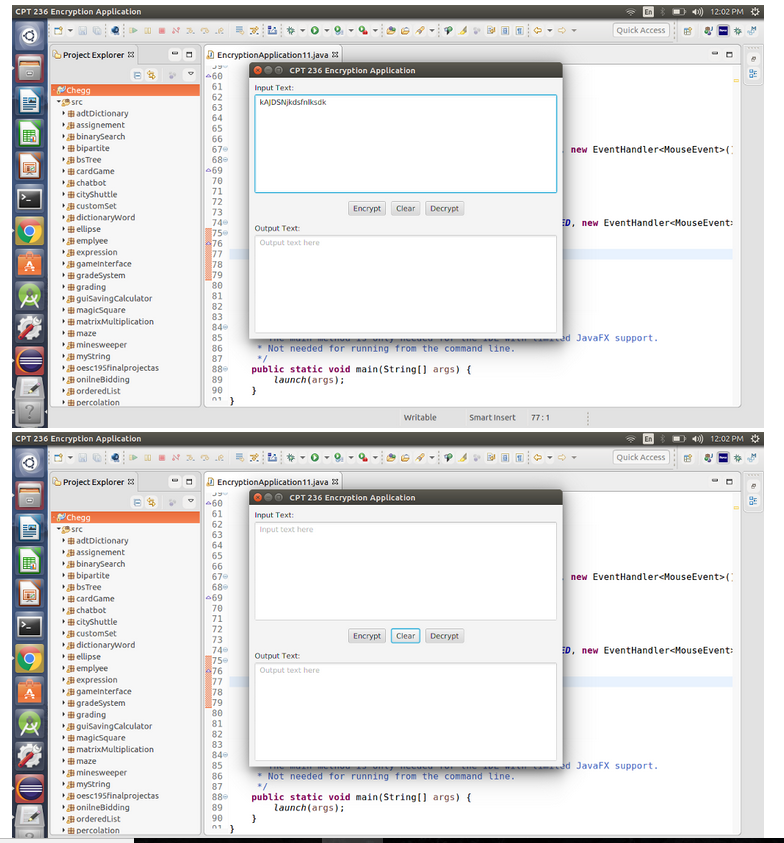
\\Needs to include and call the encryptString and decryptString methods (image below)
package Utils;
import javafx.application.*;
import javafx.event.EventHandler;
import javafx.event.EventType;
import javafx.geometry.*;
import javafx.scene.*;
import javafx.scene.control.*;
import javafx.scene.input.MouseEvent;
import javafx.scene.layout.*;
import javafx.stage.*;
public class EncryptionApplication11 extends Application {
public void start(Stage primaryStage) {
// Create the GridPane pane
GridPane pane = new GridPane();
pane.setPadding(new Insets(10, 10, 10, 10));
pane.setVgap(5);
// Place nodes in the GridPane pane
pane.add(new Label("Input Text:"), 0, 0);
TextArea inputTextArea=new TextArea();
inputTextArea.setPromptText("Input text here");
pane.add(inputTextArea, 0, 1);
// Create FlowPane pane
FlowPane btnPane = new FlowPane();
btnPane.setAlignment(Pos.CENTER);
pane.setHgap(5);
// Place nodes in the FlowPane pane and place
// pane in the GridPane pane
btnPane.setPadding(new Insets(10, 10, 10, 10));
btnPane.setHgap(10);
Button encryptButton = new Button("Encrypt");
Button clearButton = new Button("Clear");
Button decryptButton = new Button("Decrypt");
btnPane.getChildren().addAll(encryptButton, clearButton, decryptButton);
pane.add(btnPane, 0, 2);
// Place nodes in the GridPane pane
pane.add(new Label("Output Text:"), 0, 3);
TextArea outputTextArea=new TextArea("");
outputTextArea.setPromptText("Output text here");
pane.add(outputTextArea, 0, 4);
// Create scene and place it on the stage
Scene scene = new Scene(pane);
primaryStage.setTitle("CPT 236 Encryption Application");
primaryStage.setScene(scene);
primaryStage.show();
// Buttons events
encryptButton.addEventHandler(MouseEvent.MOUSE_ENTERED, new EventHandler
@Override
public void handle(MouseEvent e) {
private static String encryptString(String message) {
//convert string to character array
char stringChars[] = message.toCharArray();
//for each character
for(int i=0; i
char ch = stringChars[i];
//if character within range of alphabet
if(ch = 'a') {
stringChars[i] = (char)('a' + ((int)(ch - 'a') + 1) % 26 ); }
});
clearButton.addEventHandler(MouseEvent.MOUSE_ENTERED, new EventHandler
@Override
public void handle(MouseEvent e) {
inputTextArea.clear();
outputTextArea.clear();
}
});
decryptButton.addEventHandler(MouseEvent.MOUSE_ENTERED, new EventHandler
@Override
public void handle(MouseEvent e) {
private static String decryptString(String message) {
//convert string to character array
char stringChars[] = message.toCharArray();
//for each character
for(int i=0; i
char ch = stringChars[i];
//if character within range of alphabet
if(ch = 'a') {
stringChars[i] = (char)('a' + ((int)(ch - 'a') - 1) % 26 ); }
});
}
/**
* The main method is only needed for the IDE with limited JavaFX support.
* Not needed for running from the command line.
*/
public static void main(String[] args) {
launch(args);
}
}
\\Encrypt and Decrypt buttons need to work Also Clear button
En Quick Access l : CPT 236 Encryption Application 4) 12:02 PM a.z?3. .@O 8 4 Project Explorer !!EncryptionApplication 1 1.java CPT 236 Encryption Application Input Text adtDictionary assignement binarySearch bipartite 63 65 67 new EventHandler HouseEvent> ( , cardGame 70 chatbot cityShuttle customSet 72 73 74e 75 Encrypt ClearDecryp new EventHandler HouseEvent: ellipse Output Text emplyee Output text here expression gameinterface 79 80 , grading , guisavingCalculator , magicSquare maze , minesweeper , mystring 85 d JavaFX support " Not needed for running from the command tine 87 88 public static void main(String args) 89 launch(args): onilneBidding orderedList Writable Smart Insert 77:1 CPT 236 Encryption Application =) 4 ) 12:02 PM * Quick Access l : Project Explorer !!EncryptionApplication 1 1.java CPT 236 Encryption Application Input Text: 62 63 64 65 src Input text here adtDictionary assignement ,,Bbinarysearch bipartite 67e new EventHandler
Step by Step Solution
There are 3 Steps involved in it

Get step-by-step solutions from verified subject matter experts
 Study Help