







Question: JAVA language! How to make the oval change color from blue -> red -> green when click Next Color and green -> red -> blue...
JAVA language!
How to make the oval change color from blue -> red -> green when click "Next Color" and "green -> red -> blue"... when mouse click Prev Color
Here is what I have so far:
This is main:
public class ButtonButton extends javax.swing.JFrame {
// the field for the graphic component private BigOval dot; /** * Create the ButtonButton */ public ButtonButton() { super("ButtonButton"); setLocation(25, 25); setSize(400, 300); setDefaultCloseOperation(DISPOSE_ON_CLOSE); // create the dot dot = new BigOval(); add(dot); // create a toolbar javax.swing.JPanel toolbar = new javax.swing.JPanel(); add(toolbar, java.awt.BorderLayout.NORTH); // create a button javax.swing.JButton button1; javax.swing.JButton button2; button1 = new javax.swing.JButton("Prev Color"); button2 = new javax.swing.JButton("Next Color"); toolbar.add(button1); toolbar.add(button2); // finally, set the window to be visible setVisible(true); } /** * The application method * @param args The command-line arguments */ public static void main(String[] args) { new ButtonButton(); } }
And this is for the Oval shape:
public class BigOval extends javax.swing.JComponent { // field to hold the property value java.awt.Color fill; /** * Creates a BigOval with a white fill. */ public BigOval() { fill = java.awt.Color.green; } /** * Get the current fill color. * @return Current fill color */ public java.awt.Color getFill() { return fill; } /** * Set the fill color. * @param color The desired fill color */ public void setFill(java.awt.Color color) { fill = color; repaint(); } /** * Render the component * @param g The Graphics object to draw the component */ public void paintComponent(java.awt.Graphics g) { super.paintComponent(g); int x = getWidth() / 7; int y = getHeight() / 7; int w = 5 * x; int h = 5 * y; g.setColor(fill); g.fillOval(x, y, w, h); g.setColor(java.awt.Color.black); g.drawOval(x, y, w, h); } }
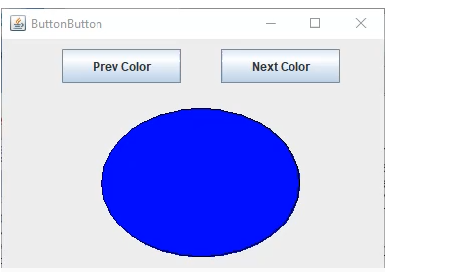
ButtonButton Prev Color Next Color
Step by Step Solution
There are 3 Steps involved in it

Get step-by-step solutions from verified subject matter experts
 Study Help