







Question: Java Sudoku Assignment We are going to write a program that draws a Sudoku board with buttons, combobox on the side, and a text area
Java Sudoku Assignment
We are going to write a program that draws a Sudoku board with buttons, combobox on the side, and a text area at the bottom for output messages. The board itself is a 9 x 9 square, divided into 9 3x3 squares. Note that each smaller square is set off by a heavier border than the regular intersquare borders. Each square is a text field. So, the user is able to type an integer number (range from 0-9). On the side, there are four buttons and a combobox. The four buttons allow you to solve, get a new puzzle, get a hint, or reset puzzle; the combobox lets you to choose the difficulty level.
To demonstrate the responses of your program, you use a text area as an output gadget. In this case, we use a titled border to single out the gadget. The caption text is Output Area as shown in Figure 1. The following segment of code shows how we can achieve this and use the text area to display the message Hi, world!.
jtxtar = new JTextArea(30, 20);
Jtxtar.setBorder(BorderFactory.creatTitledBOrder(Output Area));
jtxtar.setText(Hi, world!);
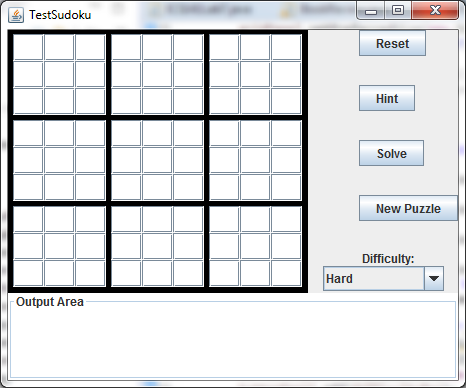
Figure 1: the GUI sample for the program
Requirements
There are two must requirenments. The layout requirements and the general requirements.
1) Layout Requirements
A. To make the GUI interface look nice, you need multiple layout managers to work together. Specifically, I ask you to use the requirements specified in Figure 2 as your layout design.
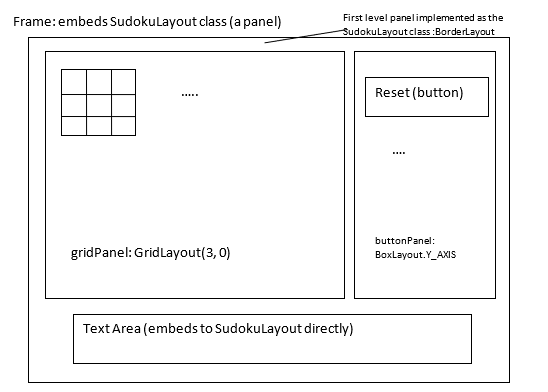
Figure 2: the GUI layout requirements.
The SudokuLayout class (itself is a child of panel) is the first layer panel. Suggested dimension for this panel should be (450, 350). At the bottom of the Sudoku, there is a text area. This gadget has certain size. The following lines show how we can achieve this:
txtArea = new JTextArea(4, 20);
add(txtArea, BorderLayout.SOUTH);
As indicated in Figure 2, the frame embeds this panel as the first level organizer. The layout managers used by each panel should be the ones indicated by the above diagram. You should set borders for some containers as indicated in the above diagram.
B.Use two for loops to draw the text fields instead of brute-force of listing 81 text fields. You should do something like:
for (int k = 1; k
{
JPanel level2 = new JPanel();
.
for (int i = 1; i
{
JTextField text = new JTextField();
}
gridPanel.add(level2);
}
Note: the for-loops implementation saves you many lines of code but there is one shortcoming: cannot refer text field individually. Since we are focusing on the layout, the for-loop method is preferred.
C.For the Combobox, you should set Hard as its initial selected item (using program code).
2) General Requirements
A. To use two classes to implement the application: an application class named TestSudoku and a work class named SudokuLayout.
B. I do expect you to implement some selected visual gadgets. Please implement the following visual gadgets and write listeners for them. These gadgets have the following behaviors:
Button Reset---when the button is clicked, the program will clear the text area, then output the string Reset button clicked! to the text area.
Button Hint---when the button is clicked, the program will clear the text area, then output the string Hint button clicked! to the text area.
Combobox Difficulty---when an item is selected, the program will clear the text area, then output the selected item name to the text area.
C. You should implement the listeners using loosely coupled methods (private listener class or private adapter class).
Notes
Dont worry about colors. If you want to play around with colors for text, textfields, buttons, etc., go right ahead. Have fun. But dont worry about it if you dont want to.
The borders around the game board, around the 3x3 sections, and around each individual square, are important. You should follow the requirement to get full credits.
SCORE YOUR POINTS BY DOING THE FOLLOWING
1. Draw a class diagram in the space below (remember that private classes neednt to be in a class diagram) (7 pts):
2. Cut and paste your Java source code in the space below (10 pts):
3. The implementation conforms to the requirements (using private class listeners or adapter class) (5 pts):
4. Do output screen captures. You will be asked to do 3 screen captures according to the following scenarios:
Scenario 1 (5 pts): start the program afresh, click the Reset button, do a screen capture and paste it in the space below:
Scenario 2 (6 pts): start the program afresh, click the Hint button, do a screen capture and paste it in the space below:
Scenario 3 (7 pts): start the program afresh. From the combobox, select the item named Medium, do a screen capture and paste it in the space below:
El Testsudoku Reset Hint Solve New Puzzle Difficulty: Hard Output Area
Step by Step Solution
There are 3 Steps involved in it

Get step-by-step solutions from verified subject matter experts
 Study Help