







Question: JAVA Swing Form Example JAVA swing form example shows how to create a form using Eclipse. This article will focus on creation of form having
JAVA Swing Form Example
JAVA swing form example shows how to create a form using Eclipse.
This article will focus on creation of form having components such as TextBox, TextArea, Label, RadioButton, Button, CheckBox etc. and also how to handle events if generated by a particular component.
2.1. Setup
Prerequisite:
This example is developed on Eclipse therefore a compatible Eclipse IDE is required to be installed on the system.
We also need WindowBuilder tool to be installed on Eclipse IDE for the easiness of the work. Following Steps are required to install the WindowBuilder tool.
- Go to Eclipse Help Install New Software
Installing WindowBuilder Tool
- Select your version of eclipse version/download/eclipse.org/release/eclipse version, For example, Mars http://download.eclipse.org/releases/mars
- Select General purpose tools from the dropdown and click next.
Installing WindowBuilder Tool
This will take some time to install the software, restart eclipse in order to see the changes.
2.2 Java Swing Form
Create a new JAVA project lets say swing_1
- Go to src right click New Other WindowBuilder select Swing Designer Application Window
JAVA Swing Form
JAVA Swing Form
Enter the name of the application(eg. JAVASwingFormExample) and click finish.
This will create JAVASwingFormExample.java file and will provide Source and Design tab.
3 Code
Source file will look like this. Basically, a Frame is being created here.
JAVASwingFormExample.java
| 01 02 03 04 05 06 07 08 09 10 11 12 13 14 15 16 17 18 19 20 21 22 23 24 25 26 27 28 29 30 31 32 33 34 35 36 37 38 39 40 41 42 43 44 45 46 47 48 49 50 51 52 53 54 55 56 57 58 59 60 61 | package swing_1;
import java.awt.EventQueue;
import javax.swing.JFrame; import javax.swing.JOptionPane; import javax.swing.JButton; import java.awt.Color; import java.awt.event.ActionListener; import java.awt.event.ActionEvent; import javax.swing.JTextField; import javax.swing.JLabel; import javax.swing.JTextArea; import javax.swing.JRadioButton; import javax.swing.JToggleButton; import javax.swing.JScrollBar; import javax.swing.JComboBox; import javax.swing.JCheckBox;
public class JAVASwingFormExample{
private JFrame frame; private JTextField textField; private JTextField textField_1; private JTextField textField_2;
/** * Launch the application. */ public static void main(String[] args) { EventQueue.invokeLater(new Runnable() { public void run() { try { JAVASwingFormExample window = new JAVASwingFormExample(); window.frame.setVisible(true); } catch (Exception e) { e.printStackTrace(); } } }); }
/** * Create the application. */ public JAVASwingFormExample() { initialize(); }
/** * Initialize the contents of the frame. */ private void initialize() { frame = new JFrame(); frame.setBounds(100, 100, 730, 489); frame.setDefaultCloseOperation(JFrame.EXIT_ON_CLOSE); frame.getContentPane().setLayout(null);
}
} |
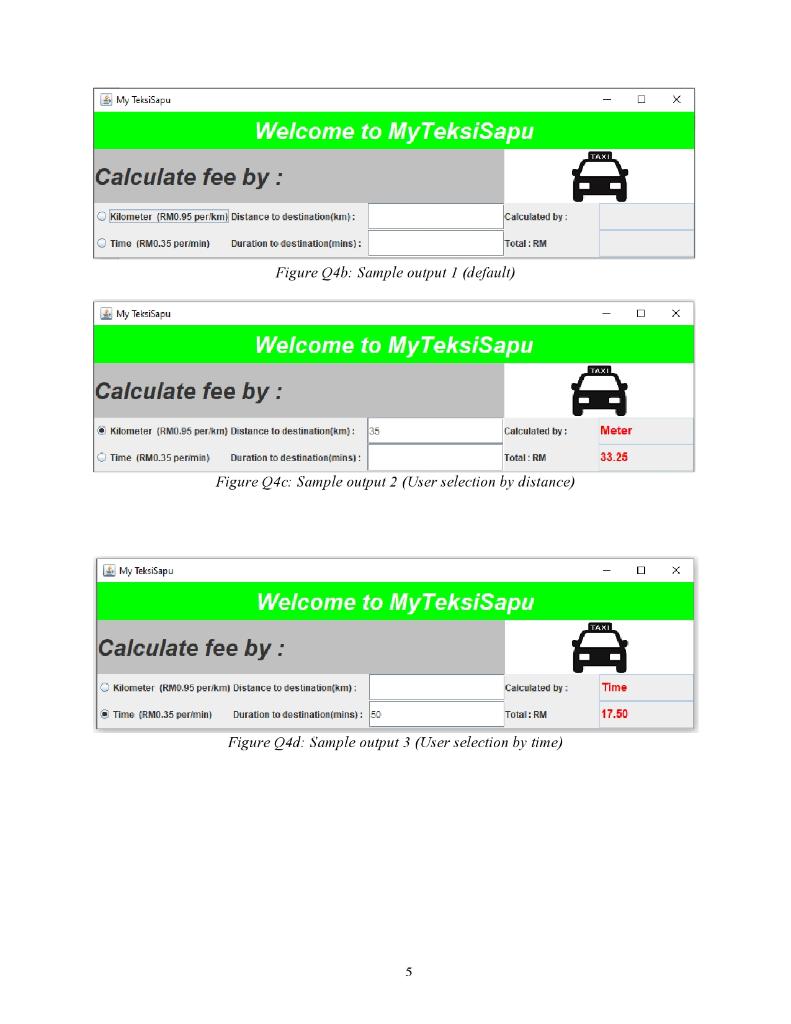
My Teksisapu X Welcome to MyTeksiSapu TAXI Calculate fee by : Kilometer (RM0.95 per km) Distance to destination(km): Calculated by Time (RM0.35 per/min) Duration to destination(mins): Total: RM Figure Q4b: Sample output 1 (default) My Teksi Sapu Welcome to My TeksiSapu TAXI Calculate fee by : e kilometer (RM0.95 perkm) Distance to destination(km): Calculated by: Meter Time (RM0.35 per min) Duration to destination(mins): Total: RM 33.25 Figure Q4c: Sample output 2 (User selection by distance) My Teksisapu Welcome to MyTeksiSapu TAXI Calculate fee by : Kilometer (RM0.95 per km Distance to destination(km) Calculated by Time a Time (RM0.35 perimin Duration to destinationimins): 50 Total: RM 17.50 Figure Q4d: Sample output 3 (User selection by time) 5
Step by Step Solution
There are 3 Steps involved in it

Get step-by-step solutions from verified subject matter experts
 Study Help