







Question: Lab 1 Introduction to the Debug Programming Objective: Access to the DEBUG program Examine and modify the contents of Registers Utilize some of DEBUG facilities
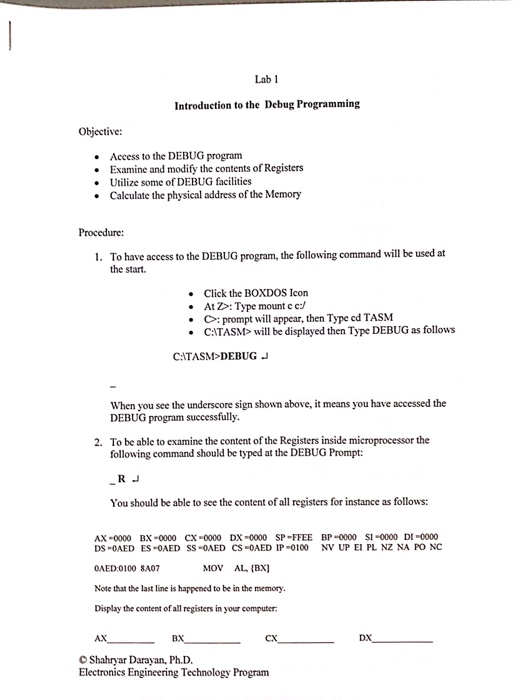
Lab 1 Introduction to the Debug Programming Objective: Access to the DEBUG program Examine and modify the contents of Registers Utilize some of DEBUG facilities Calculate the physical address ofthe Memory Procedure: 1. To have access to the DEBUG program, the following command will be used at the start. Click the BOXDOS Icon At Z Type mount c c:/ C prompt will appear, then Type cd TASM CATASM will be displayed then Type DEBUG as follows C: TASM DEBUG J When you see the underscore sign shown above, it means you have accessed the DEBUGprogram successfully. 2. To be able to examine the content ofthe Registers inside microprocessor the following command should be typed at the DEBUG Prompt: RJ You should be able to see the content ofall registers for instance as follows: AX-0000 BX-0000 CX-0000 DX-0000 SP-FFEE BP-0000 SI-0000 DI-0000 DS -0AED ES-0AED ss -0AED CS-0AED IP-0100 NV UP EI PL NZ NA PO NC 0AED:0100 8A07 Mov AL (BX) Note that the last line is happened to be in the memory. Display the content of all registers in your computer: AN DX Shaharyar Darayan, Ph.D. Electronics Engineering Technology Program
Step by Step Solution
There are 3 Steps involved in it

Get step-by-step solutions from verified subject matter experts
 Study Help