







Question: LAB 3 Design and Implementation of Binary (BCD)-To-Seven-Segment-Code Converter Lab Summary This lab teaches VHDL design entry, and prototyping using Xilinx ISE* tools and Digilent
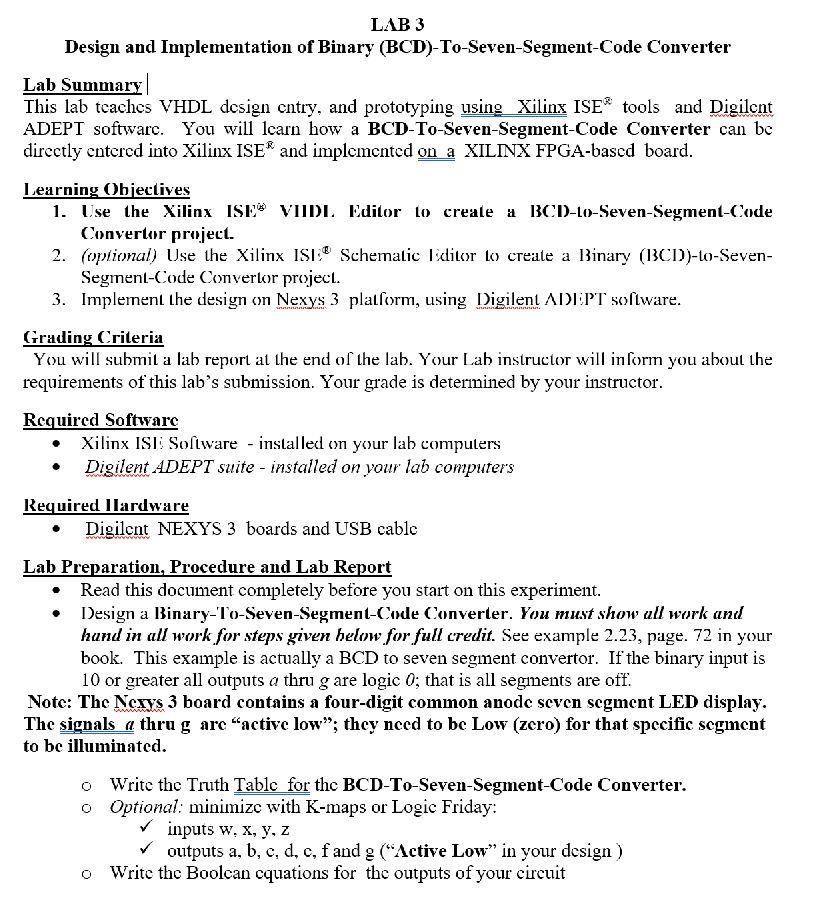
LAB 3 Design and Implementation of Binary (BCD)-To-Seven-Segment-Code Converter Lab Summary This lab teaches VHDL design entry, and prototyping using Xilinx ISE* tools and Digilent ADEPT software. You will learn how a BCD-To-Seven-Segment-Code Converter can be directly entered into Xilinx ISE* and implemented on a XILINX FPGA-based board. Learning Objectives 1. Use the Xilinx ISES VIIDI Editor to create a BCD-Lo-Seven-Segment-Code Convertor project. 2. (optional) Use the Xilinx ISI: Schematic Editor to create a Binary (13CD))-to-Seven- Segrent-Code Convertor project. 3. Implement the design on Nexys 3 platform, using Digilent ADEPT software. Grading Criteria You will submit a lab report at the end of the lab. Your Lab instructor will inform you about the requirements of this lab's submission. Your grade is determined by your instructor. Required Software Xilinx ISE Software - installed on your lah computers Digilent ADEPT suite - installed on your lab computers Required llardware Digilcnt NEXYS 3 boards and USB cable Lab Preparation, Procedure and Lab Report Read this document completely before you start on this experiment. Design a Binary-To-Seven-Segment-Code Converter. You must show all work and hund in all work for steps given below for full credit. See example 2.23, page. 72 in your book. This example is actually a BCD to seven segment convertor. If the binary input is 10 or greater all outputs a thru g are logic 0; that is all segments are off. Note: The Nerys 3 board contains a four-digit common anode seven segment LED display. The signals a thru g are active low"; they need to be Low (zero) for that specific segment to be illuminated. o Write the Truth Tablc for the BCD-To-Seven-Segment-Code Converter. o Optional: minimize with K-maps or Logic Friday: inputs w.x, y, z outputs a, b, c, d, c, f and g ("Active Low" in your design) o Write thc Boolean equations for the outputs of your circuit LAB 3 Design and Implementation of Binary (BCD)-To-Seven-Segment-Code Converter Lab Summary This lab teaches VHDL design entry, and prototyping using Xilinx ISE* tools and Digilent ADEPT software. You will learn how a BCD-To-Seven-Segment-Code Converter can be directly entered into Xilinx ISE* and implemented on a XILINX FPGA-based board. Learning Objectives 1. Use the Xilinx ISES VIIDI Editor to create a BCD-Lo-Seven-Segment-Code Convertor project. 2. (optional) Use the Xilinx ISI: Schematic Editor to create a Binary (13CD))-to-Seven- Segrent-Code Convertor project. 3. Implement the design on Nexys 3 platform, using Digilent ADEPT software. Grading Criteria You will submit a lab report at the end of the lab. Your Lab instructor will inform you about the requirements of this lab's submission. Your grade is determined by your instructor. Required Software Xilinx ISE Software - installed on your lah computers Digilent ADEPT suite - installed on your lab computers Required llardware Digilcnt NEXYS 3 boards and USB cable Lab Preparation, Procedure and Lab Report Read this document completely before you start on this experiment. Design a Binary-To-Seven-Segment-Code Converter. You must show all work and hund in all work for steps given below for full credit. See example 2.23, page. 72 in your book. This example is actually a BCD to seven segment convertor. If the binary input is 10 or greater all outputs a thru g are logic 0; that is all segments are off. Note: The Nerys 3 board contains a four-digit common anode seven segment LED display. The signals a thru g are active low"; they need to be Low (zero) for that specific segment to be illuminated. o Write the Truth Tablc for the BCD-To-Seven-Segment-Code Converter. o Optional: minimize with K-maps or Logic Friday: inputs w.x, y, z outputs a, b, c, d, c, f and g ("Active Low" in your design) o Write thc Boolean equations for the outputs of your circuit
Step by Step Solution
There are 3 Steps involved in it

Get step-by-step solutions from verified subject matter experts
 Study Help